Every way to take a deposit on Shopify, plan by plan
Separate native payment terms, POS split payments, and OrderPilot deposit orders so your team knows how to collect the deposit and the balance on the same sale.
The OrderPilot team·

A customer wants the sofa, but paying the whole bill ten weeks before it arrives is a different proposition. In September 2020, a furniture seller put the request plainly on Shopify’s community forum: offer full payment or a 50% deposit on a larger order, then send the balance link when the furniture is ready. The store needed both payments to belong to the same sale. Shopify Community, September 19, 2020.
You can take a deposit without Shopify Plus through OrderPilot’s deposit orders on quotes or drafts before placement. Plus adds native percentage deposit terms and other partial-payment capabilities. The right route also depends on where the payment happens, whether the order is already placed, and how the balance will be collected.
Start with what the deposit is meant to cover
The deposit connects the customer’s agreement to the store’s commitment to the maker. It funds part of the wait while production, freight, and receiving happen. Set the amount and collection dates around that job, then give the customer clear terms and purchasing a clear payment record.
Take an illustrative $6,000 sofa with a 50% deposit of $3,000. The store later pays $3,000 to the maker and $600 in inbound charges before collecting the balance. Cash paid out is now $600 more than the customer’s deposit. This and the payment examples below use invented amounts and leave tax out of the arithmetic.
The later $3,000 balance closes that cash gap. Plan its due date alongside the vendor’s payment schedule and the customer’s agreement. The week-by-week custom-order cash-flow example lays out the timing so the store can see how much it will need to fund along the way.
Keep deposits, payment terms, and card authorizations separate
A deposit is money paid toward the sale. Payment terms describe when payment is due. A card authorization reserves the ability to capture money for a limited period; it is not the same as a collected deposit. An order can therefore have terms, an authorization, or an unpaid request without having received the money purchasing is waiting for.
A native Shopify draft-order invoice can give the customer a checkout link. To require a percentage deposit through payment terms, the store needs Shopify Plus. Match the link to the amount due at that stage, and preview the checkout the customer will use. Shopify, Creating draft orders.
The payment-terms explainer separates due dates from collection. Put three plain answers in the customer message: what is due now, what remains, and when the store will order the piece. Staff can use the payment history to see when the request becomes a completed payment.
On Plus, native payment terms can specify a percentage deposit
Shopify Plus supports a percentage-based deposit requirement on draft-order payment terms. Admin orders with payment terms can also receive multiple partial payments. Shopify’s March 26, 2024 announcement describes the latter capability; the linked Help page expressly identifies the Plus requirement. Shopify draft-order help, March 2024 announcement, partial-payment help.
For a $4,000 order with a 50% deposit, the first payment is $2,000 and the balance is $2,000. The terms tell the customer the amount due; the payment history tells staff when it has arrived. Put both in the handoff to whoever releases the sale for purchasing.
For B2B orders, supported partial-payment methods can include a vaulted company card, a new card, or a recorded manual payment. Choose the method enabled for the company’s arrangement and give the account’s buyer a clear next step. Shopify, Collecting and recording partial payments.
Give associates the usual deposit rule and managers responsibility for exceptions. Write down who can set the terms, who can approve a change, and what the next person needs to see. Staff can then explain the payment schedule clearly while the customer is still at the desk.
Native POS split payments are a different route
Shopify POS can accept a partial payment and collect the remaining amount later when the device settings are enabled. Shopify names Accept split payments and Allow split payments to be marked as partially paid. Its documentation identifies regional restrictions, including some EU locations, and requires gift-card purchases to be paid in full. Shopify, Multiple and partial payments on POS.
The same documentation warns that refunding or exchanging an item, or editing an order being paid in multiple payments, prevents further payments on that order. Review that restriction before choosing a native POS partial-payment process for furniture likely to change. Shopify POS payment restrictions.
Shopify POS split payments and OrderPilot’s Take Deposit use different routes. OrderPilot Take Deposit uses native percentage deposit terms and requires Plus; a deposit order is prepared in Admin. Name the route in the staff instructions so the associate can open the right action while the customer is there.
Shopify’s native saved-cart and draft-order workflow has POS Pro requirements. POS Pro is a separate subscription from Shopify Plus, so match that requirement to the Shopify workflow and location being used. Shopify, Creating draft orders, POS Pro note.
Use OrderPilot deposit orders before placement on any plan
OrderPilot deposit orders work for quotes or drafts before placement on any Shopify plan. Each deposit is a separate small Shopify order with a payment link. Once paid, the amount is accounted for against the main sale, where staff can see what has arrived and what remains. Enable Deposit orders in Settings to use this route.
The payment dialog accepts an amount or percentage. Review the order total, deposit amount, and tax calculation, then send or copy the link. The separate deposit order is taxable, so include both it and the main sale in the store’s accounting process. The bookkeeper should be able to follow one customer sale across both records.
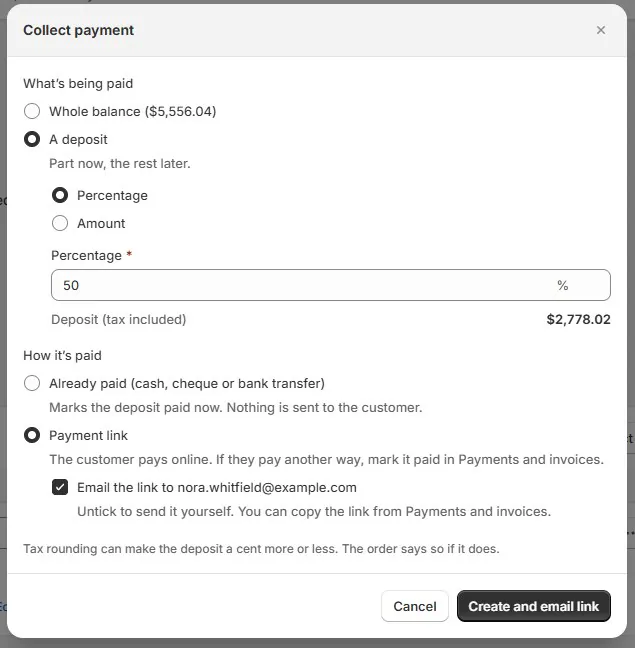
Deposit orders are available before placement and exclude tax-split orders. For a draft that fits this route, prepare the deposit from the main record so the request, payment, and remaining balance stay connected.
On a $3,000 draft, a completed $1,000 deposit leaves $2,000 to collect. Until the payment arrives, the unpaid balance is still $3,000. The person releasing the order for purchasing can see that difference on the record without reconstructing the conversation from outgoing emails.
The customer sees the payment link and checkout, while staff see the request and payment history. Explain that the deposit has its own transaction reference so the customer recognizes the payment. For the wider sale conversation, start with taking deposits on custom furniture orders.
Request the next payment from the current order
Start each new payment request from the current sale and its latest payment history. The link rechecks the position when opened. If the customer has just paid by another method, the next request can pick up the remaining amount and give both customer and staff the same balance to work from.
The part-payments and balance guide follows the order total, completed payments, refunds, and remaining balance. Train staff to read those amounts together. A request explains what the customer was asked to pay; the transaction history supplies the money received.
If a payment request is no longer appropriate, cancel the outstanding request through the supported action and send a clear explanation. Turning off customer payment access is a different control: it governs whether customers can pay through the exposed surfaces. The payment-access guide covers that decision.
On Plus, take the configured deposit at the register
At the register, bring up the selected sofa and review its fabric, size, and finish with the customer. The walnut leg sample can finally stop touring the showroom. Its choice now has a home on the specification, ready for the customer's agreement.
OrderPilot’s POS Take Deposit sends the amount from the order’s native percentage deposit terms to Shopify checkout. This route requires Plus. After reviewing the agreement, the associate hands off to checkout, then returns to the order to see the payment result.
The showroom-register deposit guide follows the customer and associate through that handoff. On a store without Plus, authorized Admin staff can prepare a deposit order and share its payment link before placement. Give the floor team that contact and process as part of training.
Collect an online deposit and an in-store balance deliberately
An online deposit and an in-store balance can belong to the same sale. Retrieve the existing order, review the remaining amount, and use the payment action supported by the plan and order stage. The customer gets one continuous purchase history, and the associate starts with the balance already calculated.
Rehearse that path on a sample order: create the deposit, pay it, refresh the main record, and collect the balance at the intended register. Let an associate run the handoff while another person plays the customer. That reveals where staff need an instruction, a permission, or a clearer explanation.
For a remote balance, the customer uses the order or portal payment link with payment access enabled. For a check or wire, staff confirm receipt and record it through the appropriate action. The balance-collection guide compares those routes.
Record checks, wires, and other outside payments
A manual payment record documents money received elsewhere. Confirm the bank or other receipt evidence, then enter the amount so the order reflects that payment. Shopify distinguishes recording from collecting money in its payment guidance. Shopify, Collecting and recording partial payments.
In OrderPilot, partial Record payment on a placed order requires Plus. Without Plus, staff can mark the placed order paid for the full remaining balance. Before placement, a deposit order can be marked paid for cash or a check already received. Choose the action for the order’s stage and keep the receipt evidence alongside it.
Use the guide to checks, wires, and financing-company payments to define who checks receipt and who records it. Avoid writing card details on an order form to solve a payment handoff; the paper-card-records guide explains that separate records problem.
Apply store credit according to the order’s stage
OrderPilot supports Shopify store credit on any plan, with a distinction between drafts and placed orders. On a quote or draft, store credit can cover part of the balance through the deposit-order mechanism, without needing the Deposit orders switch. On a placed order, Plus supports partial use; without Plus, store credit must cover the whole remaining balance.
Take a customer with $500 in credit and a placed order with $2,000 unpaid. Applying that credit as a partial payment on the placed order requires Plus; the non-Plus route needs credit to cover the full balance. The store-credit guide follows how the credit, remaining balance, and any refund connect.
Decide whether a deposit requirement is actually met
OrderPilot’s normal minimum-deposit placement check uses native percentage deposit terms, which require Plus, or full payment. A paid deposit order on a non-Plus store does not automatically meet that rule. Where the workflow permits an exception, an authorized person can review it and leave a logged decision.
Set the placement rule, name the people allowed to override it, and give them the agreement and payment evidence to review. The deposit and signature requirements guide walks through that setup so a paid quote has a clear path into purchasing.
The deposit-policy template helps put the store’s terms into customer-facing language. Match the wording to the actual payment schedule, cancellation terms, and ordering process. The customer and associate should be working from the same explanation.
Recheck the balance when the order changes
When a customer changes the fabric, read the revised total alongside the payments already made. A $4,000 order with $2,000 paid becomes a $4,400 order after an agreed option change. The payment stays $2,000, and the balance becomes $2,400. Carry that new amount into the customer’s next payment request.
A customer-visible change may require a fresh signature. Once the factory has confirmed the change is possible, send the revised agreement with an explanation of the price difference and any additional payment due. Keep the accepted revision and payment result with the sale.
For cancellation, establish what the customer agreement and law require, then carry out the payment decision. The deposit-cancellation guide covers that decision; the cancellation-after-purchasing guide follows the vendor commitment too.
Process cash refunds in OrderPilot and card refunds or returns in Shopify, which syncs back to the order. Refund a deposit through its deposit order, then review the completed transaction and remaining balance. The refunds and tax-override guide keeps the reason and payment evidence with the sale.
Do not authorize a card for the whole production wait
Shopify Payments’ standard card authorization period is seven days. Some Plus arrangements allow longer periods for cards, but authorization still expires and must be monitored. It is not an open-ended promise to pay whenever the sofa arrives. Shopify, Payment authorization and capture.
The authorize-now, capture-later explainer covers the timing problem. Use actual collected payments and supported later requests for the intended process. Keep payment-provider reserves separate from customer deposits too: the reserves guide addresses funds the provider withholds, rather than money the customer still owes.
If a payment is disputed, use the signed record and message history to show what was sold, promised, and delivered. The chargeback-evidence guide explains how to gather those records into an account of the sale.
Check the accounting beyond the payment screen
A collected deposit and earned revenue can land at different points. Haverty Furniture Companies’ 2019 financial statements, for example, record pre-delivery customer payments as deposits and recognize merchandise revenue at delivery. That is the company’s stated accounting policy. Haverty Furniture Companies, 2019 Form 10-K, Customer deposits and Revenue recognition.
Map the deposit and main sale together in your bookkeeping process. Establish the deposit-liability treatment, revenue-recognition point, and sales-tax timing for the store’s contracts, accounting basis, and jurisdiction. Reconcile a sample sale across both Shopify records so each amount is accounted for once.
OrderPilot’s QuickBooks support covers purchasing, receipt bills, vendor payments, corrections, and supported stock costs. Reconcile customer deposits through the store’s sales-accounting process. The customer-deposit bookkeeping guide follows that side of the sale from receipt to recognition.
Keep the furniture on its maintained catalog record while choosing the payment route. Shopify notes that custom items have no inventory tracking or product-sales reporting. Using the catalog piece preserves those records for the people selling, purchasing, and reporting on it. Shopify, Custom-item considerations.
Choose the route by plan, stage, and next payment
| Situation | Route to assess | Staff setup and next step |
|---|---|---|
| Any Shopify plan; quote or draft before placement | OrderPilot deposit order | Enable the setting; no tax-split orders; separate Shopify deposit transaction |
| Plus; native percentage deposit required | Deposit percentage in payment terms | Review terms and completed payment |
| Plus; OrderPilot deposit at the register | POS Take Deposit | Uses native terms; prepare deposit orders in Admin |
| Native Shopify POS partial-payment sale | POS split and partially paid workflow | Device and regional rules; later edits, exchanges, or refunds can block further payments |
| Plus; partial payment on a placed order | Supported partial collection or recording | Distinguish collecting money from recording money received elsewhere |
| Non-Plus; manual payment on a placed order | Mark paid for the full remaining balance | Record the full remaining balance |
| Store credit on a draft | Supported store-credit deposit mechanism | Check credit and remaining balance |
| Store credit on a non-Plus placed order | Credit covering the full balance | Partial store-credit payment requires Plus |
| Remote balance after a deposit | Current order or portal payment link | Enable payment access and use the current amount |
Take the chosen route through a complete sample sale, including the balance and a refund. Let sales explain the payment schedule, purchasing read the payment position, and the bookkeeper reconcile the result. That gives the team a process it can repeat when the showroom is busy.
For the next step, set the deposit and signature requirements to match the payment process your team has tested.
Sources
- Creating draft orders — Shopify Help Center
- Collecting and recording partial payments — Shopify Help Center
- Collecting and recording partial payments — Shopify Changelog, March 26, 2024
- Multiple and partial payments on Shopify POS — Shopify Help Center
- Payment authorization and capture — Shopify Help Center
- 2019 Form 10-K, Customer deposits and Revenue recognition — Haverty Furniture Companies, fiscal year ended December 31, 2019, filed 2020; primary filing hosted on the company investor-relations site
- Accept partial payments on draft orders or manual orders — Shopify Community, merchant comment September 19, 2020
Decide how to collect the balance before taking the deposit.













