Following one sofa from showroom to living room
Follow an illustrative made-to-order sale through the quote, signature, deposit, vendor PO, delivery, and a later repair, with the same order record at every handoff.
The OrderPilot team·

It is 2:15 on Saturday, and the customer is sitting on the Madison for the third time. The sofa has passed the sitting test. The walnut legs are still being interviewed. Beside them sit a Fog linen swatch and a tape measure: the room needs the 96-inch version. A side table catches their eye on the way back to the order desk.
This illustrative sale follows one sofa through OrderPilot, from the showroom iPad to the customer’s living room 12 weeks later, then into a service call in year two. The Madison, vendor Atelier Nord, prices, timing, and coverage are invented examples; all payment arithmetic excludes tax. At each handoff, the next person needs the agreed piece, the current position, and a clear job to do.
Week 0: build the sofa the customer actually chose
The sales associate starts Create Quote in Shopify POS and selects the Madison template. For this example, the configuration is a 96-inch sofa with the selected arm, Grade C Fog performance linen, and walnut legs. Required choices and the template’s rules help prevent an incomplete or incompatible combination from reaching the quote.
The associate sees the price change with the selections. Vendor costs stay private in Admin, where authorized staff can also inspect option lead times. The associate gets the current estimate from that record and explains the expected timing to the customer, then puts the delivery promise in the customer-facing wording.
The sofa is $4,160, the stocked side table $395, and white-glove delivery $245, for a total of $4,800 before tax. The named delivery charge records the service purchased. The associate also asks about access and explains how the store will arrange the appointment once the goods are ready.
The associate records Sold by and chooses the handover for each physical item. Both pieces will be delivered together in this sale. If the customer wanted to take the table today, that choice would go on its line, giving the warehouse and the payment process the information they need.
The iPad closing workflow covers the showroom stretch in detail. Behind it sits a maintained catalog: the spreadsheet-to-iPad catalog workflow explains how the team gets those choices ready before the appointment.
Week 0: give the customer a useful quote to take home
The customer wants to check the fabric beside a rug before committing. The associate sends a branded quote email with the PDF attached and checks the configuration, total, terms, and recipients first. A salesperson copy helps the person who handled the visit see the same message the customer receives.
The email explains the remaining question: compare the swatch at home and reply if the cooler fabric would work better. The customer can open the portal from the link to review the quote and continue the conversation on a phone. They do not need to remember the store’s internal order stages to ask a question about their sofa.
The order’s email information and activity history show whether the quote was opened. Before following up, the associate reads the customer’s replies and picks up the remaining fabric question. An opening helps with timing; the conversation supplies the useful next step.
Staff schedule a personal check-in after a few days. OrderPilot also offers one opt-in quiet-quote reminder for Draft quotes; a sent Quote-status record needs its own follow-up plan. The first-email-to-signature workflow follows the customer’s reply through to agreement.
Week 1: keep the signed version of the agreement
The customer approves the fabric and opens the signing link at home. The customer sees the selected options and terms before signing. OrderPilot keeps the signed PDF and evidence with the order, so the purchasing team later has a record of what was agreed rather than a screenshot from someone’s phone.
Staff put the delivery promise where the customer can read it, then preview the agreement before sending. Option lead times do not automatically print on the quote PDF. The customer-facing wording carries the explicit estimate, alongside the selected fabric, size, and terms.
The signed record establishes the version the customer accepted. Payment history supplies the deposit position, and manager review handles any exception. Keeping those three records clear gives purchasing a quick way to see whether the sale is ready to proceed.
Week 1: collect the deposit through the supported route
The store requests a 50% deposit of $2,400 against the $4,800 pre-tax total. The customer pays through the Shopify checkout link. The payment appears with the sale, ready for staff to review before purchasing.
With Deposit orders enabled in Settings, OrderPilot can create a separate deposit order for a quote or draft before placement on any Shopify plan, excluding tax-split orders. That small Shopify order has its own payment link; once paid, the amount is accounted for against the main sale.
Shopify-native percentage deposit terms and POS Take Deposit require Shopify Plus. On a non-Plus store, a paid deposit order does not automatically satisfy the normal minimum-deposit placement rule. Set the store’s placement process and authorized exceptions so staff know how to move a paid quote into purchasing.
If the store enables manager review, the quote passes through that queue before placement. The manager reviews the agreement and any exceptions within their role. With the $2,400 deposit recorded, the remaining pre-tax balance is $2,400, visible to the next person handling the order.
Week 1: send purchasing the same specification
Purchasing opens the PO workbench from the placed sale. The Madison line is grouped under Atelier Nord and carries the configured specification. The buyer reviews the vendor, quantity, destination, and minimum, then sends the PO with the agreed length, fabric, and leg finish intact.
The side table is already in stock, so staff identify the exact unit and hold it for the placed order. A quote alone does not reserve the table. The stock record makes the hold visible to another associate before they promise that same piece.
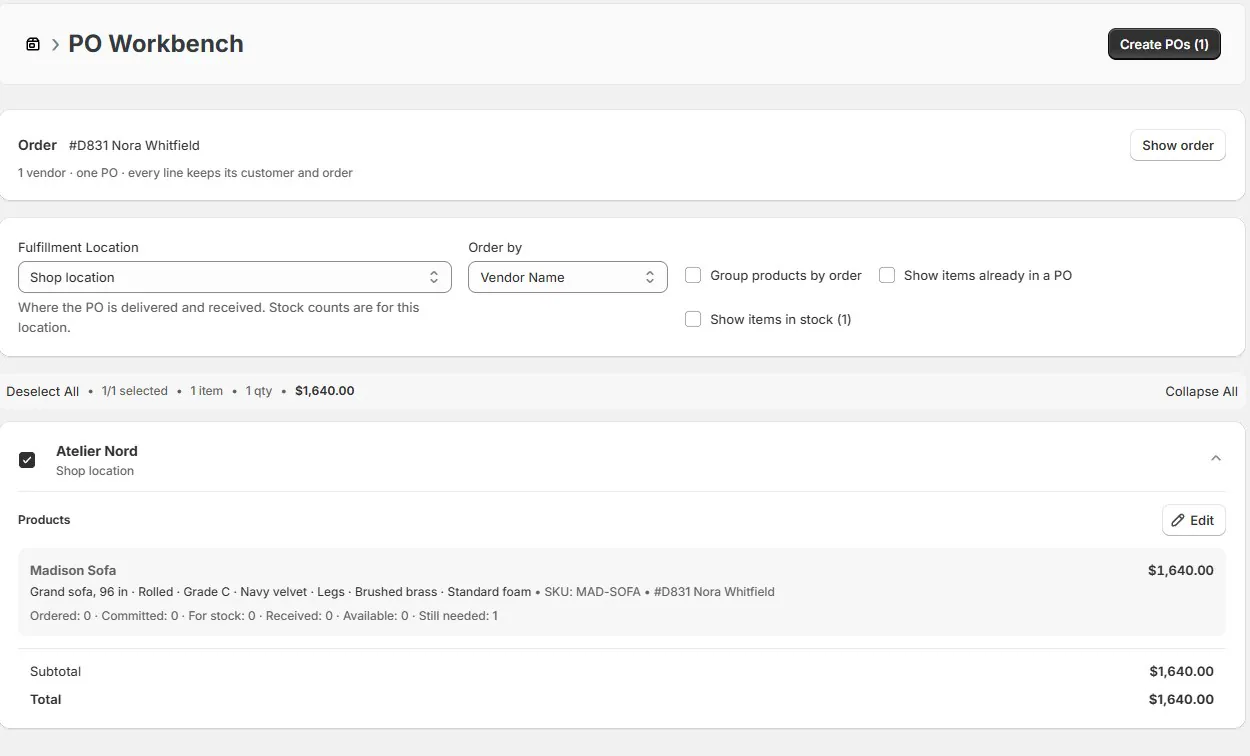
The PO PDF goes to the vendor after review. A configured status connection can move the order at the PO-sent event, with a customer notification explaining the public stage. For an order involving several vendors, the connection’s coverage rule determines when enough of the purchasing has been sent to move the whole order.
The detailed signed-sale-to-arrival workflow follows purchasing and receiving. For the broader operating routine, use the special-order playbook and the showroom-to-vendor-PO guide. Both begin with the same question: does the vendor receive the piece the customer agreed to buy?
Week 2: read the vendor acknowledgment before promising progress
The vendor replies with an acknowledgment and anticipated ship date. With vendor reply capture set up, the message and attachment land on the PO. Purchasing compares the fabric, length, leg finish, quantity, and date against the instruction sent, then resolves any difference with the factory.
The acknowledgment matches, so the responsible person records the production position and moves the order into the store’s appropriate stage. The customer sees a simpler public stage through the portal. Purchasing keeps the detailed acknowledgment close at hand for the next vendor conversation.
Set up inbound email and its DNS configuration to capture vendor replies on the PO. While that setup is being completed, staff can keep the acknowledgment with the PO through the supported manual process. Either way, the next buyer has the factory’s answer beside the instruction that prompted it.
Week 3: handle a changed fabric as a changed agreement
The customer asks about a darker fabric through the portal. Staff receive the request and purchasing asks the factory whether the change is still possible, what it would cost, and how it would affect timing. The associate returns with those answers so the customer can decide.
If the store approves and applies the change, the customer-visible revision invalidates the existing signature and requires a fresh one. The earlier signed record is retained. Staff also update and resend the purchasing instructions where appropriate, then check the acknowledgment. A correct customer record and an obsolete factory instruction still produce the wrong sofa.
The change-request workflow follows that exchange. When a vendor changes its price, the surcharge-to-re-sign workflow shows how to keep the vendor’s evidence, proposed customer revision, and accepted agreement together.
Here, the customer keeps Fog and production continues. If the customer wants to cancel, the cancellation-after-PO workflow walks through the customer agreement, vendor commitment, payments, and stock so the responsible people can settle each part.
Keep a late shipment separate from the customer’s delivery promise
A late vendor shipment starts with purchasing getting the best supported estimate and passing the change to the associate. Staff explain the revised timing and the customer’s choices in the order conversation. That gives the customer an answer and the next associate a record of what was said.
For automatic email notifications, match the wording to the triggering stage. Use the composer for specific dates or decisions; SMS uses fixed status templates. The order conversation keeps the explanation and the customer’s reply together.
Week 10: receive the sofa, then decide whether it is ready
The sofa reaches the warehouse in week 10. Receiving compares the physical piece with the PO, checks the fabric and finish, and records the accepted quantity. Any rejected goods receive their own quantity record so purchasing can deal with the vendor while accepted pieces continue toward handover.
The receipt links to the customer order, and the unit is held for the order it covers. Staff can see which sofa belongs to this customer and which goods remain available to sell. That distinction matters when the warehouse receives several similar pieces on the same truck.
The sofa’s vendor cost is $2,400 and its allocated inbound freight is $200, giving a landed cost of $2,600. Against the $4,160 sale price, merchandise gross profit is $1,560, or 37.5%. Operating expenses and the delivery service’s own economics sit outside that merchandise calculation.
OrderPilot allocates landed charges and tracks inventory costs, with cost information available to authorized staff in Admin. The PO-charges-to-QuickBooks workflow follows those amounts into purchasing accounting, including the cost method and account mapping that keep each charge accounted for once.
If the fabric is wrong, receiving records the mismatch and holds the piece for a decision. The wrong-fabric receiving workflow follows the evidence, vendor response, and customer choice. For partial shipments, accepted units can proceed while the remaining goods stay open.
Week 11: request the balance and arrange the handover
Once the agreed checks are complete, the store requests the remaining balance. The customer can open the portal on a phone, see the order’s per-item progress, and use the available balance-payment link when payment is enabled. Staff verify the transaction before treating the payment stage as complete.
The delivery team gets the current order and the access arrangements: stairs, doorway measurements, building restrictions, and the white-glove service purchased. Staff book the appointment through the store’s delivery process and give the customer the agreed handover details.
Record shipment or collection when the goods leave, then delivery when the pieces reach the customer. Those separate quantities tell staff whether the sofa is waiting at the warehouse, on the truck, or in the living room.
Week 12: record delivery and start the appropriate coverage
The sofa and table arrive in the example’s week 12. Staff record the delivered units and, where required by setup, the sofa’s serial number. OrderPilot’s coverage begins with the actual delivery or collection of each unit, not the showroom quote date. The record now connects the sold choices, physical unit, and start of coverage.
The sofa in this example carries five years of frame coverage and three years of fabric coverage, subject to the sold terms. OrderPilot preserves the coverage sold with the piece, giving service staff the right starting point when a customer calls years later.
If the side table went home earlier, its own collection date belongs on its unit record. The sofa’s later arrival should not postpone the table’s coverage start. That is why the original quote’s per-line handover choice matters to the delivery team and to the person handling a later service call.
Year 2: use the original order when the seam needs attention
Two years after delivery, a seam opens. Staff find the sofa through the customer, order, or serial record and inspect the sold coverage on the reported problem date. They collect the symptoms and photos, then compare the issue with the coverage terms and exclusions.
Staff determine that the seam repair is covered under the example’s terms. They record the decision, arrange the work, and keep the vendor conversation and expected recovery with the claim. Goodwill, paid repairs, and declined claims can also be recorded with the reasoning the team needs for the next conversation.
The technician receives a printed job sheet with the visit, sofa details, and repair instructions. After the visit, staff record the result and follow the vendor recovery through to completion. The claim-to-vendor-recovery workflow follows the whole service job.
Give each person the view their job needs
Sales, purchasing, receiving, and service each get the actions and information their work needs. Set role and location access around those jobs. Authorized Admin users can see costs and handle sensitive payment actions, while associates can keep the showroom conversation focused on the customer’s choices.
| Person | What they need from this order | What they should verify |
|---|---|---|
| Sales associate | Configuration, conversation, signature, and payment position | The customer’s remaining decision and agreed next action |
| Purchasing | Sold specification, vendor PO, and acknowledgment | The factory accepted the correct piece |
| Receiving | Expected goods, linked order, and receipt | Actual configuration, condition, and accepted quantity |
| Delivery team | Current pieces, handover choice, and access arrangements | What leaves, what arrives, and when |
| Service staff | Original unit, coverage, and claim history | Coverage decision and completed work |
| Customer | Quote, signing, payment, questions, and public progress | The agreement and the next action requested |
Sales credit can also involve more than the associate who created the quote. The sales-credit and commission workflow explains that record separately. A trade buyer has additional account needs, covered in the trade-customer workflow.
Choose the next walkthrough at the point your store hands work over
The sale can begin with a website quote request. Configured checkout through the native store cart is unavailable; the online-purchase workflow’s scope explains the supported path. A website quote request brings the customer’s selection into the same quoting and ordering process.
When the exact piece is already on another floor, the other-showroom floor-model workflow covers its location and handover. The starting point changes, while the agreed piece and its history keep travelling with the order.
Walk a sample sale through these handoffs with your team: the customer’s agreement, the vendor’s PO, the receiving record, and the delivered unit. Use the special-order playbook from quote to delivery to give each person ownership of the next step.
The handoff is complete when the next person can see what was agreed and what still needs checking.













