Revised quotes that show exactly what changed
Make the revision easy to read: identify the choices, explain the total, and collect agreement to the version you actually intend to order.
The OrderPilot team·

The customer asked for the wider sofa, oak legs instead of walnut, and no ottoman. You sent version three. Their reply: “Is this the one with the oak?” Now they're comparing PDFs instead of deciding whether to sign.
A useful revised quote tells the customer what changed before asking them to read the whole offer again. List the choices in plain words, explain the price difference, and make the current version unmistakable. In OrderPilot, approved customer requests can supply that change summary while the signature history preserves earlier agreements.
What should a revision explain first?
Start with the customer's decisions, using the same names as the quote. “Oak legs replace walnut legs” is clearer than “configuration updated.” Identify removed items too. A customer checking for the ottoman shouldn't need to infer its removal from a lower total.
The message should distinguish requested changes from consequences. A wider sofa may alter the price, fabric requirement, or expected timing. Removing an item can affect a delivery arrangement or discount. Explain those effects before presenting a new signature request.
Version labels help, but they don't explain the version. Keep the latest link prominent and use a short description of the revision in the subject or opening. The goal isn't to make the customer an expert in your document history. They've already learned more leg-finish names than they expected.
For the broader sales conversation, return to the be-back playbook. This revision should resolve the decision that kept the quote open.
How does a customer request reach the right line?
With the customer portal enabled, the customer can raise a change against the part of the quote they mean. A request pinned to the leg-finish option gives staff a clearer starting point than an email saying “the lighter one.”
Staff review the request before it changes the quote. The shared Inbox brings open items into view, including those waiting for the store's decision. The associate can accept and apply the request or explain why the proposed choice won't work.
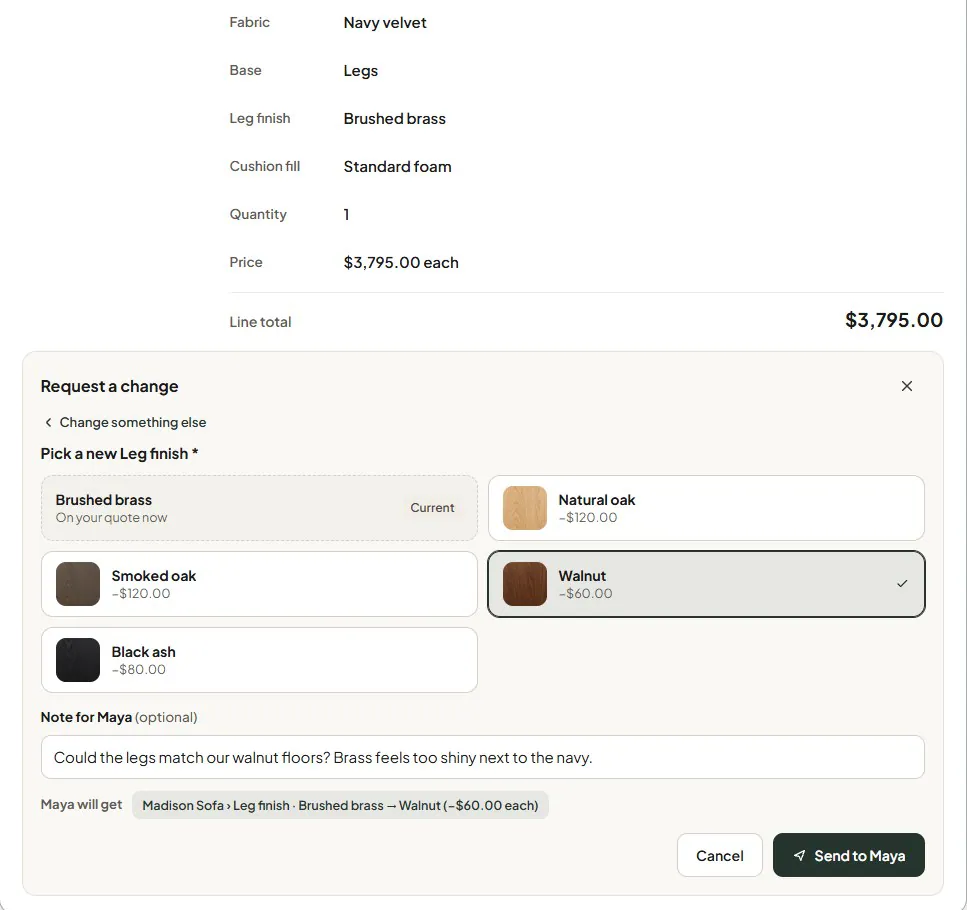
The pinned-question guide explains the customer's view. The change-request guide follows the store's review. Neither means a request automatically changes the furniture being purchased.
What if the customer asks by phone?
A phone request needs the same written clarity. Read the choices back during the call, record the request with the quote, and send the resulting revision for review. If “oak” could mean several finishes, identify the exact option before changing the line.
A direct staff edit following a phone call isn't automatically the same as a portal request that the system tracks through review. Write the change summary yourself unless the composer has the corresponding applied request available.
For example: “Following our call, I've changed the leg finish from walnut to natural oak and removed the ottoman. The sofa fabric remains oatmeal linen.” That last sentence can be useful when several details have been discussed, but it shouldn't become a full duplicate of the quote.
If a colleague takes the call, record who spoke with the customer and what remains unresolved. The associate returning tomorrow needs the decision, not merely a note saying “customer called.”
What does Include what changed put in the email?
OrderPilot's updated-quote email can list customer-requested changes that staff applied and haven't yet sent. The composer lets you include or omit that list for the send. Review the generated lines alongside your message so the customer receives a single clear explanation.
The list doesn't cover every change made by the store. A vendor price adjustment, a correction you discovered, or a new timing estimate needs a sentence in the message. Treat the summary as help with describing the revision, rather than a reason to skip reading it.
Put the changed total near the explanation. When the customer requested a more expensive configuration, make that consequence visible rather than letting the payment page introduce it later.
What does a complete revision look like?
Consider this illustrative, pre-tax quote:
| Detail | Earlier quote | Revised quote |
|---|---|---|
| Sofa size | 88 inches | 96 inches |
| Leg finish | Walnut | Natural oak |
| Sofa price | $3,000 | $3,400 |
| Ottoman | $600 | Removed |
| Merchandise total | $3,600 | $3,400 |
The revised merchandise total is $200 lower, even though the sofa costs $400 more. A bare “your quote is now $3,400” hides the useful explanation.
A sample message could read:
I've widened the sofa to 96 inches, changed the legs to natural oak, and removed the ottoman. The sofa is $400 more and the removed ottoman was $600, so the merchandise total is $200 lower. Please review the updated quote, including delivery and tax, before signing.
Reconfirm the expected timing separately. Option lead time isn't automatically printed on the quote PDF or inserted into the email, so the associate should state a checked estimate where the customer will see it. Don't assume the unchanged fabric means the wider frame has the same production schedule.
Which edits need a new signature?
Customer-facing changes invalidate the current signature so the customer can agree to the revised offer. Internal changes, such as an internal note or a vendor change that leaves the customer's agreement unchanged, do not by themselves require the customer to sign again.
The earlier signed record remains in signature history as superseded. Staff can retrieve that stored copy when they need to establish what was agreed before the revision. The customer's current signing link is for the current agreement; don't promise that the live page is a browsing library of every earlier version. Send the retained earlier copy if the customer needs it.
Written specifications have practical consequences: New Jersey's furniture delivery rule treats goods that differ from the sales contract's size, style, color, or condition as nonconforming delivery. N.J.A.C. 13:45A-5.1(e)
What if the revision changes the deposit?
Reconcile the money already paid before requesting more. Show the revised order total, the payment credited, and any additional amount the agreed terms call for. A fresh signature records the changed agreement; it doesn't itself collect the difference.
Use the payment method supported by the store's Shopify plan and setup. OrderPilot deposit orders support pre-placement deposits on any Shopify plan when enabled; native percentage deposit terms and POS Take Deposit require Shopify Plus. The customer should receive a clear request for the actual additional amount, not a second request for a deposit already paid.
Before sending any revision, read it as the customer would:
- Is the current version clear?
- Are the requested changes listed?
- Are store-initiated changes explained?
- Does the total account for removed items and existing payments?
- Has changed timing been stated?
- Is a fresh signature requested when required?
If production has begun, use the mid-production change-order process before committing a revised specification. For the complete customer journey, follow a change request after signing.
Sources
- N.J.A.C. 13:45A-5.1, delivery practices — New Jersey Administrative Code, via Cornell LII; subsection (e) added effective November 20, 2000.
Version numbers identify the offer. Plain words explain it.













