Stock held for customer orders: keep the sold sofa spoken for
A sofa can be physically in the warehouse and already belong to a customer order. Keep its hold, configuration, and location visible until it leaves.
The OrderPilot team·

Saturday, 3 p.m.: the last navy sofa sells online. Monday, 10 a.m.: a showroom customer calls to book delivery of the same sofa, paid for two weeks earlier. In this illustrative mix-up, both customers have a receipt and the warehouse has one sofa. The missing piece is the stock hold.
Furniture received for a customer order stays held for that order, and furniture sold from stock stays held until fulfillment. OrderPilot connects the unit, order, and location so an associate can see which sofa is spoken for and which one can be sold.
Check which physical units are available
On-hand inventory includes goods that are already committed or otherwise unavailable. Shopify distinguishes that physical total from the available quantity that can be sold. A warehouse count alone therefore cannot answer the associate’s question. Shopify, Understanding inventory states.
Suppose the warehouse has three navy Madison sofas, with two held for existing orders. One remains available. Its configuration matters too: the oak-legged and walnut-legged versions may be cousins, but they are not twins. Match the customer's choice to the actual available unit and location.
The inventory-states explainer separates incoming goods, physical stock, and availability. Receiving also connects the goods to their cost; the landed-cost guide follows that part of the record.
A quote does not automatically hold the piece
An OrderPilot quote leaves stock available. Place the order and establish the hold before promising the unit is reserved, then use the stock record to show the floor team which customer has claimed it.
Shopify’s separate native draft-order reservation can set aside tracked inventory until a chosen expiry. Set the expiry to match the promised hold and include expiring reservations in the order desk’s routine. Shopify, Creating draft orders, Reserve item inventory. The draft-order hold guide follows that process.
Follow the received unit to its customer order
When a PO line buys stocked units for a customer order, receiving holds the units allocated to that order. Goods received in excess of that commitment need to remain distinguishable as available stock. If the order is sold from an existing configured unit, its hold follows that sold stock until fulfillment.
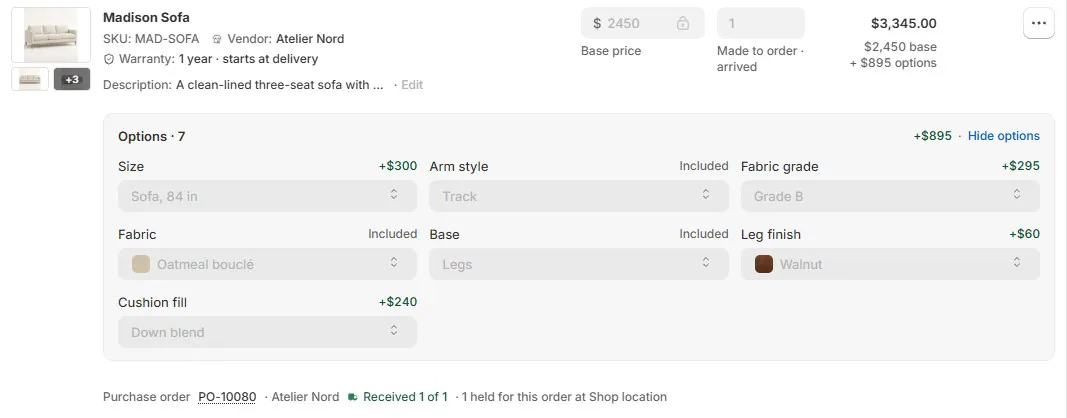
A short-stock notice gives staff a sourcing job: find the exact configuration at another location or purchase a fresh unit. The other-location POS guide covers location choices, and Order New covers buying a new piece while keeping the display model.
Let the inventory update inform the website
OrderPilot updates Shopify availability so held stock is excluded from the quantity available to sell. This uses OrderPilot’s stock hold, separate from Shopify’s native draft-order reservation. Staff can follow the unit from its order allocation to the available quantity online.
Use tracked inventory and review any setting that permits selling beyond available stock. Then look at the ordinary Shopify product page after the update to confirm the quantity offered matches the stock record. The floor team, warehouse, and website should all work from that same available quantity.
Reconcile cancellation before reselling the unit
Cancelling an order releases supported stocked units that are still held and unfulfilled. Follow the completed cancellation through to the resulting available quantity, then return the piece to the selling floor’s list.
Goods received under a choice that did not create stock need a staff decision before entering saleable inventory. Inspect the piece, resolve any damage or missing parts, and settle the vendor position. The next customer should be offered a complete piece with a clear stock record.
If an allocation needs to change, assign an authorized person to resolve the original order’s sourcing through the supported process. Record where that customer’s furniture will come from, then verify the resulting quantities before offering the released unit to someone else.
Ask the warehouse lead these questions each day
- Which received units belong to customer orders, and can staff identify their actual locations?
- Which promised configurations are short or waiting on a move?
- Which cancellations, returns, or handovers need their physical goods and inventory state checked?
Next, review Order New on the showroom iPad so the team can sell a fresh piece without accidentally giving away the display model.
Sources
Physical presence is not the same as availability.













