Three ways a customer can sign: link, QR code or the showroom iPad
Offer the signing route that fits the customer, then keep the approved document and its evidence together. Paper can still be part of the process.
The OrderPilot team·

The couple at the counter is ready to proceed. Another customer's partner is away and needs to read the quote remotely. A third customer wants the paper on the kitchen table before making a decision. One signing route won't suit them all.
OrderPilot offers a link, a showroom QR code, and signing on the showroom iPad, with a recorded paper-signature route as well. Choose the route that gives the customer a comfortable view of the agreement, then preserve the approved version and the context of the signing event.
When should you send a signing link?
Send a link when the customer wants to review the order away from the showroom. An email can explain the next step and give them a durable way back to the exact quote. Staff can send or copy the signing link from the desk; the process doesn't have to begin on the iPad.
Where status texts are enabled, a fixed OrderPilot text can carry the link through the configured workflow. Personal wording belongs in an email or the store's separate messaging channel, rather than an editable OrderPilot SMS.
The customer opens the page, reviews the specification and terms, and signs when the questions are resolved. A customer portal, where enabled, provides another way into the quote conversation. The signature-law guide explains why the record and consent process matter alongside the signing action.
When is the QR code the better choice?
Use the QR code when the customer is beside you with a phone ready. It opens the signing page without asking them to type a long address, and the customer stays on their own device.
The associate should explain what the code does before presenting it. Scanning opens the document; it doesn't sign it. Let the customer read the fabric, finish, total, and terms rather than pointing directly to the signature box.
The QR handoff article covers customers who only want to take the quote home. The same opening page can support a later decision; don't turn convenience into pressure.
When should you hand over the showroom iPad?
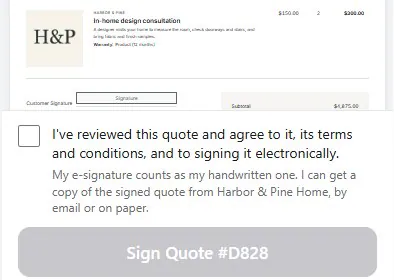
Offer Sign on this iPad when the customer wants to complete the agreement in person and doesn't have a suitable phone handy. Open the saved quote, give them a clear view, and let them perform the signing action themselves.
Place the iPad where the customer can read comfortably. Glare from a showroom window can make a fine-print paragraph disappear more effectively than any lawyer. Move the device or the conversation rather than rushing the reading.
Confirm the address for the signed-copy email. The customer should leave knowing how to retrieve the agreement, not just remembering that they drew a mark on the register.
What if the customer prefers paper?
Print the quote for signing, record the paper signature in OrderPilot, and attach a readable scan. Keep all pages that form part of the agreement together, with the correct order and version.
A scan of only the final signature box doesn't preserve the fabric choices or the terms on the preceding pages. The person handling the upload should open the file and confirm that the full document is readable.
Follow the store's policy for retaining the original paper. The wet-signature guide explains the practical recording routine without treating a scan as automatic permission to discard the original.
Does every route keep exactly the same evidence?
Every route should preserve the agreement, but the event details differ. An online signature can record browser and network information; an iPad or staff-assisted event carries its own device, staff, and location context. A recorded paper signature relies on the paper event and attached scan.
OrderPilot keeps the frozen document and digital signed PDF with its certificate for electronic signatures, along with the consent wording and available signing context. Staff can retrieve the record rather than rebuilding it from today's catalog.
Don't describe a store-network address as proof that a particular person held the iPad. Good records tell the story of the route used; they don't make every route identical.
What if there is still a question or change request?
Resolve open customer questions and change requests before signing. The signing flow waits while those matters are outstanding, giving the team a reason to settle the quote rather than collect approval around an unresolved choice.
For an illustrative sale, the customer wants the wider sofa but hasn't decided whether the oak legs work with it. Staff confirm the combination and price, apply the agreed change, and send the current quote. The customer then signs that version.
If the customer signs and later asks for a different fabric, a customer-facing edit invalidates the current signature and calls for a new one. The previous signed copy stays in history as superseded. A routine internal note doesn't by itself change the customer's agreement.
Can two people sign the same quote?
Each document has one Customer Signature. Don't promise a built-in co-signing sequence for two purchasers. If the sale needs agreement from more than one person, establish the store's process before collecting the signature and keep the supporting approvals clearly identified.
Two people can review the same quote, and a customer can share the private signing link with a partner. Reviewing together and recording multiple independent signatures are different capabilities. The associate should know who is intended to approve the offer.
The same care applies when a designer is helping a client. Record the roles clearly instead of assuming that the person holding the phone is necessarily the purchaser.
Does signing have to happen before the deposit?
Signing comes first when the store's order requirements or an outstanding signature request make it a prerequisite. Payment and signature still remain separate records: one shows money received, the other shows agreement to the document.
The signature-requirement guide explains product and category rules. For payment, use the route your Shopify plan supports: enabled deposit orders work before placement on any plan, while native percentage deposits and POS Take Deposit require Shopify Plus.
Read the order's current requirements before sending a payment request. A customer should not arrive at a payment page only to discover a missing approval nobody explained.
| Customer situation | Useful route | Associate's final check |
|---|---|---|
| Reviewing at home | Signing link by email | Current version and clear next step |
| In store with phone ready | QR code | Page opens and customer can read |
| In store without a phone | Sign on this iPad | Customer performs the action and receives a copy |
| Wants to sign on paper | Print, record, and attach scan | Complete signed document is readable |
Once the agreement is settled, follow the iPad closing flow for payment and the remaining handoff.
Choose the device around the customer. Keep the agreement around the record.













