One Shopify product per template: catalog sync and configuration stock
Keep the frame's catalog identity separate from the customer's choices, then recognize received configurations as stock your team can sell.
The OrderPilot team·

Imagine opening the product list and finding Madison Sofa Custom, Madison Sofa Custom Final, and Madison Sofa Custom Final Again. Each name belongs to a past quote. None helps the associate find the finished sofa available in the warehouse. The catalog has become a filing cabinet with very upholstered folders.
OrderPilot gives an active product template one Shopify product identity. Customer choices stay with the configured order line, and receiving can put actual configurations onto stocked variants of that template's product. The frame stays recognizable while the stock record distinguishes the pieces you can really hand over.
What does an active template create in Shopify?
An active template synchronizes to a Shopify product. Its catalog category supplies the product type, and shared option information is represented through Shopify metaobjects. Draft templates write nothing to Shopify, giving the catalog team room to prepare a frame before making it active.
Stock-tracked options are a separate case. An option representing a stocked component can have its own product, because the component needs inventory treatment of its own. That does not mean every fabric selection creates another sofa product. The product-template guide explains the distinction between the frame and its choices.
Keep activation deliberate. A frame can have correct prices but unfinished images or missing required choices. Review its configuration first, then make it active and let synchronization complete. On Products, the sync badges and Needs sync tab help staff find records requiring attention.
Does quoting a configuration make another product?
The normal template sale uses the existing template product and records the selected options with the line. The order process doesn't create a fresh catalog product for every combination. A different fabric on the next quote is another configuration of the frame, not another permanent sofa identity for staff to clean up.
Some line shapes use Shopify custom items, including service or held-stock cases, while OrderPilot keeps their own linked records. Don't judge the stock behavior solely by whether a Shopify line looks like a native variant. The app's configuration and hold records are part of the process.
That distinction matters because Shopify's draft-order guidance says an ordinary custom item does not itself track inventory or appear in product sales reports. OrderPilot's managed configured line is supported by its own product, configuration, and stock-handling relationships; it isn't merely a typed product description.
Shopify's order page can link back to the OrderPilot record, where the team sees the sale's configured details. The desk, POS, and website options block draw on the catalog's choices, while each selling surface presents the information in its own way.
How does a received configuration become sellable stock?
Receiving a template unit places it on the stocked variant for that configuration under the template's product. The stock identity includes the selected combination, so Fog linen with walnut legs doesn't become interchangeable with another fabric or finish merely because both pieces are Madison sofas.
Consider an illustrative receipt of two identical 84-inch Madison sofas in Fog linen with walnut legs. The template product remains Madison sofa. Its stocked configuration represents those exact choices. Staff can distinguish those units from a fresh made-to-order request and from any different configuration already on hand.
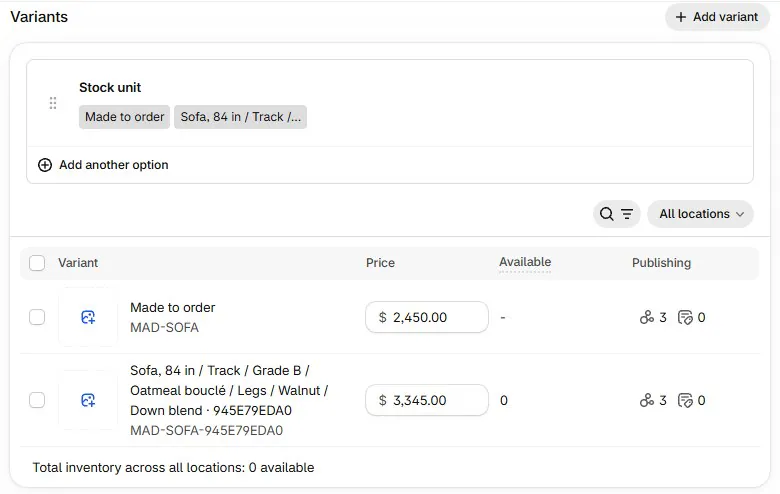
The base made-to-order variant isn't a pool of finished sofas. The received configuration carries the stock. See configuration-specific cost and stock for how the piece's actual cost and available units relate to the combination sold.
Can a walk-in buy the finished piece today?
A walk-in can buy an available stocked configuration through the stock-selling route, including native Shopify POS sale of its stocked variant. Staff should identify the exact fabric, finish, location, and unit availability before discussing handover. A similar showroom sample doesn't prove the requested combination is available.
If the customer wants a fresh piece rather than the floor model, use the appropriate Order New path. The Order New guide follows that decision through purchasing. Keep the showroom promise tied to the chosen source; “we have the model” is not the same answer as “this configuration is ready for you.”
The term quick ship also needs care. A vendor's quick-ship program and a unit physically available in your store are different routes with different timing. Tell the customer which route their order is taking.
How do held units stay attached to an order?
When OrderPilot sells from stock, the hold sets units aside for the order line until fulfillment. For an order bought new on a PO, the units needed by the customer are held when they arrive. This preserves the connection between the sold specification and the goods being received.
In the receipt above, suppose one sofa belongs to an existing customer order and the other is free stock. The reserved unit isn't another available sofa for a walk-in simply because both are in the building. Your team needs the available-versus-held distinction, not just a count of cartons.
The held-stock guide explains the operating routine. Shopify remains the home of inventory quantities, while OrderPilot records which units are held for which line. The guide to Shopify inventory states helps staff distinguish incoming, committed, and available stock.
What happens if the customer cancels?
Review the order's hold and the unit's actual state as part of cancellation. A received piece, a vendor order still in production, and a fulfilled piece need different handling. Don't tell the next customer a unit is available merely because the original customer called to cancel.
OrderPilot returns held units to Available when an order is cancelled or its line is removed. Its daily stock check also reviews outstanding holds. Verify that the change has completed and the unit is available before reselling, especially if the record shows a stock problem. The team can then offer the finished piece with its configuration and location established.
Will synchronization rewrite products the store created?
OrderPilot identifies its managed catalog products from its own records, not just a similar title or tag. A merchant-owned product linked to an option stays merchant-owned and is read rather than renamed or republished by that option synchronization. Keep the distinction clear when connecting an existing component product.
Leave OrderPilot's managed base variant and catalog metafields in place. Renaming or deleting structural data directly in Shopify can obscure the relationship the app uses. Maintain the template through OrderPilot and use View on Shopify to inspect the synchronized result.
If the store plans to uninstall, review the dedicated Remove OrderPilot data from Shopify action before uninstalling rather than manually removing a mixture of app-managed and merchant-owned data. Treat that as a separate planned data decision.
Why does a template still say Syncing?
Syncing means the catalog work hasn't reported a completed result yet. Inspect the template's state and any error information, then use the provided retry action when a failure needs another attempt. The Needs sync view and Retry sync for all help staff manage affected templates without creating replacements.
After a retry, verify the final state and open the Shopify product. Check the active template, a sample configuration, and its available stock. Website shoppers can configure and request a quote; native store-cart checkout of configured pieces isn't enabled, so keep that separate from the catalog and stock features described here.
The useful outcome is straightforward: one recognizable frame, an exact configuration on the order, and stock the team can identify. Begin with the template model, then verify the path from receipt to the available unit on the floor.
Sources
- Creating draft orders: custom items — Shopify Help Center. Explains ordinary custom-item inventory and reporting behavior.
A frame's identity and a finished unit's availability answer different questions.













