Product templates: one sofa, every fabric, finish, and size
Model a configurable piece once, with priced choices and rules the whole store can use. Keep the specification recognizable from the showroom quote to the vendor PO.
The OrderPilot team·

Take an illustrative Madison sofa with three sizes, two arm styles, four leg finishes, and 180 fabrics. That is 4,320 possible combinations before someone asks about contrast piping. Somewhere in the office, a product name is acquiring another “copy” suffix.
A product template gives that sofa one configurable definition. The team chooses the size, arm, finish, and fabric from the options the maker offers, with their prices, costs, and rules attached. OrderPilot carries the selected specification into the quote and onward through the sale, so the back office works from the choices made in the showroom.
Model the piece instead of listing every possible combination
Shopify's native products support up to three product options. A furniture model can have more independent decisions than that. The problem is not simply the number of rows: those decisions can also affect each other, have different costs, and change the wait.
Variants are useful for defined, sellable configurations. A standard chair sold in a small range of finishes can fit that model well. A configurable sofa with dependent fabric grades and arm choices needs a way to describe the choices without maintaining every theoretical permutation by hand.
Shopify's line item properties can collect extra information such as engraving text. That does not, by itself, supply a furniture pricing and costing model. A note saying “premium fabric” still needs a reliable way to produce the right price and purchasing specification.
| Approach | Useful for | Work the store still needs to define |
|---|---|---|
| Native product variants | Established configurations with their own inventory and price | Which combinations exist and how each stays current |
| Line item properties | Extra information attached to the purchase | Pricing, costs, and rules for choices that affect the sale |
| OrderPilot product template | A configurable piece with priced options and dependencies | Accurate vendor data, allowed values, and tested rules |
The three-option guide, variant-limit explainer, and variants, properties, and metafields comparison explain the underlying Shopify choices. Start with the furniture's selling logic rather than a preferred data format.
Give each configurable piece a clear identity
A template describes a piece the team can recognize: Madison sofa, a particular bed frame, or a made-to-measure dining table. It holds the base selling price and base cost, then the options that configure that piece.
A whole collection should not automatically become one template. A sofa, chair, and ottoman may share fabrics while needing different prices, dimensions, and construction rules. Separate templates make sense when staff think of them as separate pieces. Reuse the common options through bundles.
A tightly related family can share a template where its choices, base definition, and rules remain understandable. The test is whether an associate can configure the sale and the vendor can identify it without decoding a catch-all product name.
Keep the customer-facing label readable while retaining useful internal names and vendor identifiers. “Walnut” can be the label the customer chooses; the underlying record still needs to distinguish the finish and maker correctly. The multi-vendor naming guide helps prevent several different “Natural” finishes from becoming one ambiguous choice.
Put price and cost on the choice that creates them
Each offered option value can carry its own selling-price contribution, cost, and lead time. Per-template overrides let the same named choice work differently on different pieces.
In a collection, walnut legs might be included on a side chair but add $300 to a dining table. The shared name does not require the same price everywhere. A zero selling-price contribution can appear as Included, which is clearer than leaving the customer to wonder whether the selection was missed.
Cost deserves the same care as selling price. An included finish can still cost the store more. If the option's cost is absent, the price may look correct while the margin calculation is incomplete.
Use graded-in pricing to translate a frame-by-grade vendor book into a repeatable selling model. Make sure the setup does not charge for the same upholstery choice twice through both a grade contribution and an unintended fabric surcharge.
Choose an option type that fits the customer's answer
A good option asks for information in the form the customer or associate can reliably supply. A fixed list belongs in a choice field. A measured length belongs in a numeric field. A note about supplied material belongs in text.
| Choice or input | Furniture use | What to decide when setting it up |
|---|---|---|
| Dropdown or choice list | Arm style, seat depth, base type | Offered values, required state, and default |
| Swatches or value images | Fabric and finish selection | Clear label, accurate image, and vendor identity |
| Number with unit pricing | A quantity or measurable input charged per unit | Minimum, maximum, step, unit, price, and cost |
| Dimensions | Length, width, or height within the allowed range | Required parts, unit, limits, and flat charge |
| Text or text area | Monogram, COM details, or a customer instruction | Prompt, required state, and any flat charge |
| Add-on | A separate selectable addition to the piece | What is included and how the addition is priced |
Dimensions record allowed measurements with a flat charge; they are not an automatic area-pricing formula. If the maker charges by area, the catalog needs a supported pricing approach and review rather than a misleading dimensional field. Use the custom-dimensions guide for that distinction.
For visual choices, the image should help the customer identify the selection. It should not promise that every complete sofa configuration has its own rendered photograph. The swatch and finish guide covers useful presentation without inventing a visualization feature.
Make required choices and defaults deliberate
A required option stops the configuration from being complete without an answer. Use it where the maker needs a choice, such as upholstery or a base finish. Optional notes should remain optional unless they are necessary to build or deliver the piece.
A Starts as default can speed routine quoting, but a default is still a choice the customer must understand. If the template begins with standard depth, the associate should review it rather than assume the customer noticed.
Set defaults to the store's actual selling practice and vendor specification. Avoid a premium or uncommon default whose price appears before anyone explains it. Test what the customer sees with the template's initial selections and with every required choice changed.
The catalog should help the associate ask the right questions. It should not silently make consequential decisions because a field happened to have a value.
Order the questions before writing the rules
Rules work best when the option list follows the conversation. Place a controlling choice above the option it controls. For example, ask for Base before deciding whether Leg finish should be shown.
OrderPilot supports Always and Only when visibility, plus narrowing the values offered by an earlier choice. A fabric-grade selection can narrow the fabric list; a base choice can hide a finish option that does not apply.
Build the rule from a vendor fact, not a guess about what looks attractive. If a particular arm is unavailable on a narrow frame, show only the combinations the maker accepts. Then test changing the controlling choice after a dependent value was already selected.
Rules operate within a template's option choices, not across separate order lines. A modular sectional with independently added pieces still needs a pairing review. The shown-when guide and modular-sectional guide explain those two jobs.
Share common choices through bundles
A bundle lets several templates reuse an option set. If a maker offers the same leg finishes across a range, maintain the shared list and let the following templates use it.
A template can narrow the offered values or keep a deliberate exception. Lock and Match bundle distinguish an intentional local contribution from one following the shared definition. Keep those decisions visible so a later catalog update does not leave the team wondering why one frame behaves differently.
For a group of forty frames, a shared finish update is easier to manage than forty independently typed lists. That is a structure example, not a claim that every field change automatically rewrites every existing sale. See reusable option bundles for the detailed behavior.
Treat lead time as a configuration fact
Different choices can mean different production waits. OrderPilot keeps lead time on option values, with per-template overrides where needed. The slowest selected option sets the configured line's lead time; the option times are not added as though each started only after the previous one finished.
For example, suppose a selected size has a 56-day lead time, the fabric has 84 days, and the finish has 28 days. The configured line uses 84 days. Those are illustrative data values; they are not a promise from a real maker.
Staff can see the resulting lead time on the Admin order line. The website options block can show it when that display is enabled. It is not automatically printed on the quote PDF or PO, so put any delivery wording requiring customer agreement into the appropriate terms or notes.
The option lead-time guide separates that catalog estimate from the store's wider delivery commitment. Keep transit, receiving, and the customer's final delivery arrangement clear in the conversation.
Work through the price and margin of one sofa
Here is a configuration before sales tax, delivery, or landed-cost additions. The base sofa is $2,000 with a $1,000 cost. The customer chooses a fabric upgrade, deeper seat, and included walnut legs.
| Contribution | Selling price | Cost |
|---|---|---|
| Base sofa | $2,000 | $1,000 |
| Fabric upgrade | $300 | $150 |
| Deeper seat | $200 | $100 |
| Walnut legs, included in selling price | $0 | $25 |
| Configured total | $2,500 | $1,275 |
The difference is $1,225, a 49% margin on the selling price before additional costs. The included finish still contributes $25 of cost. That is the detail a plain list of customer-facing labels would miss.
The template Pricing card puts the base figures together for staff permitted to view costs. Review the configured result as well as the starting price. Once stock has been received, Cost history gives the purchasing record further context.
Freight, duty, brokerage, and other landed costs can change the eventual margin. The custom-furniture pricing guide explains why a markup rule and final margin are different calculations.
Keep costs with the staff who need them
Catalog and purchasing staff need cost information to maintain prices and evaluate the sale. Associates showing a quote to a customer need clear selling prices and choices.
OrderPilot's cost visibility follows permissions. Staff without View costs should not see protected cost and margin information, and supplier costs do not appear on the showroom register. Test with the salesperson's actual role rather than reviewing every screen as the owner.
Keep internal notes and customer-facing labels distinct too. The customer should see the furniture description they understand; purchasing should retain the identifiers required to order it accurately.
Use one definition across the sale
An active template publishes a Shopify product for that configurable piece. Draft templates do not write products to Shopify. This lets the catalog team prepare and review a piece before exposing it through its sales channels.
The same template options support the desk, the showroom iPad, and the website options block. On POS, short choice lists can appear as a button grid and longer ones as searchable lists. The associate should be choosing from the same offered range that catalog staff maintain.
On the website, the options block works within the store's product page and theme. Customers can explore the configuration and request a quote. Staff receive those choices, resolve any questions, and return a quote that preserves the configuration the customer selected.
A quote can mix configured pieces with regular Shopify products. The custom sofa, stocked side table, and lamp can be part of one sale. Purchasing can then create the vendor PO from the configured order lines, carrying the selected specification without retyping.
The catalog-sync and configuration-stock guide explains how a configurable definition differs from an actual stocked configuration. The catalog describes what can be sold; stock records identify the pieces available to fulfill a sale.
Preserve what the customer was quoted when prices change
A saved quote keeps the option prices and costs recorded with its selections. Changing the template price does not automatically reprice those saved lines or flag every open quote with a price warning.
That matters when the vendor sends a revised book. Decide which saved quotes the store will honor and which require a reviewed revision. Do not assume that editing the catalog has changed what a customer sees in an agreement already sent.
Newly added selections use their appropriate current definitions, while existing snapshots preserve what was sold. If staff change an old quote, inspect the resulting line and total deliberately. A customer-facing change can require a new signature.
The vendor price-increase guide covers that review. The discontinued-fabric guide addresses a separate problem: a value no longer offered. A no-longer-offered warning is not a price-change warning.
Build the first templates in the single-page editor
Start with a manageable group of frequently quoted frames. For example, a store might choose ten familiar pieces as its first catalog exercise. Familiarity makes it easier for associates and purchasing staff to spot a missing choice.
The template page brings title, description, media, pricing, options, and activity into the main column. The right side groups status, sales channels, the customer action, order requirements, additional terms, organization, and warranty settings.
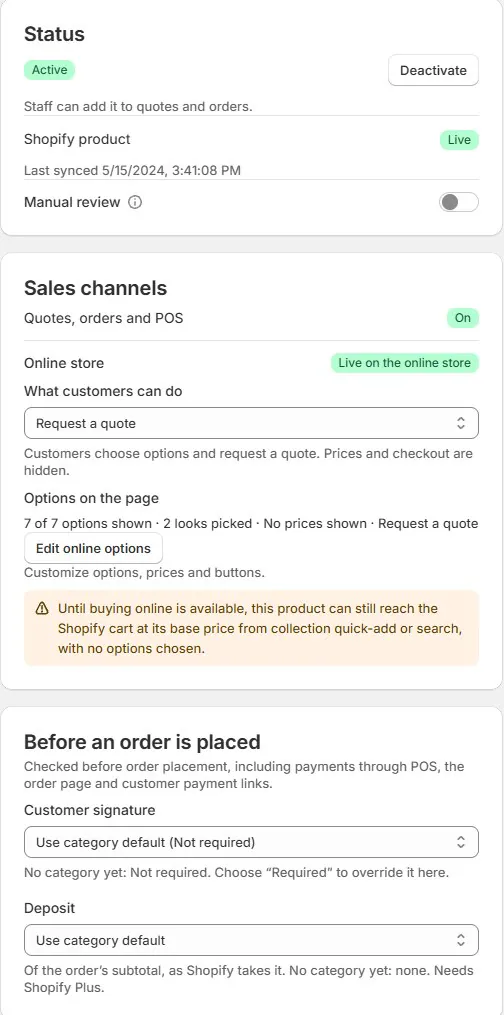
Make the description useful to someone selling the piece. Keep the dimensions and the option prompts consistent. Product images should identify the frame, while value images identify the selected material or finish.
Use catalog organization to keep drafts, vendors, and categories understandable. The product-data checklist gives the team a common review standard before activation.
Import the vendor book after the structure is settled
OrderPilot's product-template CSV import supports templates, options, offered values, prices, costs, and related catalog data. Validate the import first, review the results, then apply the intended changes.
A spreadsheet is a transport format, not a substitute for deciding how the maker's book maps to the catalog. Resolve grade names, repeated finish codes, units, and template handles before importing a large range. Keep a clear owner for that mapping.
Start with a representative sample that includes an ordinary piece and one with an exception. Compare the imported quote against the vendor book before repeating the process across the range. That catches an incorrectly interpreted price column while the review is still manageable.
The vendor-book import guide covers preparation, and the spreadsheet-to-iPad workflow follows the resulting catalog through its selling surfaces.
How to do this in OrderPilot
Build a complete sample sale before scaling the template pattern. Configure the Madison at the desk, choose a different valid combination on POS, and request the same piece from the website. Compare the saved specification and customer-facing total.
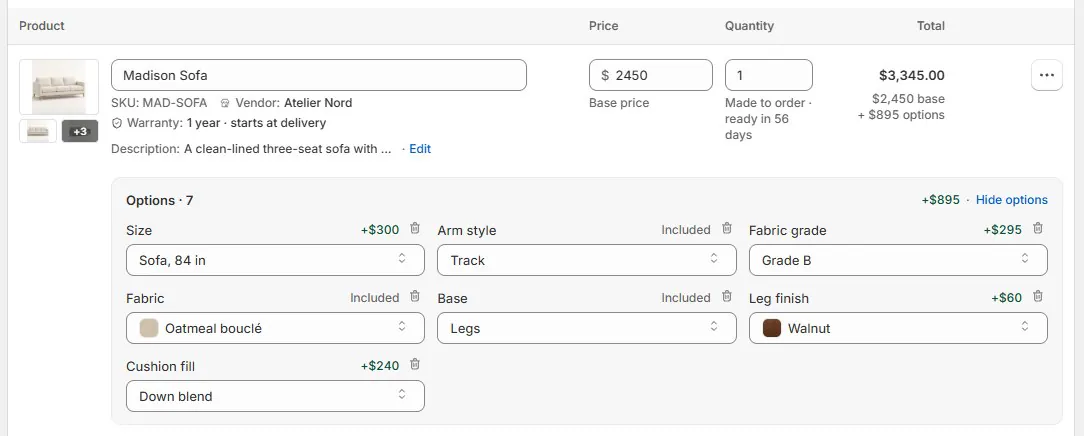
Then inspect the quote and a sample vendor PO. The vendor should receive the selected specification, and the customer should see the terms that require agreement. Use a product spec sheet where a separate product document helps the conversation.
Keep sets and non-physical work explicit. A fixed composition can add its pieces as separate lines, while a service product represents work such as design time. Neither should be disguised as a fabric option. The compositions and services guide explains those choices.
Before activating the template, finish this build checklist:
- The piece and vendor are unambiguous.
- Base price and cost match the approved source.
- Required choices and defaults fit the actual product.
- Every offered value has the right label, image, and commercial contribution.
- Visibility and narrowing rules match the maker's allowed combinations.
- Numeric and dimension inputs use clear units and limits.
- Shared-bundle exceptions are deliberate.
- Lead-time information is accurate where displayed.
- The customer terms and order requirements are ready.
- Admin, POS, website quoting, and the PO have been reviewed with sample data.
Keep the catalog useful after the first import
Give vendor updates a repeatable home. When a price book changes, a fabric is retired, or a maker alters its allowed combinations, identify the affected definition and the open sales that need human review.
Use activity history to understand changes to the catalog. Keep the distinction between the current selling definition and previously agreed orders. That lets the team maintain a useful catalog without rewriting the history of a sale.
A good template earns its place every time an associate chooses the correct fabric and purchasing receives the same specification. Begin with the shown-when rules for one familiar frame, and test the combinations the maker will actually accept.
Sources
- Adding variants: product options — Shopify Help Center; cited for the three-option limit.
- Product templates: line item properties — Shopify developer documentation; cited for supplementary information captured on a product form.
The catalog should describe the choices the maker accepts, and preserve the choices the customer made.













