How to take deposits on custom furniture orders in Shopify
Settle the specification, choose the deposit route your Shopify plan supports, and keep the money received and the balance with the order.
The OrderPilot team·

Your customer has chosen the deeper sofa, the oatmeal weave, and the walnut legs. What are they agreeing to, what are they paying now, and what will remain? Say the agreed Madison sofa order totals $4,800, including the charges and tax used in this example. A 50% deposit is $2,400, leaving $2,400 before delivery.
Taking deposits on custom furniture orders in Shopify works best when those answers stay together. OrderPilot supports deposit orders on any Shopify plan, and native percentage deposits on Shopify Plus. Choose the route before the customer reaches for a card, then keep the payment history beside the agreed specification.
Settle the piece before requesting the deposit
Record the model, dimensions, upholstery, arm style, leg finish, and quantity while the swatches are still on the table. “The darker one” is a perfectly useful showroom gesture and a very poor instruction to a factory.
Include delivery, other merchandise, and any service charges in the quote. A customer reviewing the deposit should recognize the whole sale, including what is coming later and what is leaving the store today. Use the store's quote checklist to catch missing choices before signing.
OrderPilot carries configured pieces and regular Shopify products on the same quote. The specification should be settled enough to approve before the payment request becomes the next task. If the vendor still needs to confirm fabric availability, finish that conversation first.
Make the payment arrangement easy to explain
Tell the customer what the deposit covers and when the balance is due. For the illustrative sofa, an associate could say: “The total is $4,800. The deposit is $2,400 after you approve the specification, and the remaining $2,400 is due before delivery.”
That sentence describes the payment schedule. The full terms should explain changes, cancellation, and what happens if delivery is delayed. Use the deposit-policy template to settle the store's wording, and the guide to asking for the deposit for the showroom conversation.
If your store requires a signature, show the agreement before collecting payment. A paid deposit and a signed specification record different parts of the sale. Purchasing needs to know whether both are ready.
Know the Shopify distinction
Shopify reserves the native percentage deposit in draft-order payment terms for Shopify Plus. OrderPilot provides another route: a separate deposit order, created from the quote or draft before the main order is placed.
Turn on Deposit orders in Settings › Quotes & orders › Delivery & stock. Staff can request a percentage or amount in Admin, then send or copy the deposit's payment link. The deposit is a separate taxable Shopify order. Once paid, it counts in OrderPilot's Paid amount and reduces the amount left to collect on the main sale.
| Route | Where staff use it | Shopify plan and setup |
|---|---|---|
| Deposit order with its own payment link | OrderPilot in Admin, before placement | Any plan; Deposit orders switched on |
| Native percentage in payment terms | Admin and the supported POS flow | Shopify Plus |
| Take Deposit through OrderPilot on the iPad | Shopify POS | Shopify Plus and native deposit terms |
| Request the whole remaining balance | OrderPilot payment request | Any plan, subject to the order's readiness |
Deposit orders do not cover tax-split order groups, and they are not the same as the native minimum-deposit requirement. Choose the plan-by-plan deposit route that fits the sale, then use that route consistently.
At the register, finish the conversation first
On Shopify Plus, OrderPilot's POS Take Deposit uses the deposit set in the order's payment terms and hands the payment to Shopify checkout. The associate reviews the configuration, obtains the required signature, then completes the payment through the register.
Without Plus, the associate can finish the quote and signing on the iPad, then have an authorized colleague create the deposit order in Admin and send the customer its link. Deposit orders are an Admin flow. That division should be part of staff training so nobody promises a button the register doesn't offer.
Shopify's own multiple and partial POS payment documentation describes a separate native checkout flow and its restrictions. It does not change OrderPilot's Plus requirement for Take Deposit. See the showroom iPad deposit guide for the complete handoff.
When the customer takes the quote home
Send the settled quote with a clear next action: review, sign, or pay the requested deposit. A customer may want to lay the fabric against their rug. The quote should preserve the same choices the associate helped them make.
OrderPilot's customer pages and payment links lead back to the order's current payment readiness. Customer payment access must be enabled where the store uses that control, and outstanding signature requirements can send the customer to sign first. Payment buttons on the quote, portal, emails, or PDFs should all support the same agreed sale.
For a quiet draft quote, the optional reminder sends one follow-up email. Keep any accompanying message specific to the customer's next decision, such as reviewing the finish or completing the signature.
Keep each payment with the order
Read Paid and Balance after each completed payment. For the example, the first $2,400 moves Paid to $2,400 and leaves a $2,400 balance. If the customer later pays another $1,200 through a supported partial-payment route, the remaining amount is $1,200.
OrderPilot works in currency amounts rounded to cents and prevents payment requests from exceeding what remains due. A request is not a receipt: the balance changes when payment is recorded, not merely because an email was sent.
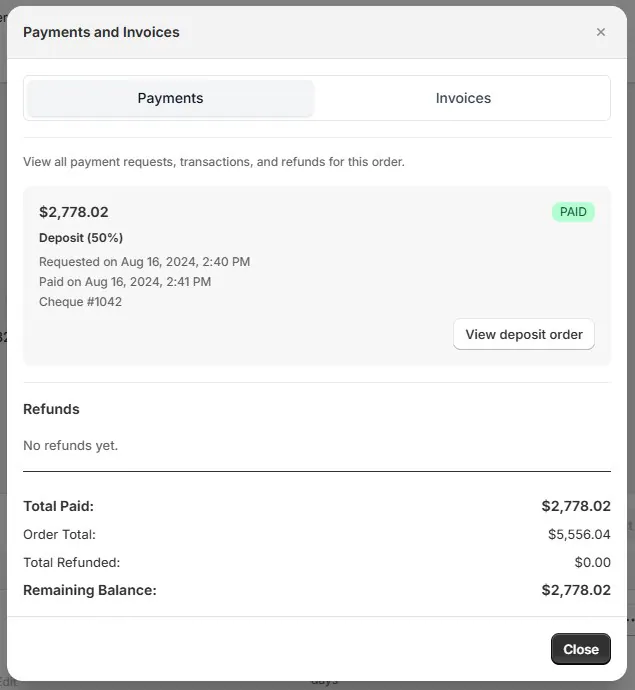
Record money received another way through the matching supported flow. A check can pay a deposit order; a partial manual payment on a placed order needs Plus. Store credit works on any plan, but on a placed order without Plus it must cover the whole balance.
Before another request goes out, resolve any unpaid request already open and reconcile money received elsewhere. The part-payment and balance guide follows that ledger through changes, refunds, and the final payment.
Treat a changed finish as a changed agreement
A change after signing needs a review of the specification, price, vendor commitment, and delivery expectation. If the customer changes walnut legs to oak, the team should establish the resulting order before asking for more money.
OrderPilot invalidates the current signature for customer-facing changes and keeps the earlier signed record. Obtain a new signature on the revised agreement where required, then reconcile the payment position. An existing deposit remains part of the history; it doesn't freeze the amount still owed on a changed sale.
Where an unpaid deposit request has the wrong amount, cancel that request and create the corrected one. Tell the customer which request to use. Once payment has arrived, handle any adjustment as an additional collection or a refund rather than rewriting the receipt.
Make the handoff to purchasing explicit
The person releasing the PO needs the agreed configuration, the signature state, the payment position, and any required manager approval. Use the store's release policy to decide when those parts are sufficient.
OrderPilot can create vendor POs from the configured order lines, carrying the selected specification forward. Minimum-deposit requirements need Shopify Plus; a paid deposit order does not satisfy that ordinary requirement automatically. The authorized team should know how its own plan handles release.
Before moving on, review the whole sale:
- The quote identifies the exact furniture, charges, and delivery choice.
- The customer has accepted the terms and signed where required.
- The received deposit belongs to the right order.
- Payments received outside checkout are recorded once.
- The balance and its due event are clear.
- Purchasing knows whether the order can proceed.
The first receipt is only the beginning of the payment history. Carry it forward with the balance-tracking guide.
Questions
Is tax charged on the deposit or at the end?
OrderPilot deposit orders are taxable Shopify orders, with the main draft adjusted so the deposit counts toward the sale. Tax treatment and remittance timing depend on the jurisdiction and setup; use the deposit sales-tax guide for that separate question.
Can the customer pay the deposit by check?
Yes. Record the check against the deposit order through its supported manual-payment flow, following the store's rule for confirming receipt and clearance.
Can the rest be paid in two installments?
Yes, where the order and plan support partial payments. Before placement, deposit orders can collect further deposits; placed-order partial manual payments and native deposit terms need Plus. Agree the route before promising installments.
Can I change the amount after sending the link?
For an unpaid request, cancel the old request and issue the corrected one. Reconcile a payment already received before requesting or refunding the difference.
Do I need Shopify Plus?
Not for Admin deposit orders. You do for native percentage deposit terms, OrderPilot's POS Take Deposit, and minimum-deposit requirements.
Sources
- Creating draft orders: payment terms and deposits — Shopify Help Center.
- Multiple and partial payments on Shopify POS — Shopify Help Center.
The deposit belongs with the agreement, and the balance belongs where the next person can see it.













