Graded-in pricing: frame × fabric grade without a 2,000-row sheet
Give each frame its own grade prices, then connect fabrics to the right grade. The associate can price the customer's choice without rebuilding the vendor's matrix.
The OrderPilot team·

The customer points to a linen on the swatch wall. The associate finds its grade, finds the frame, and then looks up the leg finish and cushion upgrade. In our example, that's an 84-inch Madison sofa in Grade D, walnut legs, and down-blend cushions. The swatch has made its decision. The price book still wants a meeting.
Graded-in pricing gives a frame a price for each offered fabric grade. In OrderPilot, model the grade as an option with prices and costs specific to the frame, then narrow the fabric list to that grade. The associate can make the choices in the quote while the catalog supplies the resolved price.
What does a fabric grade tell you about the price?
A fabric grade places a textile in the maker's pricing structure. A seating manufacturer's explanation of fabric grades describes comparing textile costs with its grade levels so chairs can be priced for the selected upholstery. That is the relationship the catalog needs to preserve: frame, grade, and a fabric belonging to that grade.
Treat the grade as vendor-specific information. Even when a fabric name is shared across makers, use the grade assigned by the maker building the piece. Don't let a familiar letter carry a price from one vendor into another vendor's frame. The separate fabric grades explainer covers the customer's question about grade and quality.
Read whether the vendor's matrix gives finished prices or additions. If a Grade D column states the whole upholstered-frame price, it cannot be added unchanged to a base price that already includes the frame. Establish the arithmetic once, document it beside the source book, and apply it consistently.
Why does duplicating each grade make maintenance harder?
Separate products for every grade repeat the frame's description, dimensions, images, and finish choices. A frame correction then has several homes. A bare text field has the opposite problem: it captures “Grade D” but doesn't by itself establish the correct selling-price and cost contribution for that frame.
Shopify explains variants as combinations of option values in its variant documentation. For furniture, decide which relationships belong in the product template before expanding every possible combination. The detailed Shopify option-limit guide covers platform choices; this post focuses on the price matrix itself.
Keep the frame identity separate from its grade ladder. The sofa remains the sofa. Grade changes the price and the fabrics offered with it. A walnut-leg addition remains a leg addition, so the team can explain how the customer's choices changed the total without opening several product records.
How should the grade and fabric options work together?
Attach a Fabric grade option to the frame and give its values the appropriate per-template price and cost overrides. Then attach Fabric and narrow its values by Fabric grade. The matrix should offer only the fabrics assigned to the selected grade for that vendor.
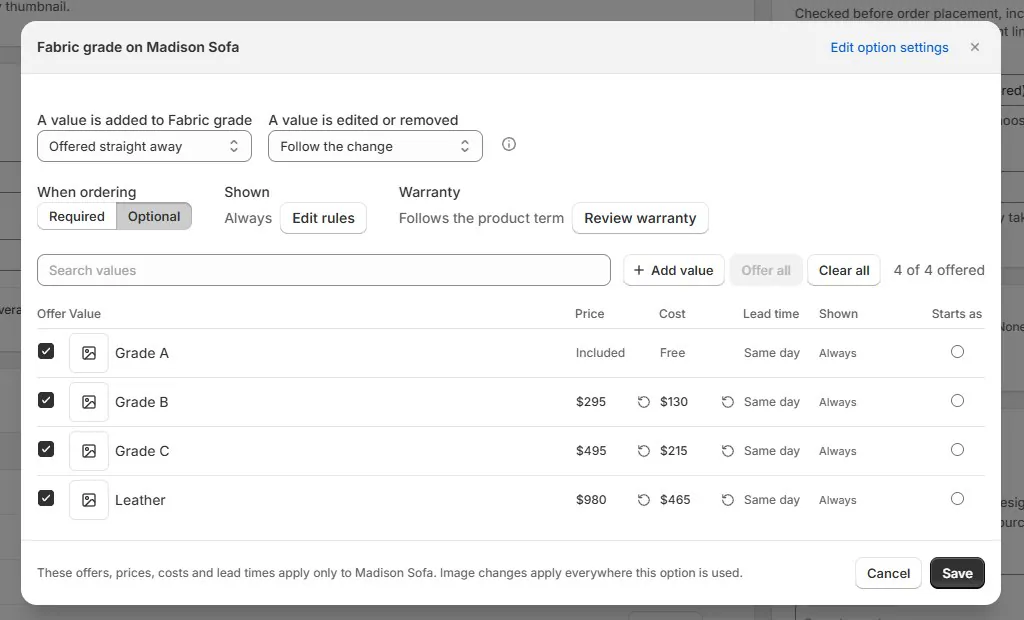
Use a shared bundle when the same grade-to-fabric relationship belongs on several frames. Keep frame-specific prices on the templates. That allows the sofa and matching chair to share an understandable fabric library without pretending that upholstering them costs the same amount.
What does a complete worked price look like?
Here is an illustrative matrix; none of these figures is a vendor quote. The Madison sofa's Grade A base is $2,400 retail and $1,200 cost. The chair's Grade A base is $1,200 retail and $600 cost. The following amounts are additions to those bases.
| Frame | Grade | Price addition | Cost addition | Upholstered-frame retail total |
|---|---|---|---|---|
| Madison sofa | A | $0 | $0 | $2,400 |
| Madison sofa | D | $400 | $200 | $2,800 |
| Madison sofa | E | $600 | $300 | $3,000 |
| Madison chair | A | $0 | $0 | $1,200 |
| Madison chair | D | $200 | $100 | $1,400 |
| Madison chair | E | $300 | $150 | $1,500 |
Choose Grade D for the sofa, then a linen assigned to that grade. If that fabric's price is already represented by the grade, its own added price is zero. Add illustrative walnut legs at $100 retail and $50 cost, plus down-blend cushions at $200 retail and $100 cost. The piece totals $3,100 retail and $1,550 product cost before freight, other charges, and tax.
The calculation is $2,400 + $400 + $100 + $200. It doesn't also add the complete Grade D frame price. Nor does it charge the linen a second time simply because the associate selected its name after selecting the grade. Separating identity from price prevents both errors.
If the vendor bills a particular textile exception outside the grade, record that exception deliberately. A nonzero fabric contribution is reasonable when it represents a real additional charge. The important point is that the same expense must not appear in both the grade contribution and the fabric contribution by accident.
What do the associate and vendor see?
The associate sees the grade, the narrowed fabric choices, and the live selling price while configuring the piece. Supplier cost does not appear on the Shopify POS register. Staff who maintain prices and staff who discuss upholstery with the customer can work from the same catalog without sharing the same cost view.
The purchase order carries the configured frame and its selected options, including grade and fabric. Review the sample vendor-facing document, using the exact fabric identifier needed to order the material. A broad label such as “blue linen” may help a customer browse, but the vendor needs an unambiguous specification.
What if a vendor prices each fabric directly?
Put the price contribution on each fabric value when that matches the book. A separate grade layer is useful only when it represents a real pricing relationship. A direct-price fabric list can still use shared choices, per-template overrides, and rules for fabrics the frame doesn't offer.
Keep different vendors' internal option names distinct even if customers see the simple label Fabric. The same textile can occupy different pricing arrangements with different makers. The naming approach in multi-vendor option naming keeps those commercial identities from becoming one ambiguous shared value.
How do you load or update a whole grade matrix?
Use the CSV importer to define shared grade and fabric values, attach them to templates, and supply each frame's value overrides. Every override row names Handle, Option, and Value. Use the starter file's Price override and Cost override columns for frame-specific amounts; Value price and Value cost define shared baseline amounts.
For an assortment of 40 frames with 9 grades, the frame-grade layer has 360 combinations: 40 × 9. That is the count of grade override rows if every cell needs an override, not the total file size. Shared values, templates, attachments, and fabric relationships also need their rows. The example is arithmetic, not a measured OrderPilot saving.
If only Grade E changes, export the catalog and prepare a focused update for those frame-grade records. Keep the stable Handles, remove columns you don't mean to touch, and review the overwrite and blank-cell warnings before applying. The full vendor price-book import guide explains that check-then-apply process.
Saved quotes retain their frozen option prices when template prices change. Review open quotes separately rather than expecting the updated matrix to revise a customer's existing offer. New configurations can then use the revised catalog while your team handles earlier commitments intentionally.
Which checks catch the expensive mistakes?
Test a small, varied set of frame-grade cells against the book before releasing the matrix. Include the base grade, a high grade, a chair sharing the bundle, and a frame with an exception. Compare retail totals and vendor costs independently, then switch grades after choosing a fabric to test the narrowing.
- Confirm whether each source amount is a finished price or an addition.
- Keep vendor-specific grade systems distinct.
- Make sure grade and fabric do not charge the same upholstery twice.
- Populate known costs instead of treating missing costs as zero.
- Check the selling price on POS and the configuration on the vendor PO.
- Review saved quotes separately after a price change.
When the arithmetic and the offered choices agree, the associate can stay with the customer. Use the catalog import routine to carry that checked model across the rest of the vendor's book.
Sources
- Frequently asked questions: fabric grades — Seating Inc. Manufacturer explanation of assigning grades against textile costs.
- Adding variants — Shopify Help Center. Describes combinations of product option values.
Price the grade once. Keep the fabric's identity with the piece.













