No signature, no order: requiring signatures by product or category
Put the signature requirement on the furniture that needs it. Give your team a clear stop before ordering and a deliberate route for exceptions.
The OrderPilot team·

Picture a $9,000 custom sectional whose PO leaves on Monday. On Thursday, the customer asks to cancel, and the back office discovers that the order was never signed. The amount is an example; the missing handoff is the problem.
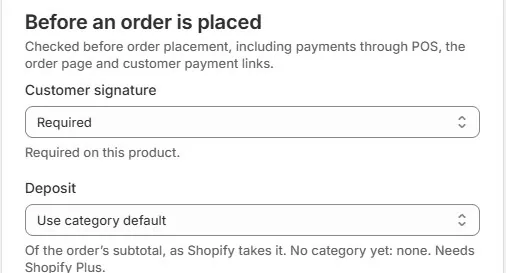
Require a signature before the order is placed for the products that depend on an agreed specification. OrderPilot lets you put that requirement on a product template or category, so the question follows the piece from the showroom to the order desk.
Put the rule on furniture with consequential choices
Custom upholstery, customer's-own-material pieces, made-to-measure tables, and special finishes all deserve a clear approval point. The signature should cover the choices purchasing will send to the vendor and the terms the customer has seen.
A standard throw with an ordinary return policy may need a simpler sale. It has enough to do keeping someone warm without acquiring a paperwork department. Choose rules according to the product and the store's agreement, rather than making every transaction equally complicated.
A category rule is useful where the same expectation applies across a range. A template rule gives you control over a particular piece. Start with the deposit and signature setup guide and make the rule part of catalog maintenance.
Make the next action clear on every sales surface
A required signature gives the customer a specific next step. On the showroom iPad, the associate obtains the signature before proceeding through the guarded payment flow. A customer opening a pay link can be directed to sign first when that requirement is outstanding.
Offer the customer the signing method that fits the sale: link, QR code, or the showroom iPad. A phone customer can receive the quote and signing link, then review it away from the call. Keep the order at the approval stage until the requirement is met or an authorized exception is documented.
A current paper signature recorded on the order also satisfies the signature requirement. Attach its complete signed scan so the signed state has supporting evidence. A paper copy in the associate's bag cannot help the back office recognize that the agreement is ready.
Keep signature and deposit requirements distinct
A signature records agreement to the presented order; payment records money received. Put both in the release routine when both are required, and explain them separately to the customer.
Minimum-deposit requirements use Shopify Plus's native deposit terms. Deposit orders provide a separate way to take deposits on any Shopify plan, but paying one does not satisfy the ordinary minimum-deposit rule. Use the supported process for your plan and keep the signed specification beside the payment history when handing the order to purchasing.
Give exceptions to a person with authority
In Shopify Admin, placing an order despite an unmet requirement is a deliberate permission-controlled decision. Force Convert to Order is an Admin action for the exceptional sale that must proceed without the normal customer-signature step. It is not a manager override on the showroom iPad.
The order history records the action. An unsigned force-converted order's PDF can show “Signature not required,” which is different from signed acceptance. A trade purchase order or written phone-order confirmation might be material for a manager to review; neither should become an associate's standing excuse to bypass the store's policy.
Write down acceptable circumstances, what supporting agreement is needed, and who approves. The roles and permissions guide helps assign that responsibility. Review exceptions in order activity history so the team can see whether a rare route is becoming routine.
Use category rules for the requirement and policy for value thresholds
OrderPilot's signature requirement is set by product or category, not an automatic order-value threshold. If your store wants signatures above a chosen sale value, describe the manual review in your policy and assign it to a responsible person.
Test the policy with a sample mixed order: a custom sectional plus a stocked side table. The custom line should carry the signing expectation even though the accessory is straightforward. Then review orders placed without signatures each month and resolve recurring reasons at their source.
Put the rule beside a well-prepared agreement. The furniture-order signature guide explains what that agreement needs to preserve.
Put the requirement on the piece, and the exception in the hands of someone accountable.













