Shopify’s three-option limit: four approaches for furniture
More variants do not create more option types. Compare native variants, separate products, line item properties, and product templates before rebuilding your furniture catalog.
The OrderPilot team·
Count the decisions in an example sofa order: length, arm style, fabric, fabric grade, leg finish, and cushion fill. That is six choices before anyone asks about contrast piping. Shopify’s native product model allows three options per product. The important question is which information must affect the sale, rather than how to squeeze every label into those fields. Shopify, Adding variants.
For furniture, the practical approaches are native variants for a bounded stocked range, separate products or combined listings, line item properties for descriptive inputs, and product templates for configurable pieces. Different products in the same store can use different approaches. You do not have to remodel every lamp because a sofa has complicated upholstery choices.
Count options before counting variants
A higher variant count does not add another independent option. Shopify’s documentation lists up to 2,048 variants and three options per product. In an October 17, 2025 developer-community reply, a Shopify staff member wrote: “we are only increasing the product variant limit at this time and for the foreseeable future”. Shopify Help, Shopify Developer Community.
Take an illustrative sofa with 2 lengths, 3 arm styles, 10 fabrics, 2 leg finishes, and 2 cushion fills. Multiplying those independent choices produces 240 combinations. That example fits within the variant-count ceiling, but its five independent option types exceed the three-option model. Combining “arm and leg” into a long label does not remove the underlying choices staff must understand.
Fabric grade needs another check. If grade is determined by the selected fabric, presenting both as independent customer choices can allow a contradictory specification. Resolve that relationship in the catalog design. A clean selector should ask the customer questions that have real answers, not invite them to assign a lower grade to a more expensive weave.
The guide to Shopify’s variant limit covers combination counts. The wider made-to-order Shopify guide connects the catalog choice to the rest of the custom sale.
Keep variants for a manageable stocked range
Native variants are a good fit when the selectable combinations correspond to the pieces you hold and sell. Think of a dining chair stocked in a small set of finishes and seat materials. A staff member should be able to identify the exact stocked item from its selected variant and match it to the physical unit.
Keep fixed specifications on the product page. Seat height, for example, belongs in product information when every chair shares it. If the customer can choose a different height, that selection needs to travel with the sold piece so staff price and purchase the version selected.
Walk one sale from selection to receiving. If sales can identify the piece, purchasing can order it, and receiving can match it, native variants are doing their job. Save the more detailed configuration work for products that need it.
Split a product family when the branches deserve their own pages
Separate products can make a furniture family easier to browse when the split reflects a meaningful difference. A sleeper version may need different photography, dimensions, construction details, and delivery guidance from the standard sofa. Give each page a clear purpose and provide a visible way to move between related models.
Separate pages work best when each answers a distinct customer need. Give the sleeper its dimensions and sleeping mechanism, and the standard sofa its own useful detail. Map the navigation, canonical setup, and review-app behavior before copying pages so customers can find the alternatives and the team can maintain them.
If you already use Plus, Combined Listings is another option. Shopify describes parent and child products that present a family together, with up to six options in total and up to 60 child products. The current developer page also lists a 2,000-variant combined-listing limit. Combined listings are Online Store only, require theme support, and are not sold through POS. Shopify, About combined listings.
Combined Listings can suit a web catalog whose separate products deserve their own merchandising. Assess the combined-listings approach against the channels your staff use, then plan how each selected piece reaches purchasing. A clear web family and a clear showroom specification both have a job to do.
Use line item properties for information that stays information
Line item properties attach descriptive information to a cart or order line. Pricing, costs, and separately stocked SKUs need additional app or custom logic; a property supplies the label. That makes properties useful for details that should accompany the piece without changing its commercial identity. Shopify, Liquid line_item properties.
A room label such as “upstairs study” is a useful descriptive property. A premium cushion fill that changes the price and vendor cost needs more than that label. If the team sees “premium fill” in a note while checkout still charges the standard amount, capturing the words has not captured the commercial agreement.
Follow a sample property through the customer document and vendor instruction. A room name should be readable wherever staff need it; a priced selection should reach checkout and purchasing with its price and specification intact. The variants, properties, and metafields guide helps assign each kind of information to the right place.
Build the custom sofa as an OrderPilot template
An OrderPilot product template holds the configurable piece and the options that belong to it. For the worked sofa, staff set the allowed lengths, arms, fabrics, leg finishes, and fills, with the appropriate price and cost contributions. Fabric grade can inform the fabric’s pricing rather than becoming a conflicting independent choice.
The template can use swatches and shared option bundles. Shared choices help maintain a fabric collection across related sofas; template-specific values and pricing keep the actual offer appropriate to each piece. Custom dimensions can be captured within allowed ranges where that is how the furniture is sold.
Add a “shown when” rule for a choice that depends on another choice. For example, suppose a particular leg finish is available only with the example sofa’s timber leg. The rule should prevent that finish appearing with an incompatible base. Test both the permitted combination and the combination staff should never quote.
Template choices support configuration in Shopify POS and the options block on the store’s product page. Customers can explore the configuration online and request a quote. Lead time appears on the Admin order line and, when enabled, the online options block; staff put the delivery estimate into the customer-facing agreement.
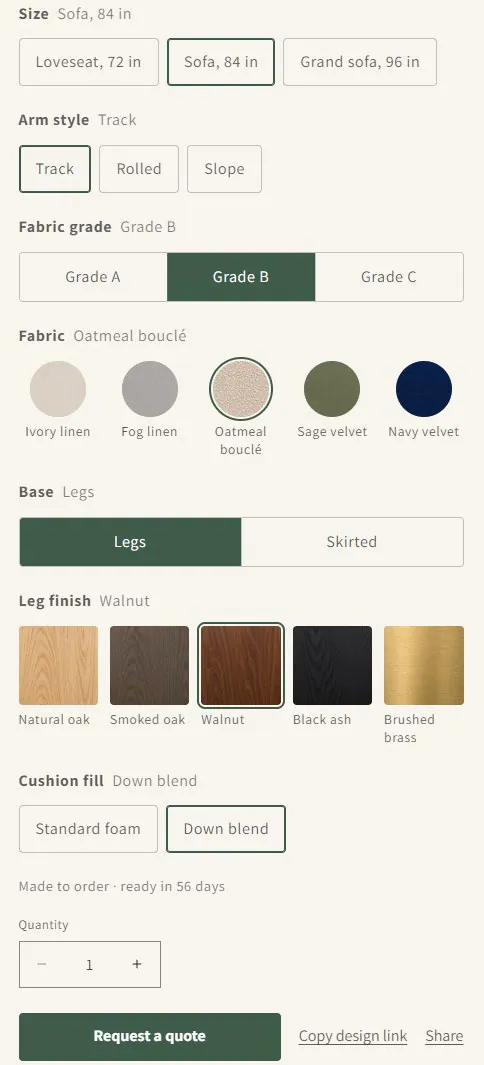
Configured checkout through the native store cart is unavailable. Use the quote-request path to bring the selected piece into the sale. The product-template guide follows that setup through to the specification purchasing receives.
Keep existing variants where they still do the job
You can keep ordinary Shopify variants for stocked goods and use OrderPilot templates for custom pieces. OrderPilot quotes can contain both. That lets the side table remain an ordinary catalog item while the sofa carries its fabric, arm, and leg choices.
Before converting a product, list what each choice changes: customer price, vendor cost, stock identity, production timing, or a descriptive note. Walk a sample sale through the customer page, quote, and purchasing instruction. The right model keeps the same selected piece recognizable at every step.
Choose the model by the job the store performs
| Your product or selling pattern | Starting approach | Check before committing |
|---|---|---|
| Mostly stocked pieces with bounded choices | Native variants | Exact stock identity and manageable combinations |
| Meaningfully different models in one family | Separate products | Page purpose, navigation, reviews, and maintenance |
| A Plus web catalog with separately merchandised family members | Combined Listings | Current limits, theme compatibility, and channel restrictions |
| Customer notes that do not change the commercial product | Line item properties | Visibility on the order and later paperwork |
| Made-to-order pieces with priced, costed, dependent choices | OrderPilot templates | Rules, POS behavior, quote requests, and the vendor specification |
| A mixture of stocked and custom furniture | Variants alongside templates | A sample mixed quote and its purchasing handoff |
Choose a model the team can maintain when the next fabric collection arrives. For the next step, build one complete furniture product template and take a sample sale through it before extending the approach across the catalog.
Sources
Capturing the option’s name is not the same as capturing what it changes.













