Reusable option bundles: one leg finish list for 40 frames
Keep shared choices together, let frames follow them, and make exceptions only where the furniture actually differs.
The OrderPilot team·
Say your sample vendor, Atelier Nord, adds smoked oak to the leg finishes used by 40 frames. The announcement arrives on Friday afternoon, just as the swatch library has finally been put back in order. Updating the same list frame by frame is an unpromising weekend activity.
An OrderPilot option bundle keeps those shared choices together. Templates that follow the bundle inherit its contribution, while individual frames can keep their own prices, offered values, or defaults where needed. The useful distinction is between a shared rule and a real exception.
What does an option bundle hold?
A bundle holds ordered options, offered values, requirements, and narrowing rules. It might collect a vendor's leg style and leg finish choices, or fabric grades with their matching fabrics. A template can follow more than one bundle, so you can reuse separate upholstery and base groups on the same piece.
Shopify's variant guidance describes variants as combinations of option values. A bundle solves a related maintenance job: keeping the options used by several product templates together without treating every frame as an unrelated list.
How do following templates receive a change?
Following lets the bundle's shared contribution reach its templates. Add an option to the bundle, and following templates receive it. Offered values and narrowing determine which choices are available. A struck-through value in the bundle remains hidden where that shared setting is followed; it isn't an invitation for the associate to make an exception.
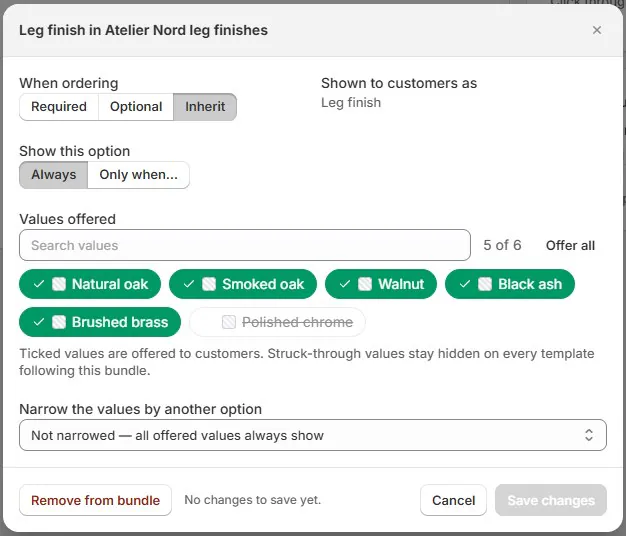
Keep rules close to the choices they govern. For example, show leg finish only when the chosen base has exposed legs. The Shown when rules guide explains the difference between hiding a question and narrowing its possible answers.
Where should a frame keep its own exception?
Use a template override when the vendor's specification differs for that frame. In an illustrative example, walnut legs are included on a sofa but add $120 to the selling price of a chair. Both pieces can use the same finish vocabulary while carrying different price contributions. The chair shouldn't require a separate, nearly identical finish library.
A template can also offer fewer values or set its own Starts as default. Edited badges identify departures from the inherited setup. Reset to inherit removes the local exception for that setting, so use it when the frame should genuinely return to the shared choice.
When should a template be locked?
Lock freezes the bundle's contribution on that template. It suits a collection you still quote under a fixed assortment while the shared range moves on. The tradeoff is maintenance: that locked contribution misses later bundle additions and changes, including corrections you might otherwise expect to propagate.
Match bundle resumes following. Review the resulting options before returning a locked frame to the shared setup. Number options can also carry numeric components such as material quantities within a bundle; keep their meaning and unit clear wherever they're reused.
What happens to orders using a removed value?
Placed orders keep the wording and price they were sold with. Removing a choice from the current bundle doesn't rewrite that history. Review unfinished work separately when a fabric or finish is withdrawn, especially if the vendor can no longer make a configuration already quoted.
Don't assume every template follows a shared removal: inspect overrides and locked contributions. The practical retirement sequence is covered in retiring a discontinued fabric. Preserve the original sold specification while resolving what can still be ordered.
Which repeated list should become a bundle first?
Start with an option your team repeatedly maintains in several places. List its templates, identify genuine exceptions, and give the bundle a vendor-specific name. Then compare a fresh configuration before and after the change, including a frame with an override and a frame that follows the shared values.
The best first bundle is easy to explain: “These frames use this vendor's leg choices.” Build from there, using consistent vendor and option names so the next person can recognize the right shared list.
Sources
- Adding variants — Shopify Help Center. Describes option-value combinations.
Share the choice list. Keep the exception with the frame that needs it.













