“Shown when” rules: hide combinations that don't work
Make the choices on a furniture quote follow the vendor's build rules, from a required fabric to leg finishes that appear only with exposed legs.
The OrderPilot team·

The vendor's acknowledgment comes back with a polite question: “Walnut legs on the skirted base?” The skirt hides the legs. The customer chose them because the screen offered them, and now the store has a specification to untangle. The legs have enjoyed a surprisingly thorough consultation for something nobody will see.
Use required choices, Shown when rules, and value narrowing to make the catalog follow the furniture. Required choices collect essential answers. Shown when rules reveal a question only when it makes sense. Value narrowing limits the answers to combinations the vendor offers. Together, they let staff spend the appointment discussing the room instead of remembering exceptions.
Which rule matches the mistake you want to prevent?
Write the vendor's restriction in plain words before choosing a control. “Fabric is required” and “this fabric is unavailable on this frame” describe different problems. So do “leg finish is irrelevant with a skirt” and “the vendor will consider a special finish after approval.” A useful rule reflects a settled product fact.
Here are sample catalog situations, rather than claims about any particular maker's range:
| Example | Rule to use | What the associate sees |
|---|---|---|
| Every upholstered sofa needs a fabric | Required choice | An unanswered fabric prevents a complete configuration |
| A table must have a size | Required choice | The size needs an answer before the quote can be created |
| A chaise must have an orientation | Required choice | The associate chooses the vendor-defined side |
| Leg finish matters only with exposed legs | Show the option when Base = Legs | The finish question appears for the legged base |
| COM needs a yardage entry | Show the option when Fabric = COM | The additional material question appears for COM |
| Pulls apply only to the three-drawer model | Show the option for that model choice | Other models don't ask about pulls |
| An outdoor frame accepts only its approved fabrics | Narrow fabric values by frame | Only that frame's fabric choices remain offered |
| A grade is offered only at a particular size | Narrow grade values by size | The unavailable grade is absent on other sizes |
Headboard heights can follow the same narrowing pattern where a vendor restricts heights by bed size. Use the maker's exact specification, including its definition of left and right, rather than a rule that merely sounds reasonable. Our needs-discovery questions help the associate establish those choices with the customer.
Shopify describes a variant as a combination of product option values in its variant guidance. In a configurable furniture catalog, the additional job is expressing which answers belong together. OrderPilot's product templates keep those offered choices and relationships with the piece.
How should the choices be ordered on a template?
Place the controlling question above the question it governs. If the base decides whether leg finish exists, Base comes first. If fabric grade narrows the fabric list, grade comes first. This also gives the showroom conversation a natural sequence: establish the piece, then refine it.
On the template's Options section, Manage brings together Required, Optional, or Inherit, the offered values, and the starting choice. Required should mean the specification needs an answer. A default should be a deliberate starting point, not a way to hide that the customer hasn't discussed a decision yet.
How does a Shown when rule change the quote?
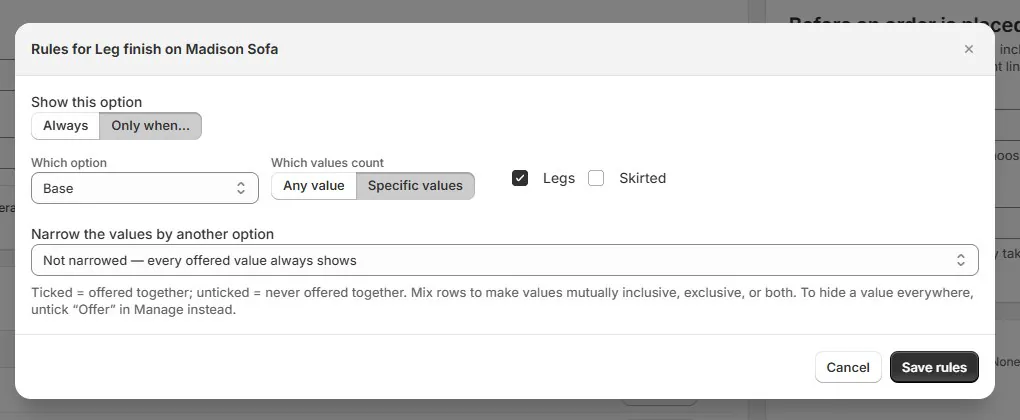
A Shown when rule controls whether the whole option appears. In the Rules dialog, the leg-finish question can be set to appear only when Base is Legs. That makes the question available at the moment it becomes meaningful instead of leaving a permanent field with a warning beside it.
Consider an illustrative Madison sofa with Skirted and Legs base choices. Start with Skirted: the associate should see the relevant upholstery questions, with no leg-finish choice to explain. Change to Legs: the finish question appears. Choose walnut, then change back to Skirted. Test this return journey as carefully as the first selection; customers revise choices during real appointments.
How does narrowing differ from hiding an option?
Value narrowing keeps the question but changes its offered answers. A fabric option can remain visible while its list follows the selected grade. The Rules dialog's matrix expresses which values are offered together. Ticked pairs are allowed pairs, so read the matrix as a list of permissions rather than a list of prohibitions.
Use a fabric library with Oat and Ink in Grade B, and Moss in Grade F. Selecting Grade B should offer Oat and Ink; selecting Grade F should offer Moss. This is a relationship between two catalog choices. It doesn't say anything about whether Moss is a more durable cloth, which belongs in the fabric's own information.
Can a rule depend on two other options at once?
Each rule is controlled by one option above it. Build a sequence where the product permits one: size narrows base choices, then base controls leg finish. That chain is useful when the later answer follows naturally from the earlier answers. It isn't a general two-condition formula.
If a vendor restriction genuinely requires an independent combination of several decisions, don't force it into a misleading chain. Simplify the template structure, separate clearly different product families, or keep the exception for staff review. Someone responsible for the vendor's specification should be able to explain every offered result without opening a second worksheet.
Rules work within one template's options; they don't compare separate lines on the order. For a sectional built from separate modules, use the more specific approach in modular sectional pairing rules, including a deliberate review of the assembled set.
How do shared bundles keep the same rule across frames?
Put a repeated relationship in a bundle when the same options and narrowing should apply to several templates. The bundle editor's Narrow the values by another option setting can connect fabrics to Fabric grade. Following templates inherit the relationship, including the values the bundle keeps hidden.
Review templates with their own exceptions before assuming a bundle edit reaches every frame in the same way. A template that deliberately overrides shared settings needs its own review. Reusable option bundles explains how to distinguish following the common list from maintaining a frame-specific contribution.
Do the desk, iPad, and website follow the same rules?
OrderPilot applies the template's rules on the order desk, in Shopify POS, and in the website options block. The presentation differs, but an unavailable choice shouldn't become an invitation merely because the customer moved from the showroom to the product page. Website use requires the options block and the template's online setup.
Test each selling surface your store uses. A short, well-phrased option label may be clear on the desk but confusing beside swatches on an iPad. Rules settle which choices are offered; the customer-facing wording still needs to describe those choices plainly.
What happens to a quote after you change the rules?
Created quotes retain their as-sold values. A catalog correction doesn't silently rewrite the customer's agreement. Draft work holding a choice that is no longer offered can open flagged, with Create waiting for the choice to be resolved. The separate guide to options no longer offered on a draft explains that recovery.
Review already-created quotes separately if the rule corrects a build problem. Establish whether the vendor can honor the sold configuration, then speak to the customer before substituting anything. Preserving the earlier specification is useful precisely because it shows what needs to be discussed.
For an approval-only combination, keep the vendor's decision attached to the purchasing conversation and give a staff member responsibility for it. Don't present an exception as an ordinary selectable promise. Once the vendor and customer have agreed on a buildable specification, the order can carry that exact choice forward.
What should you test before releasing a rule?
Choose the combinations your vendor most often sends back and run them through a fresh quote. Include a valid choice, an invalid choice, a blank required choice, and a change of mind after later answers have been selected. The last case is easy to miss when testing only in the order the form expects.
- Write the vendor restriction beside the rule you created.
- Place the controlling option above its dependent option.
- Check that the intended pairs are ticked in the narrowing matrix.
- Try the same configuration at the desk, on POS, and online where used.
- Review defaults, inherited bundle settings, and template exceptions.
- Assign a separate review of affected quotes already created.
Start with one recurring mistake, make its rule understandable, and test the conversation around it. Then use shared bundles to carry settled rules across the frames that follow them.
Sources
- Adding variants — Shopify Help Center. Explains variants as combinations of option values.
An option should appear when the customer has a useful decision to make.













