Choosing your quote, sales order, invoice, and PO documents
Give each document a clear job, with the right identity, specification, and terms. Review what prints before the first automatic email goes out.
The OrderPilot team·

A customer brings back a March quote in June and asks for the March price. The fabric moved up a grade in April. The useful starting point is the document they received: the selected fabric, the quoted price, the terms, and its printed “Valid until” date.
Every document in that conversation has a reader and a job. Set the store identity, numbering, and terms before sending the first quote, then inspect a real sample of each output. OrderPilot keeps the documents connected to the sale, while signed copies and invoice versions preserve the record needed to explain what happened.
Choose the document by the reader's next decision
A document is useful when it gives its reader the information needed for the next step. Sending every available PDF can make a simple decision harder to find.
| Document | Main reader | The job it should do |
|---|---|---|
| Quote | Customer or designer considering the purchase | Present the proposed pieces, configuration, prices, and terms |
| Sales order | Customer and store after the purchase is placed | Record the order the team is carrying forward |
| Invoice | Customer and staff checking payment | Explain the recorded payment position and amount due in that version |
| Purchase order | Vendor and purchasing staff | State what is being bought, its specification, quantity, cost, and destination |
| Product spec sheet | Customer, designer, or staff discussing a product | Provide the product information needed outside the full sale |
Record state matters here. A signature records agreement; placement establishes the order stage. Do not teach staff that signing automatically makes every document an invoice or completes every placement requirement.
The document-timing guide covers when each output belongs in the workflow. During the first-week setup, the aim is simpler: the team should know which reader each PDF is for before attaching it to a message.
Set numbering so staff can match the paper to the record
Choose prefixes and sequences for the supported order, sales-order, invoice, and PO numbers before the team starts building its own reference habits. Keep the convention easy to read over the phone and consistent with the store's recordkeeping.
Use a separate reference for the human meaning of the job. “Dining room” is useful context, but it does not need to be compressed into a document number that also tries to encode a location, salesperson, and delivery month. The numbering, tags, and fields guide helps keep those purposes distinct.
For an illustrative review, give a sample sofa order a project reference and create the customer and vendor documents it needs. Have another staff member find the order using the number and reference they can see. If they need an explanation of the numbering puzzle, simplify it before live use.
When continuing an old sequence, review the planned starting point with the person maintaining the records. Preserve the original numbers on historic evidence and avoid presenting a recreated document as though it were the original file.
Review the store identity before the decorative details
The right logo and location details tell the customer who is handling the purchase. In Settings › Branding, review the brand section, then compare the generated quote with the selling location's approved business information.
Merchants control the brand section, location details, terms, named salespeople, and reference. PDF fonts, colors, columns, header layout, and validity settings are staff-only controls. For day-one setup, concentrate on the information available to maintain and the document that actually results. Each brand can use its own document identity through the configured brand and location arrangement. Test a record from each selling location instead of assuming one preview represents them all. A customer who visited the design showroom should not receive the clearance store's contact information.
The quote-PDF guide covers the visual review more deeply. Good paper stock is pleasant; the correct showroom phone number tends to get more work done.
Read the dates without assuming the quote refreshed
OrderPilot's printed quote validity is based on the quote's creation date, normally plus 30 days. Sending the quote again does not restart that clock, and merchants cannot change the validity-day setting themselves.
That matters when an older quote comes back into conversation. Read the printed date alongside the specification and current offer before sending it again. The date is not an automatic price update or proof that a later customer action has been blocked.
A template price change also leaves a saved quote's existing option prices intact. If the fabric price changed after the quote was saved, review the customer's actual offer deliberately. Explain any revised purchase and obtain the required agreement rather than assuming a fresh PDF silently uses the current catalog price.
In the March-to-June example, staff should first identify the saved quote and its signed or unsigned state. Then settle whether the store is honoring that offer or preparing a revision. The document supports the conversation; it does not make that commercial judgment for the store.
Put additional terms with the products that need them
Product-template and category terms let the store carry specific wording with the pieces it concerns. General store terms can stay readable while additional upholstery or special-order terms accompany the relevant products.
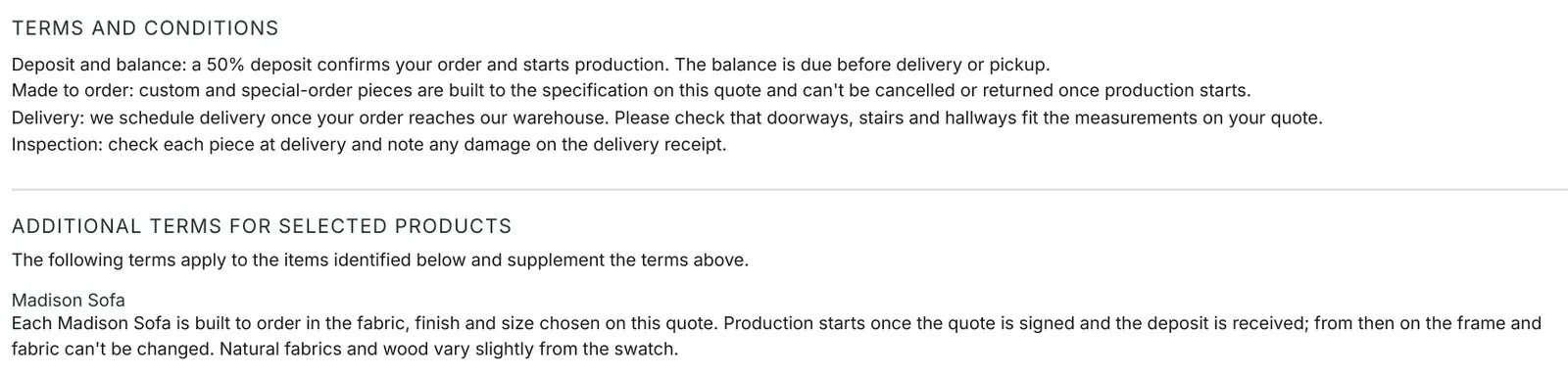
Read a mixed order before approving the arrangement. A sofa and a stocked side table may not need the same product-specific language. The customer should be able to see which terms describe which part of the purchase without working through contradictory paragraphs.
Additional terms appear on the supported quote, order, invoice, and signing surfaces. When the customer signs, the signed record preserves the terms they agreed to. Changing the store's terms next month does not rewrite that stored agreement. The frozen-terms guide explains how to handle later customer-facing changes.
Keep the original signed copy as evidence. If a revised fabric, price, or other customer-visible detail calls for a new signature, let the agreement process create that later record. Do not treat a newly generated unsigned PDF as a replacement for what the customer previously signed.
Check the invoice against the payment history
An invoice version should be read as a record of its payment position. OrderPilot keeps frozen invoice versions, so a previously issued copy can be understood without reconstructing the order from memory.
Suppose a purchase totals $3,000 including the agreed charges, and the customer has paid $1,200. The version being reviewed should make the paid amount and $1,800 outstanding balance understandable. Compare those figures with the payment history before sending the document. If another payment arrives, use the appropriate current invoice version for the next customer conversation and keep the earlier version in its historical context. A customer forwarding an old attachment is not necessarily reporting a missing payment; they may simply be looking at an earlier snapshot.
Plan and record state still control how payments are collected or recorded. The PDF review should verify the result of the store's chosen payment route, not imply that every partial-payment action is available on every Shopify plan.
Read the purchase order as the maker would
The PO must identify the piece the vendor is expected to supply. Compare its item description, options, quantities, costs, and destination with the agreed customer order before sending it. The vendor's “Include SKU on PO items” setting controls whether available SKUs print on PO lines. Use the vendor's identifying information consistently and inspect the actual output; a store's friendly display name may not be enough for the maker to identify the frame.
Do not expect a per-line customer order number or the PO's Side Label to print. Where the vendor needs an additional project reference, put it in the printable vendor notes and verify the PDF. This keeps a necessary manufacturing instruction on the document the vendor will actually receive.
Check the contact information shown too. The person who can answer a specification question should be clear from the purchasing arrangement. A PO is a working instruction, so its destination and reply path deserve the same attention as its fabric code.
Make documents easy to retrieve later
The customer portal gives customers access to their quotes, orders, and available documents. Include the appropriate route in the customer communication so they know where to return when another household member asks to see the purchase.
For product discussions outside a sale, the product spec sheet is also available through the Shopify product-page action. Use it when the designer needs the product information rather than a customer's full quote and payment details. Retrieval still needs a rehearsal. Open the sample customer route and confirm that the intended document is recognizable. On the staff side, locate the stored signed copy and the invoice version needed to answer a question about an earlier message.
Review the document and its email together
The email tells the reader why the attachment matters. Preview the selected PDF on the actual sample record before switching on an automatic send, and read the subject and message alongside it.
- Identity: the store, brand, location, and contact details match the sale.
- Reference: the document number and project reference lead staff to the right record.
- Specification: the item, options, quantities, and destination match the agreement.
- Dates: the creation and validity information make sense for the current conversation.
- Terms: general and product-specific wording belong to the purchase shown.
- Money: totals and payment information match the record and document version.
- Next action: the message explains whether the reader should review, sign, pay, or fulfill the PO.
- History: the team knows where to retrieve the signed or frozen version later.
Run that review with the person who handles the next handoff. Then use which document goes when to connect the approved outputs to the store's routine.
Choose the document by the reader's next decision.













