Hand over an order and choose who’s in the salesperson list
Related guides
- Credit salespeople on a quote or orderTeam and permissions · 5 min
- Create and manage rolesTeam and permissions · 5 min
- How roles and permissions workTeam and permissions · 6 min
- Set up commissionTeam and permissions · 6 min
- Give staff accessTeam and permissions · 7 min
Change who owns a quote or order by changing its primary salesperson, and control which people appear as salespeople.
Before you start
Can you change credit?
Adding or removing salespeople needs Change sales credit.
Are you moving the order to someone else?
Making a different person primary on an order that already has an owner also needs Reassign quotes and orders.
Are you changing the picker?
Role changes need Create and edit roles. Only the owner can change their own picker preference.
For roles limited to their own records, the order's owner decides which records they can reach. The owner is always the primary salesperson.
Understand the staff labels
| Label | Purpose | What changes it |
|---|---|---|
| Created by | Records who created the sale | Fixed record history |
| Salespeople | Credits the people who sold it | Sales credit people and shares |
| Primary | The first salesperson: named on documents and owns the order | Make primary, or removing the current primary |
The Sales credit card shows all three: Created by in its header, the people with their shares, and the Primary badge. POS uses Sold by for the same people. Customer document settings choose whether documents show the primary salesperson, everyone or nobody.
A new record belongs to its primary salesperson, or to its creator when nobody is credited. New records credit their creator when that person is available in the picker.
The Salesperson list filter matches records that credit a person. It can list people who are no longer offered for new sales credit.
Hand a record to someone else
Step 1: Add the new owner
Open the quote or order. In Sales credit, click Add salesperson and choose the person who should own it.
Step 2: Make them primary
Open their ⋯ menu and choose Make primary, then save the record. The order now belongs to them, and roles limited to their own records reach it through them.
Without Reassign quotes and orders, Make primary is greyed and says why. Adding a helper or changing the shares doesn't move the order and needs only Change sales credit.
Someone no longer available as a salesperson can't become the primary.
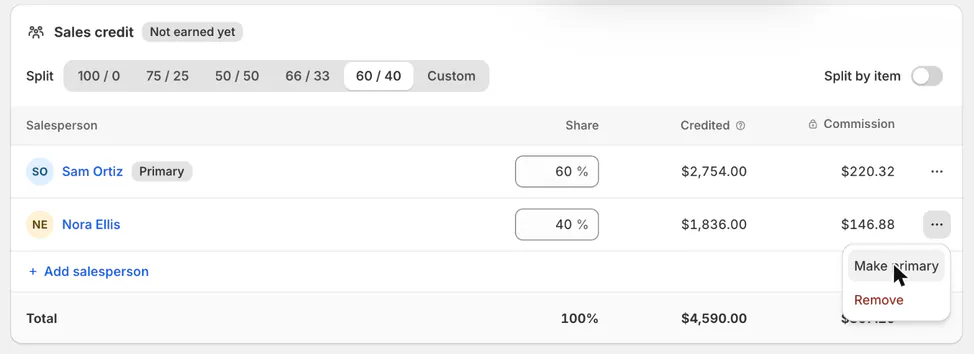
Making someone primary moves the order to them. Sales credit follows the shares, not the owner. Keep both people credited if both should share the sale.
Choose who appears as a salesperson
Step 1: Edit the staff role's picker permission
Go to SettingsStaff & rolesRoles and open the role. Tick or untick Appear in the salesperson picker.
Save and review the role change through role management. It affects new selections for people holding that role.
Suspended staff are excluded. People without a role follow the default role's picker permission.
Step 2: Review existing credit
Open a record previously credited to an affected person. Their existing credit remains even after they leave the picker.
Use sales credit only when that particular record's credit should change. Removing someone from future choices is not a historical reassignment.
Step 3: Change the owner's preference
On the owner's own staff page, the Salesperson picker card offers Appear in the salesperson picker. Unticking it preserves full access while removing new salesperson selections.
You’re out of the salesperson picker confirms the change.
What happens next
The new primary owns the record, and roles limited to their own records reach it. Sales reports keep using the saved credit shares.
Picker changes apply to new credit choices. They do not remove historical credit or remove people from the Salesperson filter.
Example: two sellers, one owner
Example · Harlow & Finch Interiors
Hand Priya's order to Nora while sharing the credit
Sam Ortiz and Nora Ellis share Priya Shah's Arden Dining Table sale equally, and Sam is the primary.
- Keep both people credited with their saved 50 / 50 split.
- Open Nora's ⋯ menu and choose Make primary.
- Save the order. Nora now owns it and Sam keeps his half of the credit.
- Check Nora's role permits the order work she will do.
If something goes wrong
Make primary is greyed
Ask someone with Reassign quotes and orders, or check that the person is still available as a salesperson.
The card is read only
Ask for Change sales credit.
A credited person cannot open the order
Check whether they own it, their locations and their role's scope. Being credited alone does not grant access.
A person disappeared from the picker
Check their role's picker permission, suspension and staff record.
The owner cannot open their row
The Staff list does not provide that action. The owner-page entry remains a review item above.
Was this guide helpful?
Thanks. Tell us what was missing at support@meetorderpilot.com.