Walkthrough: an online quote request to delivery
Related guides
- How OrderPilot works on your online storeOnline store · 6 min
- Price and send an online quote requestOnline store · 5 min
- The customer portalCustomers and portal · 5 min
- How customers sign and pay onlineCustomers and portal · 5 min
- Reply to customers from the InboxEmails and messages · 5 min
Follow Olivia Bennett from choosing a Linden Sofa online to receiving it at home. You'll see what she opens, what your team does, and which action lets the sale continue.
Harlow & Finch Interiors offers the sofa in Request a quote mode. Olivia chooses Sage Velvet, then works with Sam Ortiz to agree the details before signing and paying.
The stages
- 1RequestOlivia chooses the sofa and sends her details.
- 2PriceSam prepares and emails the quote.
- 3ReviewOlivia checks the items and asks questions.
- 4Sign and payShe approves the quote and pays the deposit.
- 5Make and deliverThe team orders the sofa and updates its progress.
- 6CompleteOlivia receives the sofa and can return to her records.
Each stage has a customer view and a store action. The request acknowledgment doesn't replace the priced quote, and a customer question doesn't change an order until your team handles it.
Use this story to understand the handoffs. The linked guides explain the full setup and staff controls for each stage.
She requests a quote
Step 1: Choose the sofa options
Olivia opens the Linden Sofa product page and chooses Fabric: Sage Velvet. In Request a quote mode, she requests pricing instead of seeing a purchase price.
The online store guide explains the product modes. For this story, the product is configured for a quote request, so Olivia expects your team to prepare the price.
Step 2: Review the quote request
Olivia adds the sofa to her quote request. Added to your quote request confirms the selection. She chooses Review and send request to check what she is asking for.
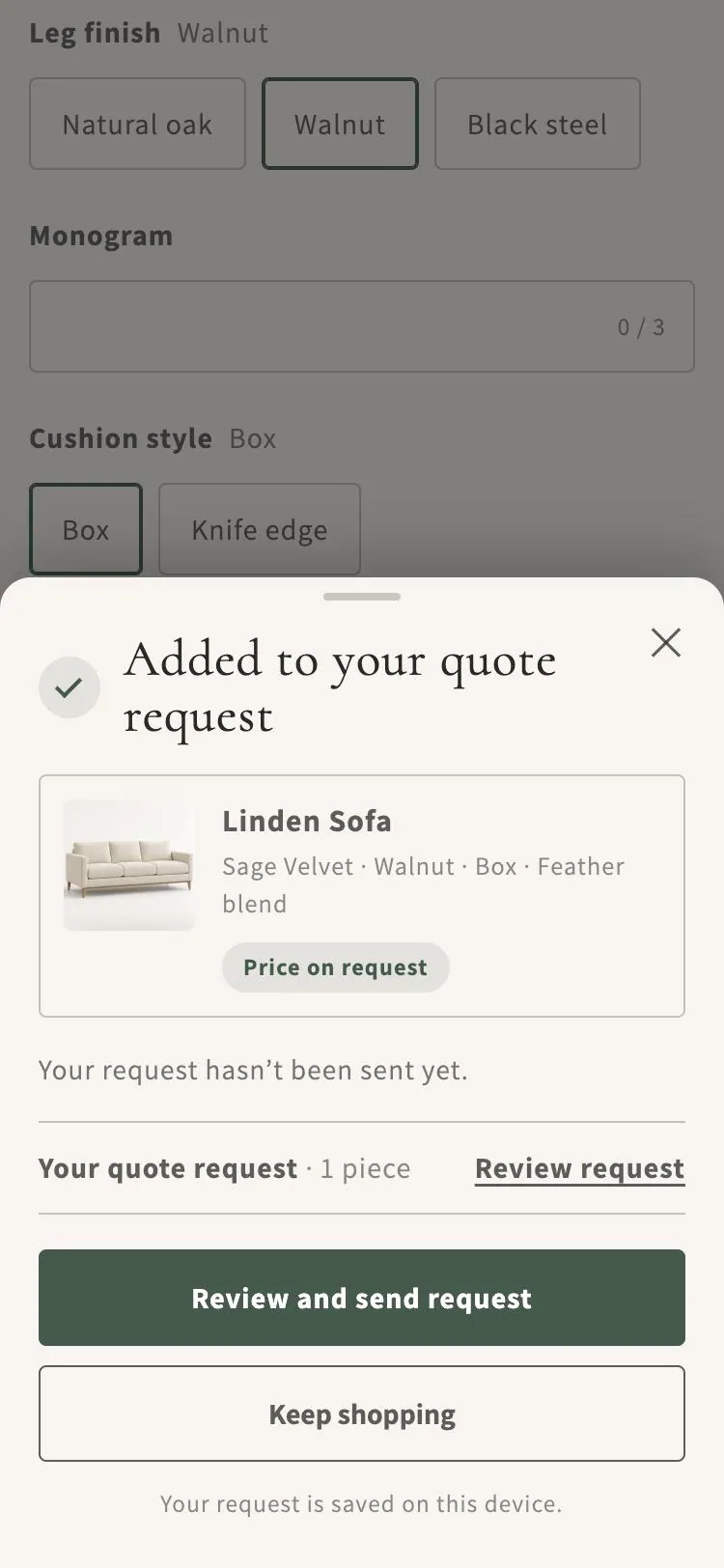
Added to your quote request bottom sheet for the Linden Sofa. She checks the sofa and her contact details before sending. The selected fabric travels with the request, so Sam can price the piece Olivia actually chose.
Step 3: Send the request
Olivia chooses Send quote request. The Request sent page tells her when to expect the quote: the next weekday in the shop's time zone.
See your request lets her return to it. The acknowledgment email, We got your quote request, includes the request number and View your request. It contains no prices or PDF.
That email confirms receipt. Olivia still needs the priced quote before she can approve the sale, so Sam treats the new request as work awaiting attention.
Your team prices and sends it
Step 1: Open the unassigned request
Sam opens the Quotes list and finds Olivia's request. It starts unassigned and shows Being priced. No named store contact appears until the request is assigned.
Follow Price and send an online quote request for the detailed staff process. Check the requested fabric and any other choices before preparing a price.
Step 2: Prepare the agreed quote
Sam prices the Linden Sofa, confirms Feather Blend cushion fill, and includes White Glove Delivery. He assigns the quote so Olivia has a contact for the next stage.
This is the time to check the complete request. A price alone doesn't answer whether the configuration, delivery, and customer details are correct.
Step 3: Email the quote
Sam emails the priced quote. Olivia receives Open your quote and her portal PIN. The email now takes her to a quote she can review.
When previously applied customer requests haven't yet been sent, the email includes What changed. Olivia can identify the update instead of comparing every line unaided.
She reviews and asks
Step 1: Open the portal
Olivia follows Open your quote and enters the PIN from the email. The customer portal opens her quote with the items and next actions.
She checks the Linden Sofa, Sage Velvet, Feather Blend, and delivery. The portal keeps that review alongside her conversation with Harlow & Finch Interiors.
Step 2: Review the items
Olivia marks the sofa and delivery Looks good. These ticks record her item review while a signature is requested. They don't complete the signature.
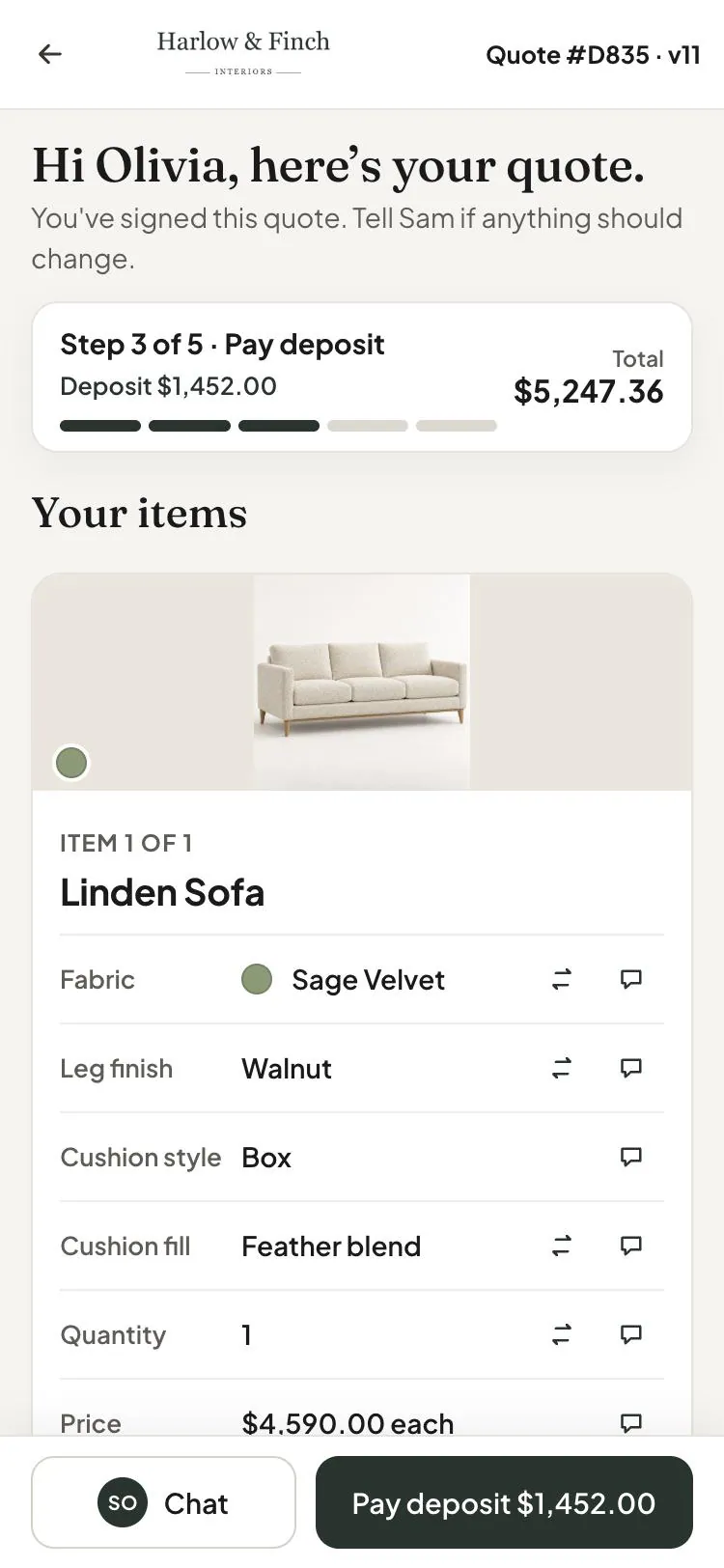
Sage Velvet and Feather blend, as quoted. If Sam edits an item after Olivia reviews it, that item needs review again. Olivia should read the current item details before approving the final quote.
Step 3: Ask about cushion fill
Olivia attaches a living-room photo and asks about Feather Blend. Sam answers from the Inbox, where the conversation remains linked to the quote.
If she requests a different configuration, Sam handles it through customer change requests. A request alone doesn't change the sale. The question is settled before Olivia signs.
She signs and pays
Step 1: Approve the quote
Olivia uses Approve & sign, agrees to the document, and completes her signature. She now has an approved quote with the terms she reviewed.
How customers sign and pay explains the consent, signature options, and signed copy. Sam checks the order record if Olivia reports a signing problem.
Step 2: Pay the deposit
When payment is available, Olivia chooses Pay deposit. Shopify checkout opens for the requested deposit, and the payment is recorded against the sale.
A payment hold must be resolved before she can continue. Sending the same link repeatedly doesn't remove a signature requirement or an unresolved question.
She follows her order
Step 1: Check production progress
The team orders the Linden Sofa from Atelier Homeworks. Once its purchase order is sent, the item can show In production.
The order heading also reflects its customer status group. Order statuses explain Confirmed, In production, Ready, On its way, and Complete, including how item progress contributes.
Step 2: Check the delivery information
Olivia checks the delivery window on the order page. Until a time is confirmed, it can show Time to be confirmed. Ask to change lets her raise a delivery question.
The delivery promise gives the team its own guide to the recorded timing. Sam distinguishes an estimated window from a delivery arrangement that still needs confirmation.
Step 3: Settle the balance and receive
Olivia pays the balance due before delivery through the available payment action. The team completes the handover and keeps the order's progress current.
She can return to the portal for her order, documents, and coverage information. The sale's conversation remains attached to the record when another team member helps her later.
Recap
The template's Request a quote mode shaped Olivia's first step. Your sign-in rule shaped access, while Branding shaped the request page, confirmation page, and portal.
Portal access and email rules determined how she received updates. Customer status groups made internal progress understandable. Sam's pricing, answers, and quote email moved Olivia toward approval.
Jo Park's purchasing and delivery work then moved the order forward. For the full staff-side sale, follow one sofa from quote to delivery.
Was this guide helpful?
Thanks. Tell us what was missing at support@meetorderpilot.com.