How landed cost and cost layers work
Related guides
- Add freight, duty and other costs to a purchase orderInventory and costs · 6 min
- Correct costs after goods arriveInventory and costs · 4 min
- Keep Shopify costs right and read your marginsInventory and costs · 5 min
- Purchasing and costing settingsPurchasing · 4 min
- Send vendor payments, cost of goods and POs to QuickBooksSettings and integrations · 5 min
Landed cost combines the vendor's cost with the charges assigned to the goods. Use it to understand what a unit cost your store after freight, duty and similar charges.
View costs is needed to see the figures. Enter costs and charges is needed to add them. All amounts use your shop's currency.
How it works
Landed / unit is the vendor cost plus the unit's share of charges. Adding a charge lets you select its items, allocation method and estimated or final state.
- 1Record goods costEnter the vendor cost on the PO or receipt.
- 2Allocate chargesShare freight and other charges across their covered items.
- 3Receive unitsApply each arriving unit's share to its receipt cost.
- 4Cost the saleUse the assigned order cost or available stock layers.
- 5Adjust with a reasonRecord later changes without silently replacing receipt history.
How charges are shared
| Method | Allocation |
|---|---|
| By value | Based on unit price multiplied by units |
| By quantity | Based on the unit count |
| Manual | Enter each share, starting from an even split |
| By weight | Unavailable |
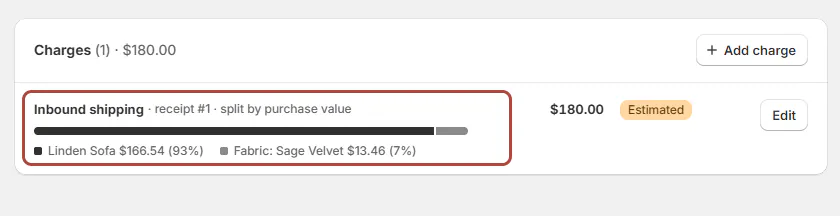
A charge can cover the whole PO, selected items or a particular option. Shares add up to the cent; the first participating line takes the leftover cent.
Missing cost blocks a value-based split. A PO price of exactly zero counts as unrecorded for this purpose. Choose quantity or supply the missing cost instead.
A whole-PO charge is allocated across the PO's lines, rather than charged again on every delivery. Units take their portion as they arrive.
Rejected units take no share. If every covered unit is rejected, the allocation falls back to ordered quantities. Quantities above the ordered amount receive no share.
Charges entered on a receipt split by value across that receipt. Adding or changing a whole-PO charge later records the difference against earlier receipts as a late adjustment.
Where you'll see it
The Add charge preview and Charges card show how the amount is divided. Lines and receiving show Landed / unit.
The landed-cost card starts as Estimated landed cost. It becomes Received landed cost to date for a partial delivery, then Received landed cost.
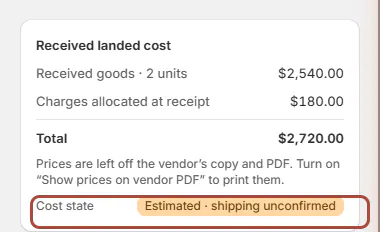
| Cost state | Meaning |
|---|---|
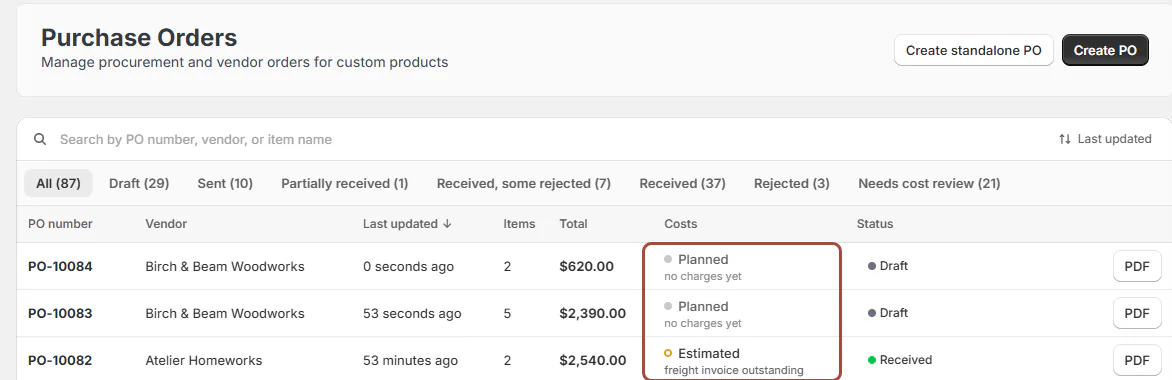
| Planned | Nothing has been received |
| Missing | A required vendor cost is unknown |
| Estimated | A relevant charge remains estimated |
| Final | Vendor costs are recorded and relevant charges are final |
Missing takes priority over Estimated, which takes priority over Final. A line with no vendor cost cannot become final by confirming freight alone.
The page can show Costs missing, Estimated costs or Costs adjusted. Incomplete identifies a total that cannot be fully calculated.
Receipt totals do not add up and PO and receipt charges differ lead to Review receiving history. Use cost corrections to resolve the underlying records.
Screen reference
The choices you have
Received stock creates cost layers for each stock identity and location. Units bought for a specific customer order keep their assigned cost and stay outside the shared stock pool.
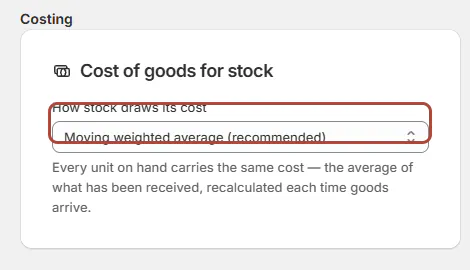
The costing setting controls how a stock sale draws from that pool.
| Method | Which cost a sale uses |
|---|---|
| Moving weighted average | The blended average of received stock |
| FIFO | The oldest available batch first |
| LIFO | The newest available batch first |
Estimated layers make the sale's draw estimated. The chosen method is saved with the order's cost, so changing the setting does not reprice past sales.
Switching from moving average to FIFO or LIFO begins with the next delivery. Existing stock keeps the average it already had.
Native Shopify sales also consume cost layers when fulfilled. A restocking refund restores the relevant cost and reverses cost of goods.
Shopify's published Cost per item uses a weighted average regardless of the sale-costing method. See Shopify cost publishing for its final-cost checks.
Example: dining freight and sofa batches
Priya Shah's Arden Dining Table and 6 Mira Dining Chairs share one freight charge. By value, the more valuable line receives more freight.
By quantity, each physical unit carries an equal share. For a manual split, Jo Park makes the displayed allocations add up to the full charge.
Two deliveries of Linden Sofas arrive at different costs. FIFO uses the earlier batch first; LIFO uses the later one; moving average uses a blended cost.
Do it
Add and review charges, then finalize when the goods and costs are complete. Received costs change through recorded adjustments with a reason.
For differences in received figures, use cost corrections. For purchasing cost entries sent to accounting, see QuickBooks sync.
Was this guide helpful?
Thanks. Tell us what was missing at support@meetorderpilot.com.