Online store settings
Related guides
- Set up your theme for OrderPilotOnline store · 6 min
- Style the options block with your theme and CSSOnline store · 4 min
- Let shoppers quote your Shopify productsOnline store · 4 min
- Put a product template on your online storeOnline store · 6 min
- How Settings is organizedSettings and integrations · 5 min
Use Online store settings to control template publication, quote-request access, theme setup and the options block's shared appearance. The page sits in the Customer experience group.
Changes need Manage order and quote settings. For the initial setup sequence, read Set up your theme.
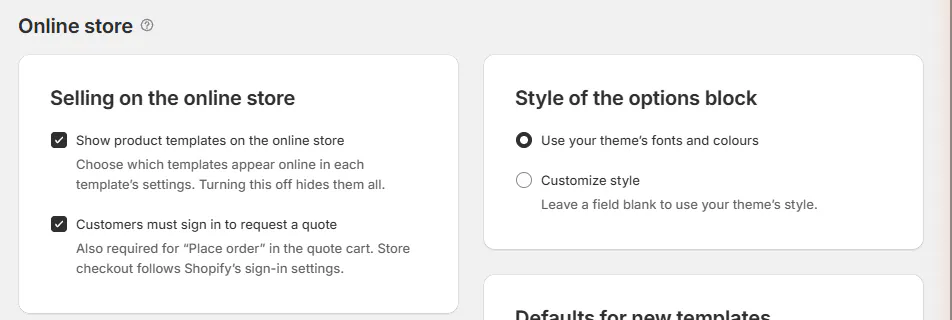
Selling on the online store
Open SettingsOnline storeSelling on the online store.
| Setting | Default and effect |
|---|---|
| Show product templates on the online store | Off initially. Individual template modes decide which products appear after it is enabled. Turning it off hides the templates. |
| Customers must sign in to request a quote | On initially. It also applies to Place order in the quote cart; Shopify checkout follows Shopify's own sign-in settings. |
Reset to defaults turns template publication off. Review the customer-facing consequence before using that page-level reset.
Changing publication or sign-in settings republishes the shop configuration. A publication-switch change also republishes active templates.
The separate Quote Template Catalog block has its own listing behavior. Check theme setup when you need to remove that catalog from a page.
Style of the options block
Choose Use your theme's fonts and colours or Customize style.
| Field | Controls |
|---|---|
| Accent | The block's highlight color. |
| Corners | Corner radius. |
| Space between options | Spacing between choices. |
| Swatch size | Size of swatch controls. |
| Borders | The controls' border treatment. |
| Selected option outline | The selected choice's outline color. |
Blank custom fields use the theme's style. The brand color can supply the accent when no explicit accent is set.
Use Style the options block for accepted values, CSS and the related Branding controls.
Theme setup
The checklist reports progress and offers Check again to re-read the published theme.
| Row or control | Purpose |
|---|---|
| Add the options block to your product page | Add in theme editor opens the placement route. |
| The options block is on your product page | Confirms the detected block. |
| Turn on the OrderPilot app embed | Turn on in theme editor opens the embed setup. |
| The OrderPilot app embed is on | Confirms the embed and offers App embeds. |
| Cart and checkout | Shows Not available yet while unavailable and is excluded from the setup count. |
The embed remains necessary with the block present. It handles quote-only product-card prices and adds options where a product page has no block.
Follow Set up your theme if a row is incomplete or the theme cannot hold the app block.
Defaults for new templates
| Setting | Default and effect |
|---|---|
| What customers can do | Starts as Not on the online store. It supplies the initial online mode for a new template. |
| Price line | Starts as Options and total. It supplies the new template's price-summary presentation. |
Existing templates keep their own settings. Use Put a template online to change an existing product.
Custom CSS
The field accepts up to 20,000 characters scoped to the options block. Reset to default clears the custom rules.
These rules are separate from the customer-page CSS in Branding. A change here does not restyle the portal or quote-request page.
A saved CSS change republishes the shop configuration. See Style the options block for validation messages and browser support limits.
Class names and events
This reference lists supported classes, CSS variables and events for theme customization.
The option's own class comes from Class name on the shared option. That name is retained rather than renamed by the app.
Use the documented hooks when adding styling or reacting to configuration changes. The reference includes selection, validation and quote-added events.
Quote eligibility
This section controls which regular Shopify catalog products can be quoted online. Template products use their own online modes and options block.
Create rule groups with inclusion and exclusion conditions, then choose Match across groups. A group can use product tags, Shopify category or collections.
Read Quote Shopify products online for the rule logic and collection-publication requirements.
Changes to the online switch, sign-in rule, style, custom CSS or brand color republish the shop configuration. Allow for Shopify's storefront cache before evaluating the final page.
Was this guide helpful?
Thanks. Tell us what was missing at support@meetorderpilot.com.