Stock: what receiving and custom pieces do in Shopify
Related guides
- Receive a deliveryPurchasing · 5 min
- Resolve rejected goods and receiving correctionsPurchasing · 5 min
- Buy for stockPurchasing · 5 min
- Order a new unit or sell from stockInventory and costs · 6 min
- How stock on hand and tracked options shape purchase ordersPurchasing · 4 min
Available stock is stock that can be sold. Held stock has been reserved for a particular customer order, so it is no longer available for another sale. For configured furniture, the stock must match the customer’s selected configuration.
Receiving records goods accepted from a vendor. Handing those goods to the customer is a separate event. OrderPilot connects receipts and held units to the order, while Shopify remains the source of inventory counts.
A successful receipt and a completed Shopify stock update are separate moments. Read the PO’s stock messages before treating an unexpected count as a second delivery.
How it works
Receiving a delivery records accepted units at the PO's receiving location. Inventory updates follow after the receipt is saved.
- 1Receive the goodsRecord accepted quantities on the PO.
- 2Add inventoryAdd the accepted units at the receiving location.
- 3Hold customer unitsReserve the template units needed by linked orders.
- 4Keep surplus availableLeave extra units available for another sale.
- 5Release the holdRelease the reservation when the order line is fulfilled.
| Kind of PO row | Inventory result |
|---|---|
| Template configuration | Add all accepted units to available stock, then reserve the customer's portion |
| Shopify product variant | Add accepted units to available stock |
| Tracked option | Add accepted units to available stock; Shopify already committed the option when ordered |
The row's PO location determines where stock lands, falling back to the order-line location where needed. Without either, receiving is refused.
Tracked options can have their own purchasing rows. They are not reserved a second time like the template's finished configuration.
Extra units stay sellable. Over-receiving is refused, so buy unexpected surplus through another PO before receiving it.
Custom configurations become Stock unit variants
Receiving a template configuration finds or creates its stocked variant on the template's own Shopify product. Placing the order does not create that stocked variant.
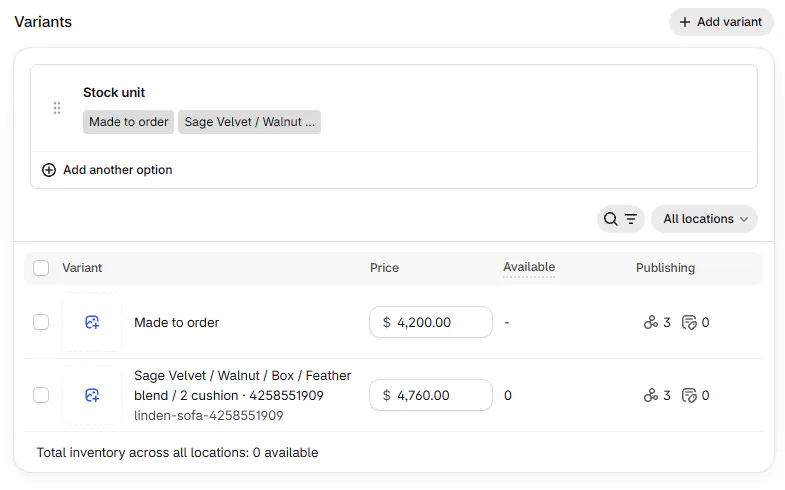
The product uses the option Stock unit, with Made to order as its base variant. A stocked value combines readable choices and a configuration code.
For example, a value can read Sage Velvet / Walnut / Box / Feather blend / 2 cushion · 4258551909: every choice, then a numeric configuration code. Its SKU combines the template SKU or handle with the configuration key.
The order line remains a custom item. Its hold links the customer to the finished stock without replacing the line's configuration history.
The initial variant cost comes from the PO unit cost where set. Ongoing cost publishing can later replace it with the average of final cost layers.
The old Create stock choice is no longer part of receiving a template. Every accepted template unit becomes stock.
If a matching configuration already exists, Already stocked as names it. A kept-SKU notice explains when the existing variant retains its SKU instead of taking the line's SKU.
Many configurations on one template
After 2,000 stocked variants on a template, new configurations use a separate stock product. Existing configurations retain their existing stock identity.
Where you'll see it
The PO line names the quantity held for order and the location. The order line reads held for this order, and stock sales also have a From stock row.
Shopify displays the held units as Reserved. Check the receiving location as well as Available, because a customer allocation can reduce the quantity available to sell.
A stock sale is held when the order is sent to Shopify. Quotes hold nothing. Receiving template units for an existing order places the needed hold on arrival.
Hold status appears on the next load. A daily check also reconciles missed fulfillment releases and retries shortages after inventory changes.
Read the stock-update messages
| Message | Meaning |
|---|---|
| Updating stock in Shopify | An update is pending or being retried |
| Stock not updated in Shopify | The listed movements failed their retries |
| Received with warnings | The receipt saved, but some stock updates lack needed Shopify details |
| Not held | There was insufficient stock when the hold was attempted |
Pending movements can show the updating banner after about a minute. A failed movement names the item, action, quantity and Shopify error.
The choices you have
Use buy for stock to purchase configurations for later sale. Use Use stock unit to sell an available finished configuration.
Move eligible held template units between warehouse and showroom through receiving corrections and moves. That action moves the customer's held quantity together.
A return does not automatically put the unit back on its stock variant. Review the returned goods and adjust Shopify stock through your inventory process.
On the online store, the OrderPilot embed hides the theme variant picker for template products with stock variants. Customers use the options block for configured quotes and purchases.
Example: two sofas, one customer
PO-10001 brings 2 Sage Velvet Linden Sofas with Feather Blend to Warehouse. Olivia Bennett needs 1; the other was bought for stock.
Shopify receives 2 units on the configuration variant. One becomes reserved for Olivia, leaving 1 available for another sale.
When Olivia's line is fulfilled, its hold is released. If the inventory update is still pending, Jo Park reads the PO banner before changing any count manually.
Do it
For Stock not updated in Shopify, read the error, correct its cause and click Retry. This needs Receive items. Nothing to retry means no failed movement remains available for that action.
For Not held, wait for incoming inventory or modify the line. A PO receipt retries the shortage immediately; a manual Shopify count change is checked within a day.
Failed holds retry automatically after 6 hours and stop after 30 days. If the message says retries stopped, modify the line to try holding again.
If a unit sold elsewhere first, no hold is placed. Resolve that shortage before promising the same piece to another customer.
Contact support with the PO number if stock still fails.
Was this guide helpful?
Thanks. Tell us what was missing at support@meetorderpilot.com.