Start, end or extend coverage by hand
Related guides
- Check and change warranty on an orderWarranty and service · 5 min
- How warranty coverage worksWarranty and service · 5 min
- Choose pickup or delivery and hand items overQuotes and orders · 5 min
- Handle a warranty claimWarranty and service · 6 min
- See what changed and restore an earlier versionGet started · 4 min
Correct an individual unit's coverage when delivery, a return, or an agreed goodwill extension isn't reflected in its record. Check the actual handover before changing dates.
Manual coverage actions can also affect delivery progress. Use the date the customer received the unit, not the date you noticed the missing record.
Before you start
Identify the unit
Use Warranty on an order to find the product, unit, and serial.
Check coverage permissions
Starting coverage and goodwill extensions need Override warranty coverage.
Check return permissions
Mark returned and its undo need Create and edit quotes and orders, within your order change scope.
Find out why cover didn't start
Check whether Shopify shows fulfillment and whether delivery was recorded. Untracked shipping without delivery confirmation can remain fulfilled without starting coverage.
For a register sale, inspect the recorded handover. OrderPilot's Mark collected, Mark delivered, and register handovers record coverage at that handover.
A missed Shopify update can be caught by the hourly check. Allow that check to run before creating a duplicate correction. Older orders may offer no Shopify date beyond the available 60-day history.
Use pickup, delivery, and handover when the missing event is the actual handover. Use manual coverage when you need to fill a verified delivery gap.
Start coverage by hand
Step 1: Open the line's start form
Open the order's Warranty panel and choose Start coverage… on the line. The form identifies units without a recorded delivery.
Step 2: Enter delivery and units
Set Delivered on to the date the customer received the goods, then click Start coverage. It covers the line's units that have no recorded delivery.
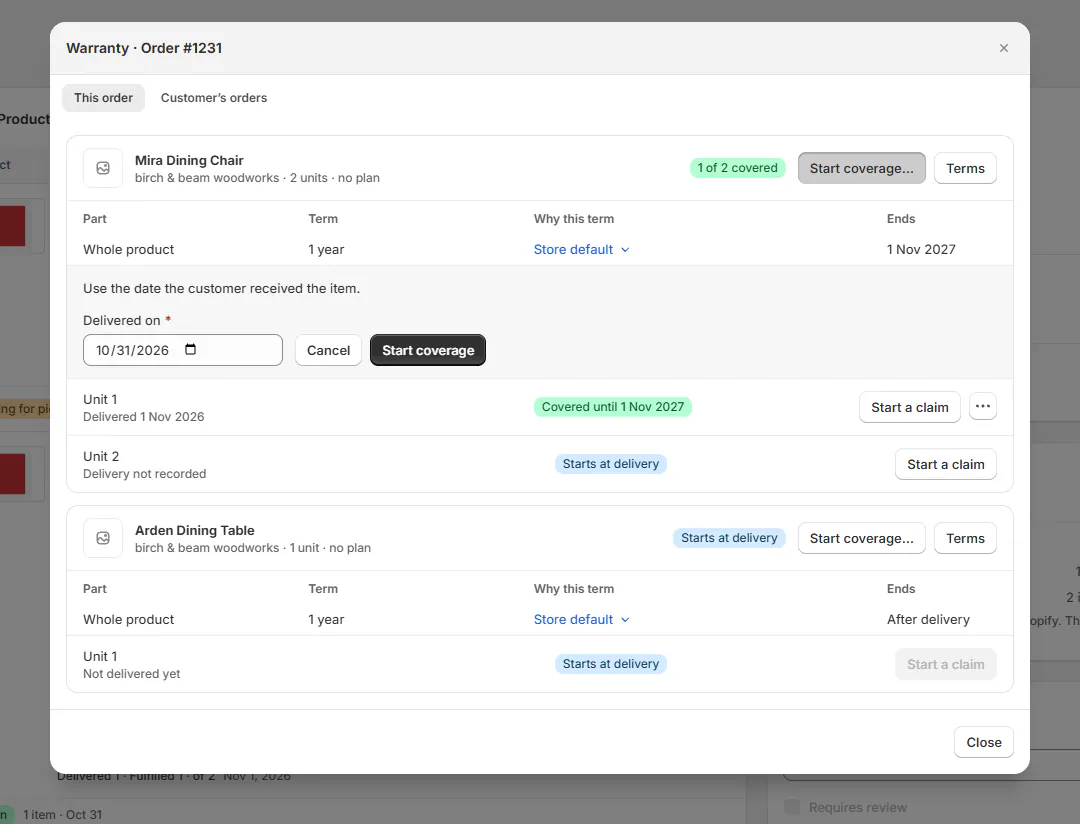
Start coverage form with Delivered on. The result says Cover started on N units or Those units were already covered. The action fills missing coverage; it doesn't overwrite already covered units.
Step 3: Use coverage look-up when appropriate
From Coverage look-up, open the row menu and choose Start coverage today or Start coverage on a date…. Review the date and affected units before confirming.
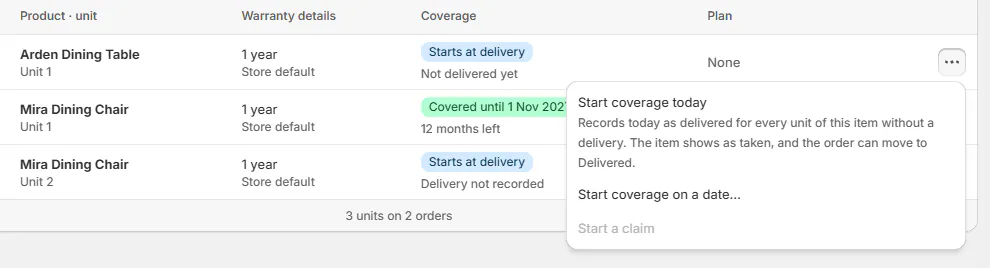
Coverage look-up row menu with Start coverage today and Start coverage on a date…. Warning
Starting coverage records delivery
Starting coverage can make the item show as taken and let the order move to Delivered. Confirm the goods reached the customer before using this action.
Mark a unit returned
Step 1: Open the unit's return action
In the Warranty panel, open the unit menu and choose Mark returned…. Confirm the serial or unit number before entering a date.
Step 2: Record the return date
Set Returned on between delivery and today, then click Mark returned. Marked returned confirms the change, and coverage stops for that unit.
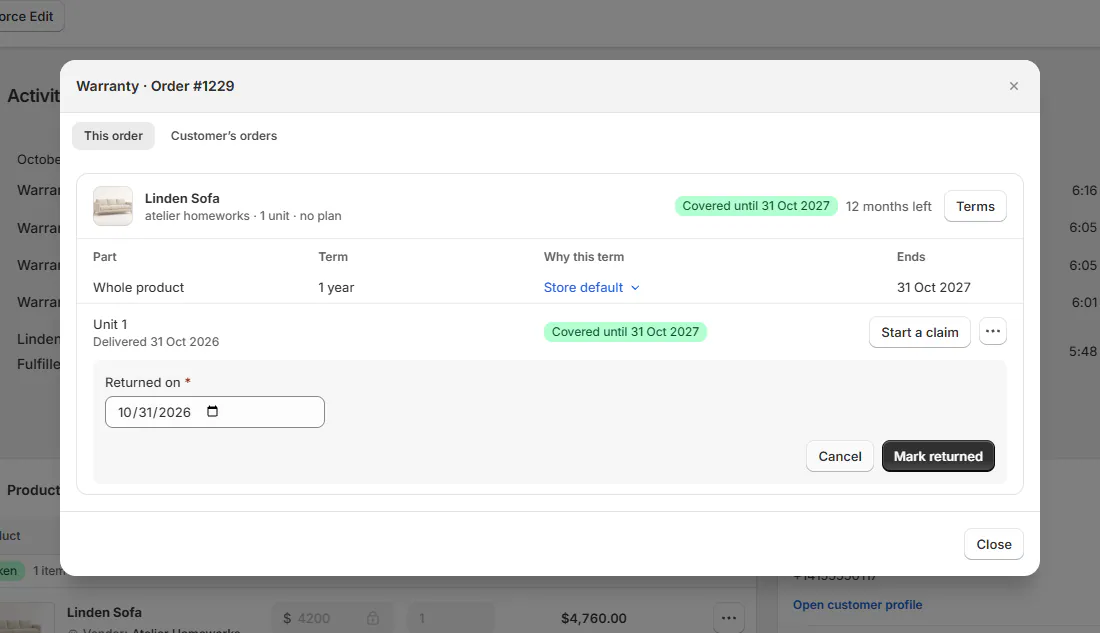
Mark returned form on a unit. Step 3: Undo a manual return if incorrect
Use Undo the return on a return marked by hand. Return undone confirms the reversal. A return recorded through Shopify doesn't offer this manual undo.
A Shopify refund with a return stops coverage automatically. A refund without a return leaves coverage in place; record the actual return if one happened.
Extend coverage as goodwill
Step 1: Open the extension form
On the unit menu, choose Extend coverage (goodwill)…. The form asks for Covered until.
Step 2: Choose a later end date
Enter a date after the current coverage end. Add an optional Reason, up to 500 characters, then click Extend coverage.
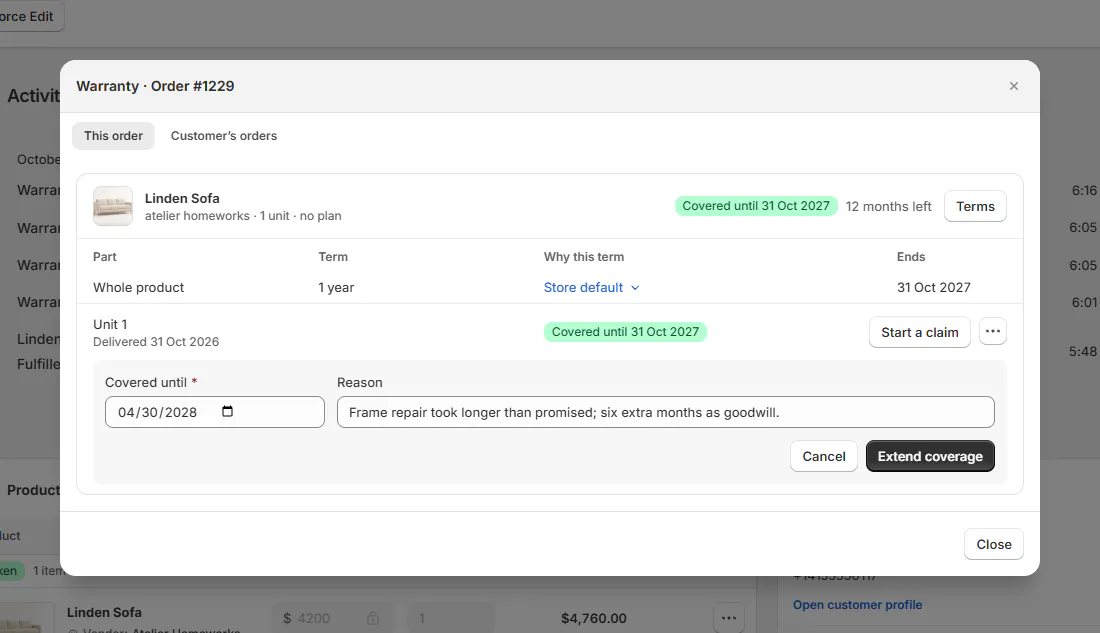
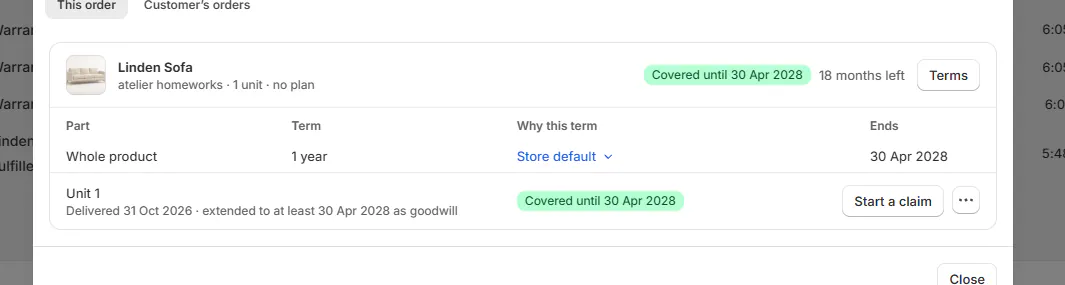
Extend coverage form with a date and reason. Cover extended confirms the change. The unit explains it is extended to at least the chosen date as goodwill. The reason appears in the order's activity.
Step 3: Remove an incorrect extension
Use Remove extension when the goodwill extension should be removed. Extension removed confirms it. Goodwill extends coverage; entering an earlier date isn't a way to shorten the original term.
What happens next
The Warranty panel, line chips, coverage lookup, and claims use the updated dates. Activity records the action and the person who made it.
Review that history after a correction. It should explain the delivery, return, or goodwill decision without requiring another team member to reconstruct the conversation.
Example: three separate corrections
Example · Harlow & Finch Interiors
Correct only the affected units
Harlow & Finch Interiors reviews 3 service records.
- Nora Ellis confirms Priya Shah received her untracked Arden Dining Table on 14 Mar 2026.
- She starts that unit's coverage from 14 Mar 2026.
- Jo Park records Marcus Reed's returned Mira Dining Chair after a refund that omitted the return.
- Nora extends Olivia Bennett's Linden Sofa coverage as agreed goodwill.
- She records the reason so the service team can understand the extension.
If something goes wrong
The delivery date is refused
It cannot be in the future or more than 5 years ago.
Start coverage is missing
Check override permission and whether every unit already has coverage.
Undo the return is missing
The return may have come from Shopify.
The extension date is refused
Choose a date after the current coverage end.
Was this guide helpful?
Thanks. Tell us what was missing at support@meetorderpilot.com.