Handle data requests, reset settings, or uninstall
Related guides
- Manage your subscription and covered locationsSettings and integrations · 5 min
- Export, hold and retain signature recordsPayments and signatures · 5 min
- How Settings is organizedSettings and integrations · 5 min
- How templates sync to Shopify productsCatalog · 5 min
- Find and edit customersCustomers and portal · 5 min
Prepare a customer's requested data, understand what a settings reset changes, and review what happens when you uninstall OrderPilot. These actions have different effects on records and access.
Use Account & data for the app's controls. Shopify sends the customer and shop privacy requests that trigger the corresponding data handling.
Before you start
Understand the subscription
Read subscription and locations before cancelling or uninstalling.
Find the settings area
How Settings is organized explains Account & data.
Export signed records separately
Use signature records for evidence, holds, and retention.
| Area | Required permission |
|---|---|
| Subscription | Manage billing. |
| Customer data requests | Download customer data requests. |
| Signature records | Export and hold signature records. |
| Danger zone | Reset settings and remove app data. |
Each section applies its own permission. Danger zone is shown only to people allowed to reset settings. Signature records also holds Export evidence and Orders on legal hold, and a Before you remove OrderPilot card offers Export everything.
How OrderPilot handles your data
| Shopify request | OrderPilot's response |
|---|---|
| Customer data request | Prepares a file for the store to download and provide to the customer. |
| Customer erasure request | Erases customer data, including warranty-claim text and files. |
| Shop erasure after uninstall | Erases shop data and files, with specified retained records. |
The shop erasure request follows 48 hours after uninstall. The shop record, privacy-request log, and billing record remain. Signed signature records and their files are retained for legal retention.
Error IDs don't contain customer, order, or staff data. Use them when seeking help without copying private records into an error description.
Respond to a customer data request
Step 1: Find the request
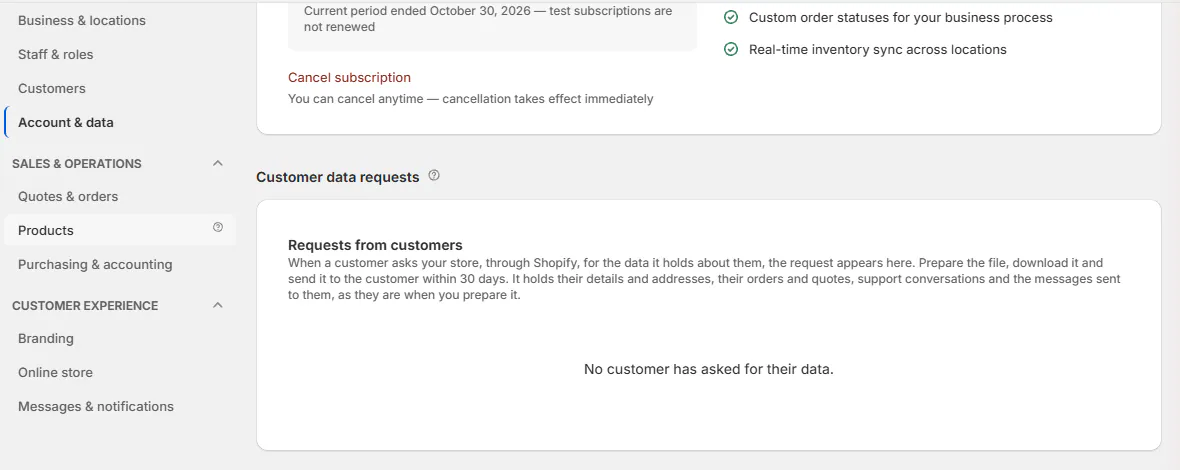
Open SettingsAccount & dataCustomer data requests. Under Requests from customers, find the row using Customer, Requested, Orders named, and Status.
Step 2: Prepare the current file
Click Prepare file. The row shows Preparing… while the file is created. When ready, it offers Download file and Kept until with the date.
The file reflects details and addresses, orders and quotes, support conversations, and messages sent to the customer when prepared. Internal notes aren't part of the customer export.
Step 3: Download and provide the file
Click Download file and send it to the requesting customer within the 30-day period stated on the page. The row records Downloaded with the date.
A prepared file is kept for 7 days. Prepare it again if that period ends before you download it.
Reset all settings
Step 1: Review the reset scope
Open SettingsAccount & dataDanger zone. Read Reset all settings before choosing Reset settings.
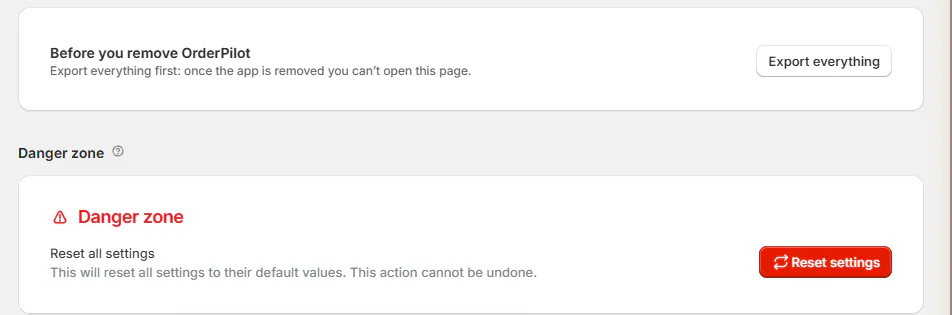
Danger zone card with Reset settings. A reset affects numbering, review rules, brand grouping, Customers and Review menu settings, brand color, support email, commission rules, and other shop settings.
It turns the portal back on and online selling off. Template products leave the Online Store when that online-store setting is reset.
Step 2: Confirm the reset
Click Reset settings, then review the confirmation. Click Reset Settings only when you intend to restore the defaults. Settings reset to defaults confirms completion.
Warning
Reset cannot be undone
The reset affects app behavior across the store. Record the settings you need before confirming, then review the resulting defaults.
Quotes, orders, templates, options, vendors, statuses, and roles remain. The made-to-order location is retained while ordered-new items still wait there.
Uninstall OrderPilot
Step 1: Download needed records
Download the documents and reports you need. Export signature evidence through Signature records if you need it before the uninstall email arrives.
OrderPilot's Shopify products and metaobjects remain in Shopify after uninstall. Uninstalling the app isn't a complete removal of those Shopify objects.
Step 2: Open Shopify's app management
In Shopify admin, go to SettingsApps. On OrderPilot's row, open the ⋯ menu and choose Uninstall, then review Shopify's confirmation before completing it.
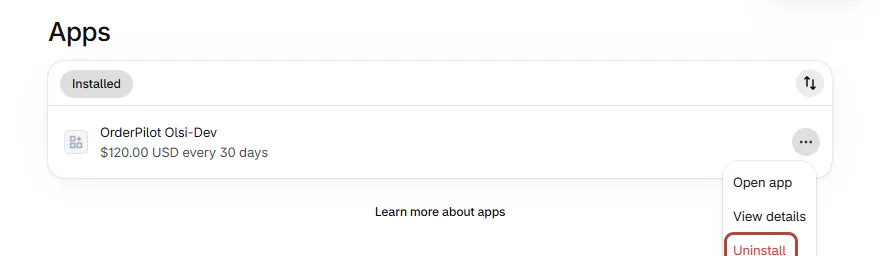
Shopify admin Apps list with the uninstall option. Step 3: Review the resulting account state
After uninstall, pending plan changes close, managed email sending is revoked, scheduled emails and texts stop, and app sessions end. Signature evidence is exported and emailed to the store owner.
Notification personal data is removed, followed by the shop erasure process. Retained signature evidence follows its separate retention rules.
A reinstall within the retained paid period can use the previously paid locations until that period ends. Subscription shows Your paid period is still running where applicable.
What happens next
After a data download, the request retains its downloaded status. After a settings reset, review the store setup again before staff resume work.
After reinstalling, check Subscription and the rebuilt starter setup. Existing retained statuses are kept where present, and missing system statuses are added. Theme blocks remain until removed from the theme.
Retention controls belong to Signature records. Confirm those options there rather than treating customer erasure or uninstall as immediate signature deletion.
Example: respond to Marcus's request
Example · Harlow & Finch Interiors
Prepare Marcus's customer file
Marcus Reed requests his data through Shopify.
- Nora Ellis opens Customer data requests.
- She finds Marcus's row and prepares the file.
- She downloads it before its retention date.
- She provides it to Marcus within the stated period.
- A later erasure request follows the separate customer-erasure process.
If something goes wrong
The file couldn't be prepared
Use Try again. Preparation running over an hour is shown as failed.
The request list doesn't load
Check Download customer data requests.
Danger zone is missing
Your role lacks Reset settings and remove app data.
A downloaded file is no longer available
Prepare it again after the 7-day retention period.
Was this guide helpful?
Thanks. Tell us what was missing at support@meetorderpilot.com.