Sell a set of pieces as a composition
Related guides
- How the catalog fits togetherCatalog · 6 min
- Create a quote or orderQuotes and orders · 6 min
- Choose options and a vendor for each lineQuotes and orders · 6 min
- OrderPilot on Shopify POSShowroom (POS) · 6 min
- Create a product templateCatalog · 6 min
A composition is a predefined set of products and quantities that staff can add to a quote or order together. It saves your team from finding and adding every piece individually.
Adding the composition inserts its pieces as separate lines, each keeping its own product, price and stock. The composition’s header names the set but does not become an order line itself.
Use a composition to sell a set of pieces. Use a bundle to group the options used to configure a product.
Before you start
Prepare the pieces
Each piece must already exist as a normal Shopify product with a single variant. Exclude archived or deleted products and OrderPilot-managed template or option products.
Use the app
Compositions work in the app's quote and order picker. They are not available on Shopify POS.
Prepare Shopify access
Setup happens on Shopify products and their metafields. There is no composition-building screen in OrderPilot.
Review the catalog and creating a quote before setting up the set.
Set up the composition
Step 1: Create the header product
In Shopify admin, create the product that names the set, such as Linden Sofa composition. Keep it Draft, priced at 0, with inventory tracking off.
Add the tag OrderPilot Composition. The header identifies the set but never becomes an order line itself.
Step 2: List its pieces and quantities
Use the product metafield namespace
bevy-orderpilot. Set the header'scomposition_roletoparent.Fill
composition_componentswith the piece products in order. Fillcomposition_quantitieswith one matching quantity for each piece.The lists must have the same length. You can include 1 to 30 pieces, with whole quantities from 1 to 99.
Metafield Type Where it belongs composition_roleSingle-line text Header: parent; piece: child. composition_componentsList of product references Header, listing pieces in order. composition_quantitiesList of integers Header, matching that same order. composition_parentsList of product references Each piece, listing its headers. Step 3: Mark each piece's membership
On every piece, set
composition_roletochildand add the header tocomposition_parents.Save the products. Each piece now identifies the compositions it belongs to.
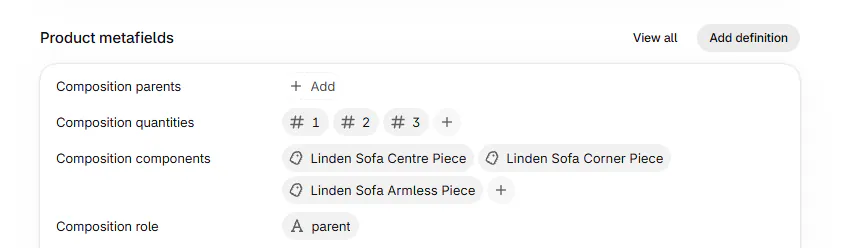
Role parent, three pieces in order and one quantity for each. Warning
If the component and quantity lists do not line up, the composition is refused. Check each quantity against its intended piece before staff use the set.
Add the set to a quote
Step 1: Find the composition
Open a quote or order and click Add product. Search for Linden Sofa.
Choose the row with the Composition badge. It says Adds each piece as its own line and Priced by its pieces.
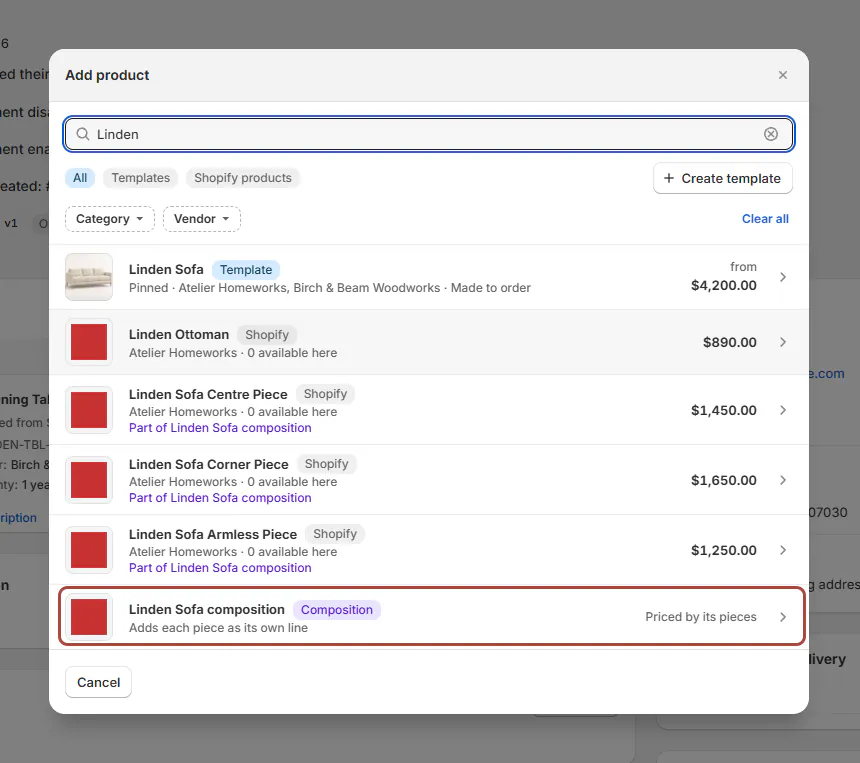
Add product dialog with a Composition row ('Adds each piece as its own line') and pieces showing 'Part of Linden Sofa' Step 2: Review the added lines
After the pieces load, check each product and quantity. The header is absent; its pieces appear as normal lines.
The composition is added whole or not at all. It must fit within the order's 50-line limit.
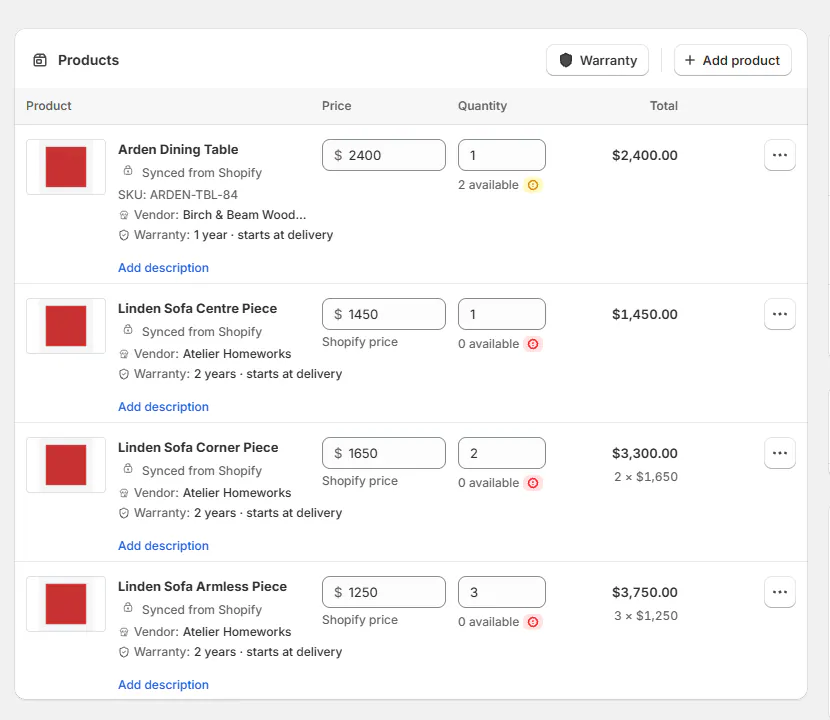
A quote with the Linden Sofa's centre, corner and armless pieces as separate lines at quantities 1, 2 and 3 A piece listed separately in the picker shows Part of its composition. Choosing that piece alone warns that you can add the composition for the complete set.
What happens next
Each piece is priced by its own Shopify product. The lines do not stay grouped as a composition after addition.
If a piece is already on the order, its quantity normally increases. A customized line or a line held by a purchase order stays unchanged.
In those cases, a second line is added for the composition's piece. Review both lines before changing a total quantity.
If the order changes while the pieces load, addition can stop. Review the current lines, then choose the composition again.
Example: Marcus's modular sofa
Example · Harlow & Finch Interiors
Add the complete Linden Sofa set
Harlow & Finch Interiors sells a modular Linden Sofa.
- Create centre, corner and armless piece products.
- List them on the draft header with quantities 1, 2 and 3.
- Mark each piece as a child of that header.
- Open Marcus Reed's quote and choose the composition.
- Check the 3 resulting lines.
The quote contains 1 centre, 2 corners and 3 armless pieces, each priced separately.
Important notes and tips
Keep the header as a draft so it cannot sell on its own. On POS, add the active piece products individually.
To find headers in Shopify, search composition or use the OrderPilot Composition tag. There is no dedicated composition filter.
If something goes wrong
Nothing was added
Check list alignment, piece eligibility and the order's 50-line limit.
The order changed during loading
Review its current lines and try adding the composition again.
A piece became a second line
The existing line was customized or held by purchasing. Check both quantities before editing.
The composition is missing on POS
Draft headers are not offered there. Add the pieces separately.
Was this guide helpful?
Thanks. Tell us what was missing at support@meetorderpilot.com.