How Settings is organized
Related guides
- Find your way around OrderPilotGet started · 7 min
- How roles and permissions workTeam and permissions · 6 min
- Business details and what each location printsSettings and integrations · 6 min
- Bring in your locationsSettings and integrations · 6 min
- Quotes & orders settingsSettings and integrations · 4 min
Find the setting you need across 3 groups and 10 pages. Settings belong to the store and can affect work in the app and on POS.
What you can change depends on your role. A page you can read may still show View only for changes.
Before you start
Consider the whole store
A setting change isn't a personal preference unless its control says so.
Check your access
Roles and permissions explain who can change each area.
Use search
Search Settings finds current and older setting names. See Find your way around.
Open Settings
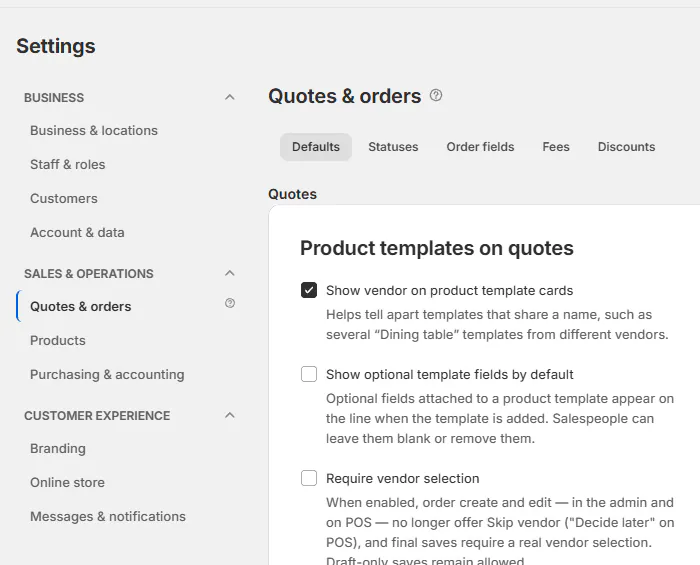
Click Settings at the far right of the app header. It opens on the first page your role can change. The left navigation groups the available pages.
The help icon beside a page title opens What followed by the page name holds. Use that description when deciding whether the setting belongs there.
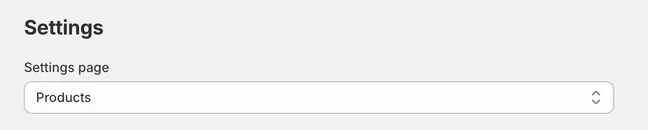
On a narrow screen, Settings page replaces the side navigation with a grouped selector. Locked pages include View only in the selection label.
This lets you navigate the same settings without relying on the desktop rail. The permission still applies whichever layout you use.
Business
| Page | Tabs and areas | Full guide |
|---|---|---|
| Business & locations | Business details, Locations, Brand grouping, Terms & payments. | Business details and locations. |
| Staff & roles | Staff, Roles, Activity, Access rules. | Roles and permissions. |
| Customers | Customer fields, Customers page, Customer tags, Portal access. | Customers settings. |
| Account & data | Subscription, Customer data requests, Signature records, Danger zone. | Subscription and data actions. |
Business & locations defines who the store is, where it operates, and the details each location uses. Staff & roles controls access rather than customer contact information.
Customers settings define fields and customer-facing access. The customer records themselves are reached through Customers or linked profiles, not edited as general shop settings.
Account & data combines billing with retained records and irreversible data actions. Check the specific action's guide before using Danger zone.
Sales & operations
| Page | Tabs and areas | Full guide |
|---|---|---|
| Quotes & orders | Defaults, Statuses, Order fields, Fees, Discounts. | Quotes & orders settings. |
| Products | Options, Bundles, Categories, Product defaults, Warranty coverage, Warranty plans, Claims. | Products settings. |
| Purchasing & accounting | Vendors, Purchase orders & costing, Commissions, QuickBooks. | Purchasing settings, commission, and QuickBooks. |
Product templates live under Products in the main app. The Products settings page holds shared catalog configuration, not the main template list.
Purchasing & accounting separates vendor setup, PO behavior, costing, commissions, and the accounting connection. A person's permission for one tab doesn't establish permission for the others.
Your store can rename its vendor label. Look for the configured word when a vendor tab differs from an example in the Academy.
Customer experience
| Page | Tabs and areas | Full guide |
|---|---|---|
| Branding | Quote PDF, Customer portal, Quote request page, Request sent page, Emails, Signing page, Product page and pop-up, POS receipt. | Branding settings. |
| Online store | Selling mode, options style, theme setup, template defaults, CSS, class names and events, quote eligibility. | Online store settings. |
| Messages & notifications | Sending settings, Quick replies, Delivery activity. | Messages settings. |
Branding controls appearance, including email templates. Messages & notifications controls sending identity, timing, recipients, reply routing, and delivery history.
That distinction matters when a customer email looks wrong but sends at the correct time. Edit its template in Branding; investigate its trigger in Messages & notifications.
Some email-related tabs and PDF themes depend on availability for the shop. A missing tab doesn't always mean you opened the wrong page.
Saving and View only
| Control | What to expect |
|---|---|
| Save | Applies changes waiting in the save bar. |
| Discard | Drops unsaved changes in that form. |
| Saving… | Identifies a control that is saving its own change. |
| View only | Marks an area your role cannot change. |
| Unsaved changes | Asks you to resolve edits before leaving. |
Read the control's save behavior. Some pages use the shared save bar, while switches such as Reviews and changes on the brands board save immediately.
For a locked page, hover over the lock to read View only and its reason. Ask an administrator for the specific permission needed for the work.
Don't repeatedly change another setting to get around a read-only control. The page's permission is part of the store's access model.
Older setting names
Older names still work in Search Settings. Older settings links redirect to the current area.
| Older name | Current area |
|---|---|
| Order defaults or Quote rules | Quotes & orders, Defaults. |
| Review rules | Quotes & orders, Defaults, Approval rules. |
| Custom fees or Order attributes | Quotes & orders, Fees or Order fields. |
| Order status | Quotes & orders, Statuses. |
| PO defaults or Costing | Purchasing & accounting, Purchase orders & costing. |
| Vendors | Purchasing & accounting, Vendors. |
| Options or Categories | Products, matching tab. |
| Locations or Business details | Business & locations, matching tab. |
| Email settings | Messages & notifications; designs in Branding, Emails. |
| Vendor label | Products, Product defaults. |
| Warranty settings | Products, Warranty coverage, Warranty plans, or Claims. |
| Staff permissions | Staff & roles. |
| Billing or Customer data | Account & data, Subscription or Customer data requests. |
| Advanced | Account & data, Danger zone; brand grouping is under Business & locations. |
Example: Nora and Sam open Settings
Nora Ellis opens Settings to update Harlow & Finch's business details. Sam Ortiz opens the same area to read it, but a lock explains why his role cannot change it.
Sam can still use search and the page description to find the setting. He asks Nora to make the store-wide change when it is needed.
If something goes wrong
A page is View only
Hover over the lock for the required permission.
A tab is missing
Check feature availability and any store-specific label.
An old name is gone
Enter it in Search Settings to find the current page.
Edits disappear on leaving
Check whether you discarded unsaved changes or missed the page's save action.
Was this guide helpful?
Thanks. Tell us what was missing at support@meetorderpilot.com.