Set payment terms and place pay-later orders
Where are you working?
Related guides
- Take a depositPayments and signatures · 5 min
- Collect a paymentPayments and signatures · 6 min
- How payments workPayments and signatures · 5 min
- Set signature and minimum-deposit requirementsPayments and signatures · 5 min
- Take some items home and deliver the restQuotes and orders · 5 min
Set when the customer will pay, then place the order with payment still outstanding. Add a native deposit percentage when your Shopify plan supports it.
Terms can change only while the record remains a Shopify draft. Check them before placement because Force Edit does not reopen them afterward.
Before you start
Know the collection route
Read Collect a payment and Take a deposit.
Have terms access
Setting terms and deposits needs Set payment terms and deposits.
Have placement access
Quotes need conversion permission. Draft orders accept conversion or create-and-edit permission.
Have Shopify terms
Available terms come from Shopify's configured payment terms.
Native deposits use Shopify's subtotal before shipping and tax, rounded down to the cent. Do not substitute the full displayed total when checking that amount.
Set terms in the app
Step 1: Choose payment due later
In the summary, tick Payment due later. Under Terms, choose the available term.
Due on receipt, Due on fulfillment, Net terms (listed as Within 30 days and so on, with a Net terms badge) and a fixed date represent different due-date choices.
Step 2: Enter the required date
For Net terms, enter Issue date. For fixed-date terms, enter Due date.
Check the date against the agreed arrangement. The selected term and relevant date appear in the form.
Step 3: Add a native deposit
On Shopify Plus, click + Require deposit and enter Deposit required as a percentage greater than 0 and less than 100.
The control appears once Payment due later is ticked. Use Remove deposit (the bin beside the field) if the agreement has no deposit.
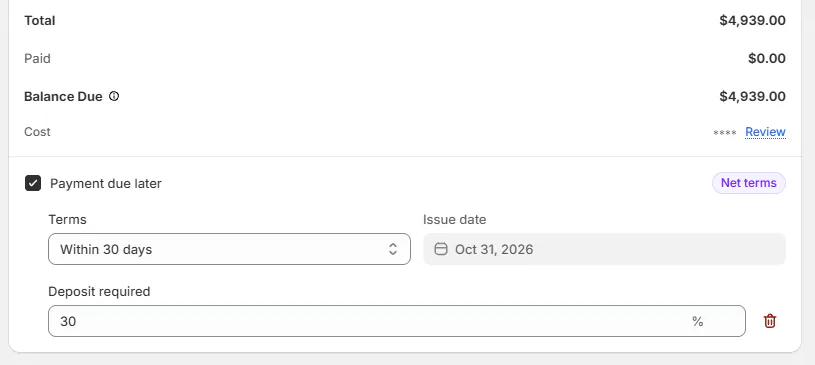
Set the terms and deposit before placing the sale. Step 4: Save the sale
Review the terms, deposit and dates, then save the order. The controls alone do not save the record.
The saved summary shows the deposit due now and remaining amount due later, where applicable.
Set terms on POS
Step 1: Open Payment Terms
Tap Add beside Payment Terms and turn Payment due later on.
The form explains that the customer can pay after placement. Choose the intended arrangement before continuing.
Step 2: Choose the deposit
Select No deposit, an offered percentage chip, or Other and enter Deposit %. Native deposit entry allows 1% to 99%.
An item's minimum deposit hides lower chips and No deposit. Its requirement note explains the minimum.
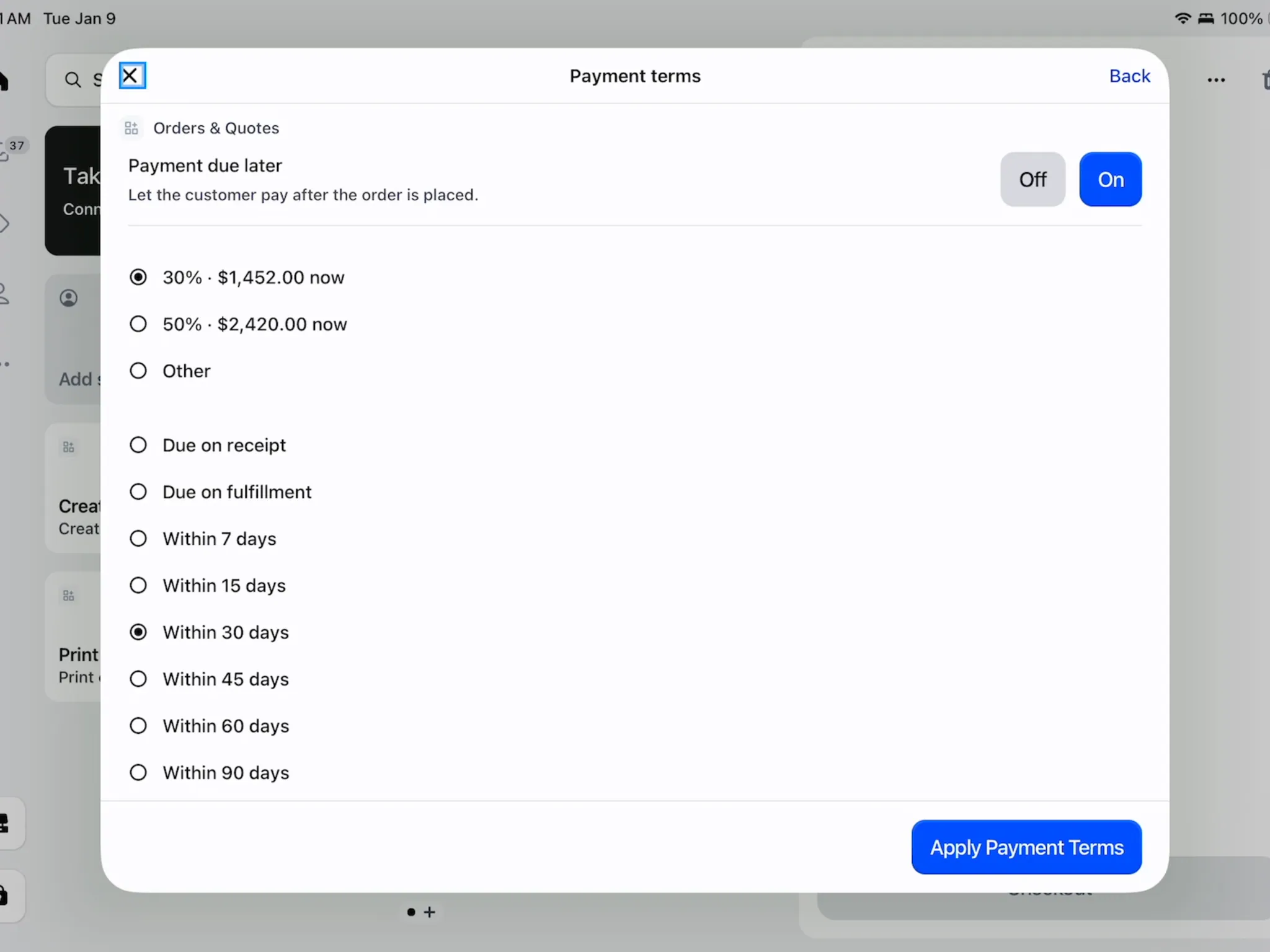
The chips show the native deposit choices. Step 3: Apply the term and date
Choose Select terms, then fill Issue date or Due date as required. Tap Apply Payment Terms.
The form returns the terms to the sale. Use Save Changes to save them, or Remove to remove saved terms before placement.
Shopify Plus
Native deposit percentages and POS Take Deposit require Shopify Plus. Without Plus, you can set terms with no deposit; an existing saved deposit is retained.
Place now and collect later
Step 1: Open app placement
Choose Create order (pay later) from the ••• menu. When the record has payment terms, Collect payment opens the same dialog. Read Place order, payment pending before you click Create order.
If the record has a deposit percentage, the dialog explains that both the deposit and remaining balance stay outstanding.
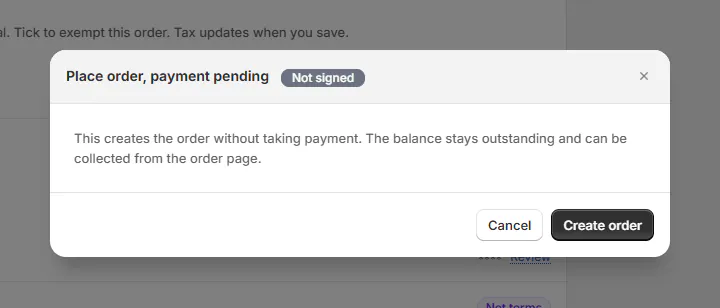
Placement does not record a payment. Step 2: Confirm app placement
Click Create order when the arrangement is correct. The completion message identifies the created order.
No payment is taken by this action. Check the placed order and outstanding balance before requesting payment later.
Step 3: Place through POS
Set payment due later, choose Other with no amount for no deposit, apply the terms and save. The payment button reads Create Order.
Review Pickup or Delivery?, where Due now indicates payment due later. Continue with Create Order and complete any required signature.
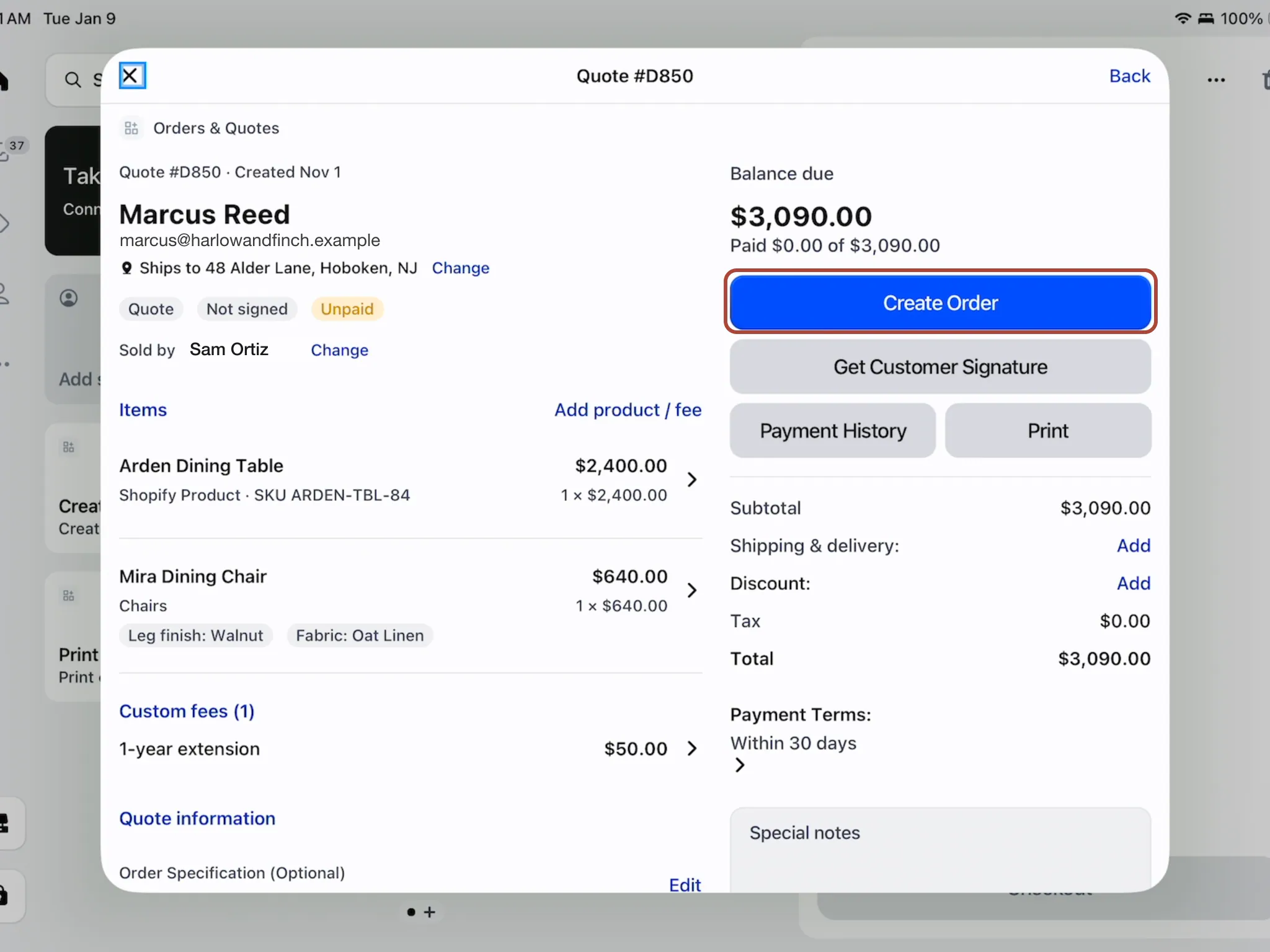
No-deposit pay-later terms change the primary action. Step 4: Collect when payment is due
Use Collect a payment for the later balance. Check the sale's actual outstanding amount.
A placed pay-later order on POS shows Payment due later. Collect Payment Anyway is available when you intend to collect before the scheduled due point.
What happens next
Shopify holds the placed order, and the record logs placement. Payment terms and deposit settings now show as locked.
With a native deposit, checkout asks for the deposit under those terms. Verify the actual received amount after checkout.
A terms percentage can satisfy the configured deposit requirement. A separate paid deposit order follows a different route and does not satisfy that minimum rule.
Example: two payment arrangements
Example · Harlow & Finch Interiors
Set the agreement before placing
Harlow & Finch Interiors gives Olivia Bennett and Marcus Reed different terms.
- For Olivia's Linden Sofa on a Plus shop, Sam Ortiz selects Net 30 and a 30% native deposit.
- Sam saves and checks that the deposit is due now.
- For Marcus's Arden Dining Table, Sam chooses Net 30 with no deposit.
- Sam places Marcus's order with payment pending.
- Sam checks that the balance remains outstanding and terms are locked.
Important notes and tips
Shopify POS checkout can still accept less than a required deposit. Check what was actually collected, even when the proposed amount meets the requirement.
Signature and deposit requirements covers the order-placement checks and exceptions.
If something goes wrong
Require deposit is missing
Check Plus eligibility, Payment due later and the selected term.
The percentage is refused
Enter a valid percentage above 0 and below 100.
No terms are configured
Arrange the Shopify term setup before retrying.
Terms cannot change
The record is already placed in Shopify; Force Edit does not unlock them.
Deposit too low
Raise the native percentage to the requirement before continuing.
Payment is still outstanding
Creating a pay-later order did not collect or record money.
Was this guide helpful?
Thanks. Tell us what was missing at support@meetorderpilot.com.