Use OrderPilot in Shopify admin and Sidekick
Related guides
- How OrderPilot syncs with ShopifyGet started · 6 min
- Quote faster: Sidekick, auto-save, barcodes and stock checksQuotes and orders · 4 min
- Create a quote or orderQuotes and orders · 6 min
- Download and print quote and order PDFsPayments and signatures · 5 min
- Bring in your locationsSettings and integrations · 6 min
Open an OrderPilot record from Shopify, make a location-branded product specification PDF, or ask Sidekick to prepare a quote. These entry points reduce the need to search for the same sale again.
Sidekick can prepare and find information, but you review and save the OrderPilot quote yourself. It doesn't change an existing record.
Before you start
Understand the linked records
Know how to save the quote
Use Create a quote or order for the final review.
Use a linked sale
The Shopify block opens records created through OrderPilot.
Open OrderPilot from a Shopify order
Step 1: Open the Shopify record
Open the order or draft order in Shopify admin. Find the OrderPilot block. It can show Looking up linked order… while it checks the connection.
Step 2: Check the linked record
Read the Quote or Order badge and document number. Confirm that the linked record is the sale you intend to open.
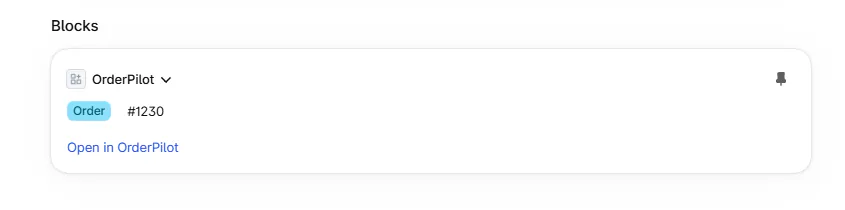
Shopify order page with the OrderPilot block. Step 3: Open the app record
Click Open in OrderPilot. The linked quote or order opens in the app, where your normal access applies.
Not linked means the Shopify record isn't linked to an OrderPilot record. The block doesn't create a new quote from an unrelated Shopify order.
Generate a spec sheet
Step 1: Open the product action
Open the product in Shopify admin and choose Product Specification from its app actions. The dialog identifies the Branded Specification Document.
On the product page it's under More actions, below Shopify's own Duplicate, Archive and Delete.
Step 2: Choose the location
Choose Location for the document's branding; each reads brand → location. Locations follow the configured brand and location order, so check the default: it's the first one, not necessarily your showroom.
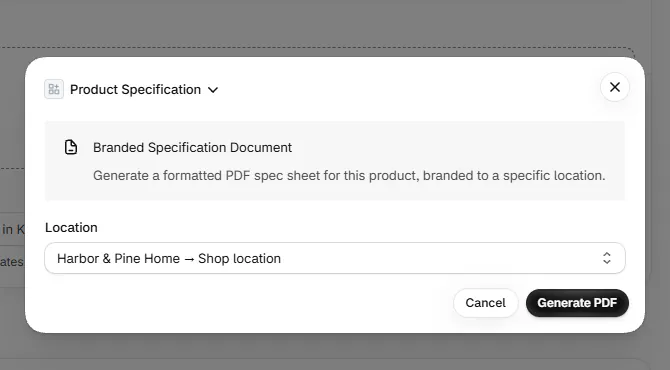
Product Specification dialog with Location chosen. Use the location whose details should appear on the sheet. A trade customer viewing an Arden Dining Table may need the showroom's branded specification.
Step 3: Generate and download
Click Generate PDF. When the dialog says Spec sheet ready, click Download PDF, then OK.
For document styling, use quote and order PDFs. This action creates the product sheet; it doesn't place a sale.
Use Sidekick with OrderPilot
Step 1: Ask for a quote draft
Open Sidekick and describe the customer, product, options, and fees. For example, ask for Olivia Bennett's Linden Sofa in Sage Velvet with White Glove Delivery.
Sidekick opens the OrderPilot create form with the supplied information filled in. Review the selected product and customer before accepting the draft.
Step 2: Review and save the sale
Check the quote using Create a quote or order. Complete missing choices and save it yourself. Sidekick doesn't save the record.
A draft can be restored within 30 seconds after leaving. Start fresh instead clears the restored draft when it isn't the one you want.
Step 3: Ask for an existing record or answer
Ask whether a quote is paid, find the order behind PO-10001, or ask how to perform an OrderPilot task. Read the returned status, total, link, or guidance.
Sidekick's how-to answers come from Academy material. If an action isn't supported directly, it returns a link so you can continue in the app.
Other Sidekick lookups
What Sidekick can look up
Sidekick can find orders by number, customer name or email, PO number, or tag. It can also look up orders needing review, purchase orders, order emails, incoming stock, and settings.
It can open an OrderPilot page or find documentation. These lookups don't authorize it to edit an existing sale.
What happens next
The Shopify block opens the linked app record. Product Specification gives you a downloadable PDF. Sidekick's filled form becomes a saved record only when you review and save it.
Example: a trade specification and a sofa quote
Example · Harlow & Finch Interiors
Use the appropriate Shopify entry point
Sam Ortiz starts from Shopify admin.
- He opens Priya Shah's linked order through Open in OrderPilot.
- He opens the Arden Dining Table's Product Specification action.
- He chooses Showroom and downloads the branded PDF.
- He asks Sidekick to prepare Olivia Bennett's Linden Sofa quote.
- He checks the filled form and saves the quote himself.
If something goes wrong
The block says Not linked
The Shopify record wasn't linked through OrderPilot. Find the intended sale in the app.
The linked order lookup fails
Retry after checking access; retain the exact message if it persists.
Product locations won't load
Retry the product action.
The PDF won't generate
Check the selected product and location, then try again.
Sidekick isn't available
Its availability is controlled by Shopify; use the app's create and search screens directly.
Was this guide helpful?
Thanks. Tell us what was missing at support@meetorderpilot.com.