How order statuses work
Related guides
- Set up your statuses and customer groupsStatuses and workflow · 6 min
- How the status map worksStatuses and workflow · 7 min
- Connect statuses and add Next status buttonsStatuses and workflow · 5 min
- Change an order’s statusStatuses and workflow · 5 min
- When an order’s status doesn’t do what you expectStatuses and workflow · 4 min
A status describes the stage a quote or order has reached. It helps staff understand the next job and can control which actions are available.
A customer group brings several detailed statuses under a simpler progress milestone. Your team can track the stages it needs while customers see broader updates.
Quotes and orders share one status list. Some moves happen when staff act; others follow events such as purchase-order receiving or Shopify delivery updates.
Before you start
Open SettingsQuotes & ordersStatuses to see the list. Changes need Manage order and quote settings; other staff can view it.
A store can have up to 50 statuses, including the 20 supplied to a new store. You do not need to change anything to understand them.
How one list works
Moving a record to Order makes it an order. Moving it to Quote makes it a quote.
Draft and Pending Review display as Draft Quote or Draft Order, and Pending Quote or Pending Order, according to the record.
- 1QuoteThe customer reviews the proposed sale.
- 2OrderThe sale is placed.
- 3Sent to VendorPurchasing sends the required lines.
- 4In ProductionStaff record vendor confirmation.
- 5Ready to ShipThe goods have arrived.
- 6DeliveredDelivery is confirmed.
Built-in statuses belong to app-managed movements. They cannot be renamed, deactivated or deleted, and their connections are locked on the status map.
Your own statuses need connections before automatic events can move records through them. Naming a status like a familiar milestone does not create that behavior.
The starting statuses
In this table, “Yes” under Built-in means the status itself is protected. The other supplied statuses remain editable.
| Status | Built-in | Visible | PO eligible | Customer group |
|---|---|---|---|---|
| Draft | Yes | No | No | Ungrouped |
| Pending Review | Yes | No | No | Ungrouped |
| Quote | Yes | Yes | Yes | Quote |
| Order | Yes | Yes | Yes | Confirmed |
| Rejected | Yes | No | No | Ungrouped |
| Changes Requested | Yes | No | No | Ungrouped |
| Partially Sent to Vendor | Yes | Yes | Yes | In production |
| Sent to Vendor | Yes | Yes | No | In production |
| Ready to Ship | Yes | Yes | No | Ready |
| Partially Ready to Ship | Yes | Yes | No | In production |
| In Production | No | Yes | No | In production |
| Quality Check | No | Yes | No | In production |
| Partially Shipped | Yes | Yes | No | On its way |
| Shipped | Yes | Yes | No | On its way |
| Partially Delivered | Yes | Yes | No | On its way |
| Delivered | Yes | Yes | No | Complete |
| Reorder needed | No | Yes | Yes | In production |
| Ready for pickup | No | Yes | No | Ready |
| Picked up | No | Yes | No | Complete |
| Cancelled | No | Yes | No | Cancelled |
No status emails are enabled by default. A connection that permits email still depends on the destination status's email setting.
Starter connections include Vendor confirmed, Collected, Rest collected, Damaged or wrong, Replacement PO sent and All here · pickup.
The former Approved status has been folded into Order.
What each status controls
| Setting | Meaning |
|---|---|
| Name, Colour, Description | The status's staff-facing identity and explanation. |
| Group | The simpler customer milestone containing this status. |
| Visible to customers | Whether customers can see this stage. |
| Eligible for purchase orders | Whether its orders are available for purchasing. |
| Waits to be placed | Quotes and drafts become orders once paid and signed. |
| Restrict editing | Protects committed orders from ordinary edits. |
| Active | Whether a shop-created status remains available. |
| Email and SMS | Which status notifications are enabled. |
Waits to be placed starts on for Draft, Quote and Pending Review. Force Edit permission provides an exception to restricted editing.
See Set up your statuses before changing these controls.
Moves the app makes
| Event family | Result | Email behavior |
|---|---|---|
| Saved · needs review / quote / POS draft order / order | Pending Review, Quote, Draft or Order | Can send, if enabled. |
| Reviewer approves, rejects or requests changes | Matching review outcome | Silent. |
| Placed or force converted | Order, or the appropriate placement connection | Follow the connection's behavior. |
| Some / all lines sent | Partially Sent to Vendor / Sent to Vendor | Silent. |
| Some / all items here | Partially Ready to Ship / Ready to Ship or Ready for pickup | Silent. |
| All received rejected | Reorder needed, or Rejected if unavailable | Silent. |
| Nothing on a PO | Order or Quote | Silent. |
| Shipping or delivery advances | Partially Shipped, Shipped, Partially Delivered or Delivered | Can send, if enabled. |
| Shipping moves backward | Matching earlier stage, with delivery evidence | Silent. |
| Cancelled in Shopify | Cancelled when the supplied destination exists | Can send, if enabled. |
| Refund | No default status move | No default move notification. |
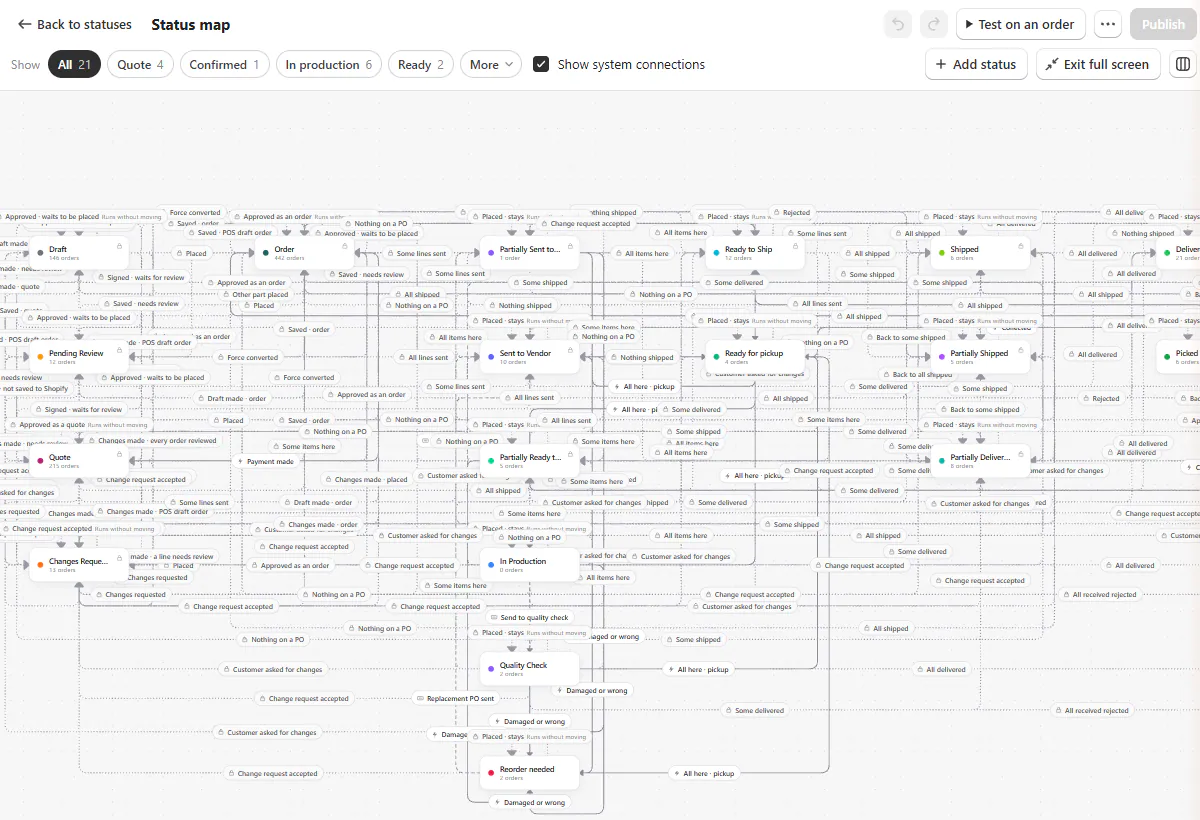
Purchasing counts PO-covered lines and special-order lines still waiting for a PO. A tracked stock line without a PO does not hold the order back.
A line with unknown inventory-tracking status waits as made to order. This avoids treating uncertain stock as ready.
A status chosen manually holds until a fact read by its connections changes. See How the status map works.
What customers see
Grouped statuses show the group's name and customer text on the portal, tracking and My orders. They also supply the Customer status message email field.
| Group | Starting customer text |
|---|---|
| Quote | Your quote is ready. |
| Confirmed | Your order is confirmed. |
| In production | We're preparing your order. We'll let you know when it's ready. |
| Ready | Ready for pickup or delivery. |
| On its way | Your order is on its way. |
| Complete | Delivered or picked up. |
| Cancelled | Your order has been cancelled. |
Moves within one group appear once. For example, Sent to Vendor and In Production both show In production to the customer.
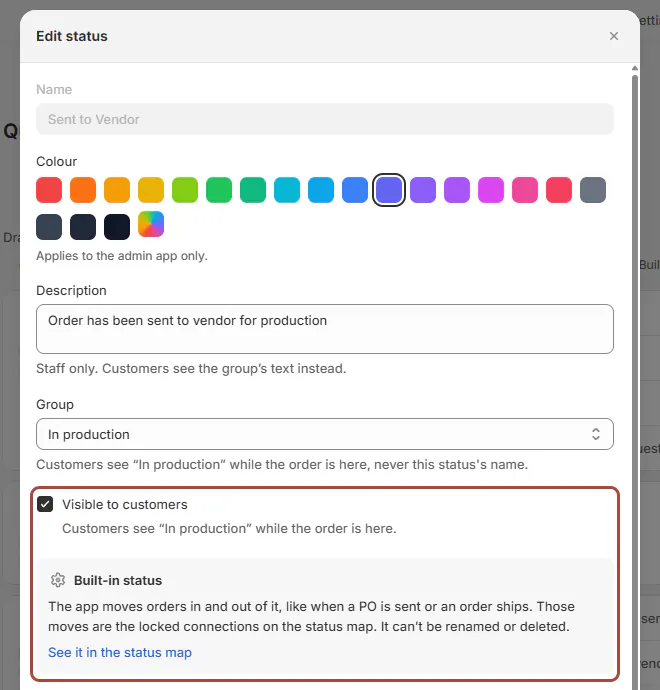
When Visible to customers is off, customers keep the last status they saw. A visible ungrouped status can appear on their order page.
Group order sets the progress track. Quote and Cancelled appear on that track only while the order is in them.
Older installations
Earlier stores received the 7 groups around their public built-in statuses. Internal and custom statuses remained under Not in a group yet.
They did not receive Reorder needed, Ready for pickup, Picked up or Cancelled. A custom status with the same name does not gain automatic connections.
Starter connections wait in the draft until published. Existing orders did not move or send email when the status map became available.
Example: Olivia's sofa and Priya's table
Olivia Bennett's Linden Sofa moves from Quote to Order, then Sent to Vendor when purchasing emails Atelier Homeworks.
Staff use Vendor confirmed to record production. Receiving moves it to Ready to Ship, and confirmed delivery moves it to Delivered.
Olivia sees Quote, Confirmed, In production, Ready and Complete. Those customer milestones are simpler than the staff's internal stages.
Priya Shah's order combines a special-order Arden Dining Table with 2 stocked Mira Dining Chairs. Receiving the table makes its purchasing work ready.
The tracked chairs, without purchase orders, do not hold that move back.
Do it
Set up statuses and groups, connect them, then test and publish the map.
Staff use the order's Status field and Next status controls to change status. POS shows statuses but has no status picker.
If something goes wrong
Shopify cancellation did not move an older store's order
Connect the cancellation event to your intended status.
A status has no list tab
Tabs appear only when that list contains a record in the status.
A status says Draft Order or Pending Quote
Those are display names for Draft and Pending Review.
An order moved unexpectedly
Use Status problems to inspect the event and connection.
Was this guide helpful?
Thanks. Tell us what was missing at support@meetorderpilot.com.