How OrderPilot syncs with Shopify
Related guides
- Fix a quote or order that didn’t sync to ShopifyGet started · 4 min
- Use OrderPilot in Shopify admin and SidekickSettings and integrations · 4 min
- Bring in your locationsSettings and integrations · 6 min
- Quotes, drafts and ordersQuotes and orders · 4 min
- How templates sync to Shopify productsCatalog · 5 min
OrderPilot keeps your quote or order connected to Shopify as the sale moves forward. You can see whether the matching Shopify draft or order is ready, still updating or needs attention.
Payments and fulfillment recorded in Shopify come back to OrderPilot. The link lets your showroom, office and warehouse follow the same sale without creating another order by hand.
Before you start
Sync runs automatically; there is no separate setup step for each quote. The difference between an OrderPilot draft, a quote and a placed order determines what exists in Shopify.
OrderPilot does not adopt draft orders created separately in Shopify, and syncing a sale does not change your theme. See Quotes, drafts and orders if you are choosing how to save a sale.
How it works
| What happens in OrderPilot | What happens in Shopify |
|---|---|
| Save as Draft | The unfinished record stays in OrderPilot. No Shopify draft order is created. |
| Create a quote or order | OrderPilot creates the matching Shopify draft order. The record can open while that work finishes. |
| Edit a linked quote | Changes sync to its Shopify draft in the background. |
| Collect payment, or create the order to pay later | The Shopify draft becomes a Shopify order. |
| Record payment, fulfillment, a refund or cancellation in Shopify | Shopify sends the change back to OrderPilot. |
- 1Saved draftStays in OrderPilot only. Nothing is in Shopify yet.
- 2Quote or orderOrderPilot creates the matching Shopify draft order.
- 3Shopify orderCollecting payment, or creating the order to pay later, turns the draft into a Shopify order.
- 4Updates come backPayments, fulfillment, refunds and cancellations in Shopify update OrderPilot.
Saving an unfinished draft and creating a quote are different actions. An OrderPilot draft saved without a location belongs to all locations until you choose where the sale is handled.
Shopify also supplies information used elsewhere in the app. Active locations come from Shopify, and vendor names on Shopify products are imported into OrderPilot.
Customers are your Shopify customers. Product templates become Shopify products when activated; How templates sync to Shopify products explains that separate catalog connection.
Payments and fulfillment come back
A payment recorded in Shopify updates the linked sale in OrderPilot. Refunds and cancellations also return, so check the existing linked sale before making another record.
Shopify fulfillment updates can advance shipping and delivery statuses, including Shipped, Partially Delivered and Delivered. A partial delivery does not mean that every line reached the customer.
A line is fulfilled when it leaves the store. A special-order piece does not leave at checkout merely because the customer paid for it.
How missed updates are caught
OrderPilot processes Shopify updates in the background and checks for updates that did not arrive. It also avoids applying an older draft update over a newer edit that is still syncing.
You do not need to keep the record open for that work to finish. If the record reports a failure, open its explanation and follow the retry guidance below.
Where you'll see it
| Label or control | What it means |
|---|---|
| Syncing with Shopify | The matching Shopify record is updating in the background. Fields stay locked until it finishes: This quote is syncing with Shopify. Editing is available once the sync finishes. |
| Sync complete or Draft synced | The Shopify draft is up to date. It stays until your next change. The hover text explains that a Shopify order is created when payment is collected. |
| Draft on Shopify | The sale is linked to a Shopify draft order. |
| Shopify Sync Failed | Shopify did not accept the update. Hover for Shopify's error. |
| Deleted, in red | The Shopify draft was manually deleted. |
| Eye icon | Opens the linked Shopify order or draft in a new tab. A split order offers a menu for its parts. |

The eye icon reads Open the order in Shopify or Open the draft order in Shopify on hover. For a split order it reads Open in Shopify and lets you choose the part.

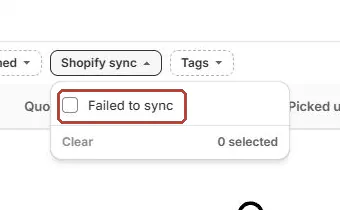
Home also reports failed syncs, and the quote and order lists offer Failed to sync. These help you find affected records without opening every sale.
Warning
A quote cannot be signed until its Shopify sync settles. The signing page asks the customer to refresh shortly and review the final total.
On Shopify's order or draft-order page, the OrderPilot block shows the link back. A connected record offers Open in OrderPilot; an unrelated Shopify record shows Not linked.
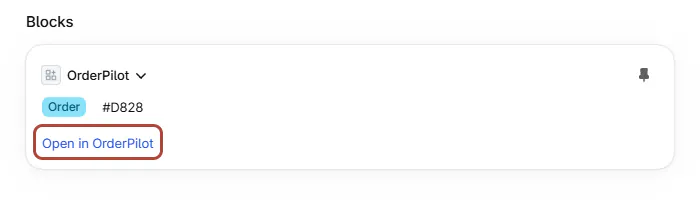
OrderPilot in Shopify admin and Sidekick explains where the block appears and how it helps your team move between the two views.
The choices you have
| Situation | What to do |
|---|---|
| A normal update is syncing | Wait for the status to settle before asking the customer to sign. |
| A saved record shows a sync failure | Open the error and use Retry Shopify sync when the cause is resolved. |
| A Shopify location is missing | Use Sync from Shopify in location settings. |
| A draft was created directly in Shopify | Continue managing it there; it is not automatically adopted by OrderPilot. |
| You need storefront options | Follow theme setup separately; order sync does not install or change your theme. |
Fix a failed Shopify sync covers retries. Retrying requires Create and edit quotes and orders or Convert quotes to orders.
Your locations covers manual location refreshes. Set up your theme for OrderPilot covers storefront setup.
What happens next
When the Shopify draft is ready, continue with the sale's next action. Turn a quote into an order covers placing the sale, and Collect a payment covers payment choices.
Keep the existing linked record as your starting point when a customer calls. Check its sync status, payment and fulfillment separately; each answers a different question about the sale.
Example: Priya's Arden Dining Table
Sam Ortiz creates Priya Shah's Arden Dining Table quote at Harlow & Finch Interiors. Syncing with Shopify changes to Draft synced when Shopify has the quote.
Priya signs, and the team places the order. The sale now links to a Shopify order rather than an open draft.
Her payment in Shopify returns to OrderPilot. Later, shipping and delivery updates show how far the table has moved toward the customer.
Once delivery is recorded, the sale can show Delivered. Nora Ellis can open the Shopify order and use its OrderPilot block to return to the original sale.
If something goes wrong
Shopify sync failed. Signing is blocked.
Open the record's error, resolve the cause and use Retry Shopify sync. Follow the failed-sync guide for the full checks.
A red Deleted badge appears
The linked Shopify draft was manually deleted. Retry Shopify sync can recreate that draft.
The customer sees The store is updating this Quote
Wait for sync to settle, then ask the customer to refresh and review the final total.
Was this guide helpful?
Thanks. Tell us what was missing at support@meetorderpilot.com.