Turn a quote into an order
Related guides
- Quotes, drafts and ordersQuotes and orders · 4 min
- Set signature and minimum-deposit requirementsPayments and signatures · 5 min
- Get a quote signedPayments and signatures · 5 min
- Collect a paymentPayments and signatures · 6 min
- Take a depositPayments and signatures · 5 min
Turn an agreed quote into an order, or use an authorized exception when its signature or deposit is still missing. Check whether Shopify placement has happened too.
An OrderPilot order can still be backed by a Shopify draft. Quotes, drafts and orders explains why changing the type and placing the sale are separate checks.
Before you start
Have a created quote
Finish and create the record before converting it.
Check conversion access
Your role needs Convert quotes to orders to move a quote to Order.
Read the requirements
Missing before order placement identifies signature and deposit gaps.
Check exception access
Skipping a requirement needs Bypass signature and deposit requirements, with additional permissions for the action.
Signature and deposit requirements explains how the store chooses these rules. In the app, authorized staff can confirm an exception and have it recorded.
Continue through signature and payment
Step 1: Send the appropriate request
Use Get a quote signed for the agreement, or Collect a payment for the amount due.
The customer receives the relevant link. Check the record for the resulting signature and payment state.
Step 2: Check the payment result
When the customer pays, the Shopify draft becomes a Shopify order. If payment was received elsewhere, use the appropriate record-payment action.
For an agreed later payment, use Create order (pay later). Payment terms and paying later explains that route.
Step 3: Check the resulting order
Read the record's title, Shopify badge and payment state. Do not infer a paid balance from the word Order.
Approving a signed pay-later quote in Review also places it as an order.
Move the quote to Order
Step 1: Choose the destination
Use Next status, or Status in Quote settings, and choose Order.
The option requires Convert quotes to orders. If it is greyed out, read the reason before continuing.
Step 2: Save and check the title
Save the change. The page follows the record to its order page, and the title changes from Quote to Order.
The number remains the draft name until a Shopify order number exists. Check the Shopify badge to establish whether placement is complete.
Place it with a missing requirement
Step 1: Review the placement warning
When placing a record with a missing signature or deposit, read Place this order without and the listed gaps.
Choose Get signature first to return to signing, or Cancel to stop. Authorized staff can choose Place anyway.
Step 2: Open Force Convert when appropriate
For an eligible unsigned quote, choose •••, then Force Convert to Order. Read the confirmation naming the quote.
It warns that you can be ordering items without the customer's signed commitment. Check the sale and the intended exception before confirming.
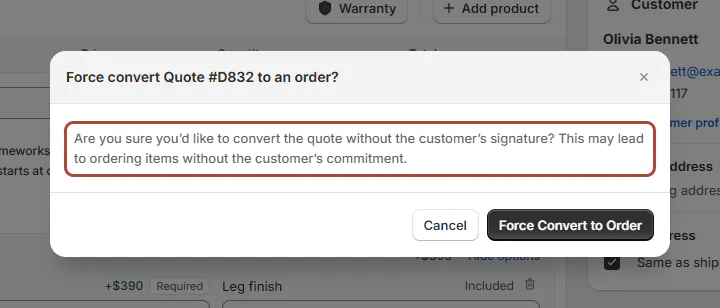
Confirm only when you intend to place the unsigned sale. Step 3: Confirm and wait
Click Force Convert to Order to proceed. The page reports conversion in progress, then confirms that the quote is an order.
If it says conversion is still running, refresh in a minute. Check the completed record rather than starting another conversion.
Warning
Force Convert cannot be undone. It places the sale and records that the customer's signature was waived.
What happens next
The record appears under Orders with its lines and history. Once Shopify supplies the order number, the earlier draft number remains as formerly information.
Force Convert completes an unpaid draft with payment pending. If it has no terms, it uses Due on receipt.
No signature identifies the exception. Its hover names who converted the sale and when; the customer can still sign from the signing link.
The PDF's signature area reads Signature not required, with the staff member and date. Activity records the conversion without the customer's signature.
Example: two agreed sales
Example · Harlow & Finch Interiors
Choose the route that matches the agreement
Olivia Bennett and Marcus Reed agree to different next steps.
- Sam Ortiz sends Olivia her Linden Sofa signing and payment links.
- Sam checks the completed payment and Shopify order.
- Marcus asks to proceed with his Arden Dining Table before signing.
- Nora Ellis checks the requirements and confirms an authorized Force Convert.
- Nora checks No signature and the outstanding payment, and Marcus can sign later.
Important notes and tips
Force Convert needs Create and edit quotes and orders plus Bypass signature and deposit requirements. Quotes also need Convert quotes to orders.
Records in review require review approval permission. Locked records also require Force Edit locked orders.
How order statuses work explains automatic stages. Use the displayed record state to verify what actually happened.
If something goes wrong
Order is greyed out
Check conversion permission.
Place anyway is greyed out
Check permission to bypass signature and deposit requirements.
Force Convert is missing
It is offered only for eligible unsigned, uncancelled, unplaced records and authorized roles.
Statuses are paused
Resolve the status pause before Force Convert.
The quote is not created
Create it before converting.
The Shopify draft was deleted
Retry Shopify sync before conversion.
A delivery address is missing
Add it for delivery items, or correctly switch them to Store pickup.
Was this guide helpful?
Thanks. Tell us what was missing at support@meetorderpilot.com.