How stock on hand and tracked options shape purchase orders
Related guides
- Create purchase orders in the PO WorkbenchPurchasing · 6 min
- Split or attach one order's purchase linesPurchasing · 5 min
- Order a new unit or sell from stockInventory and costs · 6 min
- Stock: what receiving and custom pieces do in ShopifyInventory and costs · 5 min
- Set option prices and track separate stockCatalog · 5 min
Use the stock badges in the PO Workbench to see what needs buying. Stock already at the chosen location can cover a line, while a configured product's tracked options may need their own purchasing rows.
How it works
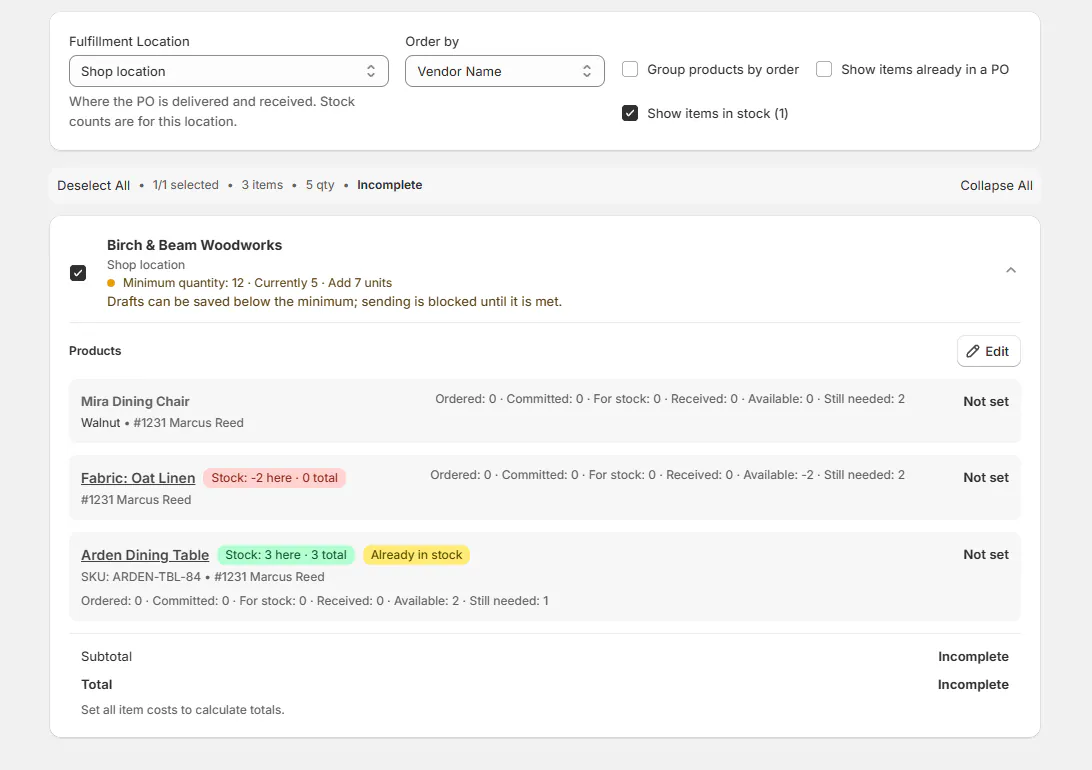
The PO Workbench reads Shopify stock at Fulfillment Location. It shares that available quantity across lines in their displayed order.
Covered lines stay off the PO. Show items in stock counts those lines; ticking it brings them back with Already in stock.
- 1Choose the locationCheck inventory where the goods will be fulfilled.
- 2Compare the linesApply stock to each line in list order.
- 3Review exceptionsKeep ordered-new and customized requirements visible.
- 4Prepare purchasingBuy the remaining quantities and tracked options.
Stock of a standard product cannot cover a customized version. A line marked Ordered new remains on the PO regardless of stock on hand.
A line taking its units from another location needs no PO. Its note names that source location.
Choosing one of the selected orders' own locations keeps only that location's lines. Choosing a separate warehouse where none of those orders belongs keeps every line.
Tracked options have separate rows
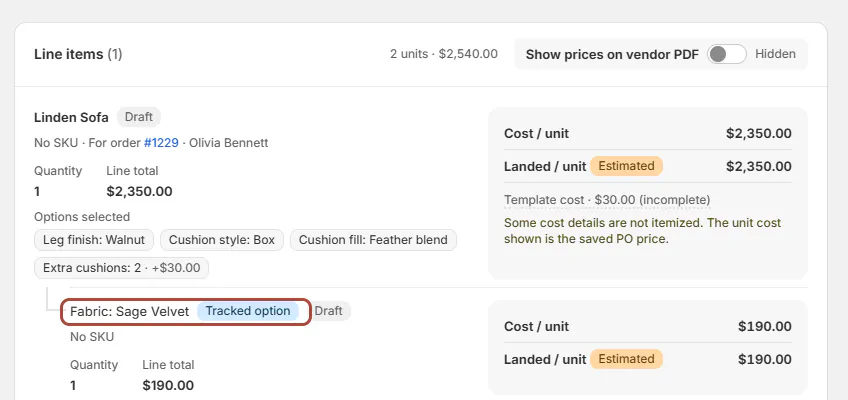
When an option tracks inventory, the configured line has a parent row and a row for each tracked option. Each row is allocated and received independently.
Tracked option identifies a value chosen on the product above it. Option stock settings control which options behave this way.
Receiving a tracked option adds available stock. It does not add a second reservation, because Shopify committed the option when the order was placed.
Where you'll see it
Stock badges appear in the workbench. Purchasing and hold notes appear beneath the customer order's line.
| Display | Meaning |
|---|---|
| Stock: 2 here · 3 total | The chosen location has 2 units; all locations have 3 |
| Stock: 0 here · 2 at Warehouse | The stock is elsewhere |
| Stock: 3 total | Choose Fulfillment Location to check a specific location |
| Already in stock | You brought a covered line back into purchasing |
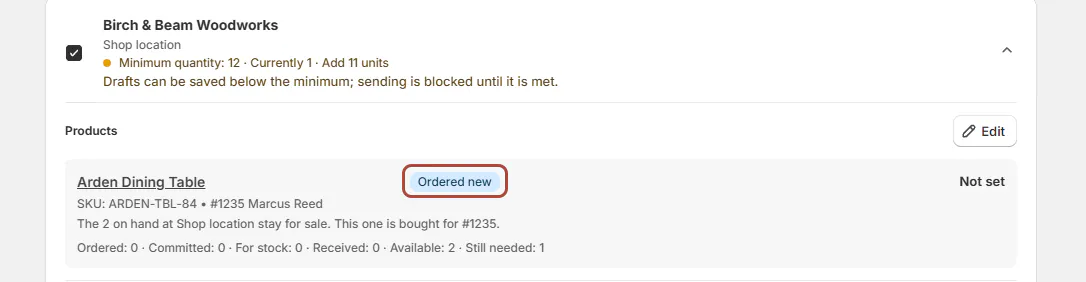
| Ordered new | Buy this customer's units regardless of stock |
| Tracked option | This value has its own inventory and purchasing row |
An ordered-new line also says how many on hand stay for sale and which order the unit is bought for, for example The 2 on hand at Shop location stay for sale. This one is bought for #1235.
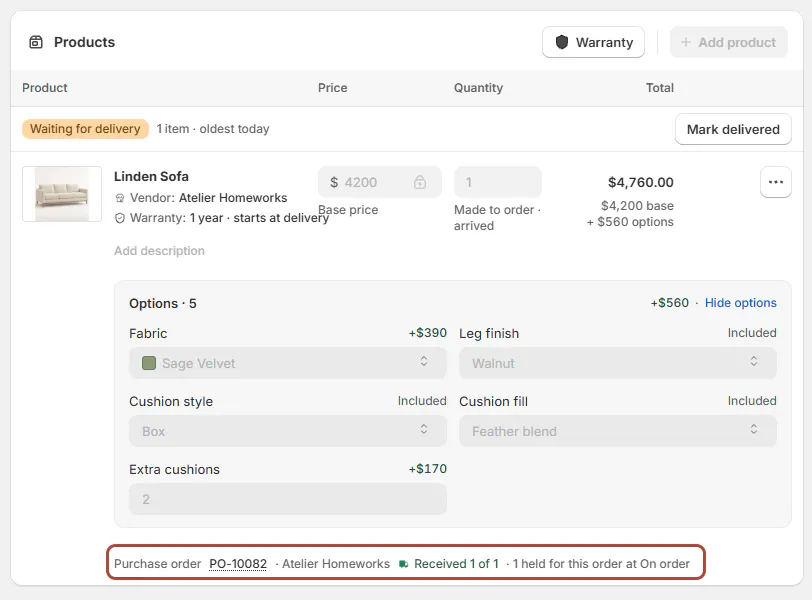
An order line names its Purchase order, vendor and Received X of Y quantities. Held units add a note naming the location and quantity reserved for that customer.
The From stock row can show Holding, a confirmed held quantity or Not held. A shortage is retried when stock arrives. A PO receipt triggers that check immediately; a Shopify count change is checked within a day.
A failed hold message says whether automatic retries continue. Follow its instruction to modify the line if the hold must be attempted again. See Shopify inventory for the distinction between available and held stock.
Screen reference
The choices you have
Use Manage PO to work with parent and option allocations. Excluding a parent can offer Parent and options or Parent only.
You can apply a landed-cost charge to an individual option. That changes the option's cost without spreading the charge across the entire sofa.
Made-to-order lines show their expected readiness as a dotted link. Lead time opens the breakdown explained in the delivery promise.
When every required unit and tracked option has arrived, the line reads Made to order · arrived. A partial receipt or an increased order quantity keeps the remaining lead-time display.
Matching stocked configurations can offer Use stock unit. Ordered-new lines show New with their destination before arrival, then Arrived & Held afterward.
A Shopify product without inventory tracking shows no stock count. Where costs are visible, missing receipt costs are identified as No cost has been recorded for these goods yet.
Example: chairs and tracked fabric
Priya Shah needs 2 Mira Dining Chairs, and the showroom has 2 available. Her line stays off the PO until Jo Park ticks Show items in stock.
Marcus Reed's chairs are marked Order New, so they remain eligible for purchasing. Olivia Bennett's Linden Sofa has tracked Sage Velvet, producing separate sofa and fabric rows on PO-10001.
Accepted units satisfy the customer-order portion first. Rejected units come off the stock portion first. Extra accepted units remain available for stock.
Do it
Create POs in the workbench after checking the location and stock badges. Hover over a greyed Create POs button to read whether stock covers every line.
After receiving, reload the order to see its hold status. Use receiving corrections if the quantities or held location need attention.
Was this guide helpful?
Thanks. Tell us what was missing at support@meetorderpilot.com.