Export, hold and retain signature records
Related guides
- Get a quote signedPayments and signatures · 5 min
- Sign in the showroom: on the iPad, by QR code or on paperPayments and signatures · 5 min
- Set signature and minimum-deposit requirementsPayments and signatures · 5 min
- Handle data requests, reset settings, or uninstallSettings and integrations · 5 min
- How roles and permissions workTeam and permissions · 6 min
Inspect the document and evidence saved with a signature, preserve records under a hold and export copies for your store.
A signature record keeps the agreement as signed. Later customer-facing edits supersede that record instead of replacing its contents.
Before you start
Find the agreement
Open a signed or Re-Sign quote or order. Get a quote signed covers creating the electronic signature.
Check evidence access
Anyone who can view the order can inspect its available signature history.
Check management access
Holds, exports and retention settings need Export and hold signature records.
Choose consent wording and retention periods with your store's adviser. The app's settings and evidence fields do not establish a legal outcome.
What the record keeps
| Evidence | What it preserves |
|---|---|
| Document | The agreement frozen when the customer signed, with its fingerprint. |
| Signed PDF | The stored signed document and certificate page, with a separate SHA-256 fingerprint. |
| Consent | The wording accepted at signing. |
| Signer and method | Name, email and whether signing happened online, on the store iPad or through a staff-recorded paper copy. |
| Signing context | IP address, device, and the relevant POS staff and location. |
| Timeline | Signing-link events, copy-email information and later supersession. |
| Scan | An attached copy of a paper-signed document, where provided. |
Signed records are retained through customer data requests. Customer-facing edits preserve the earlier signed copy as Superseded.
Open history and download
Step 1: Open Signature history
Click the Signed badge, or choose •••, then Signature history.
Inspect Current and Superseded, the signing method and the associated document. Choose the version relevant to the event you are investigating.
Step 2: Download the stored evidence
Use Download signed PDF, Download evidence or Download scan, where available.
Keep the signed PDF and its evidence together. The stored document reflects the signed version, rather than today's unsaved edits.
Step 3: Attach a paper scan
On the recorded paper signature, use Attach scan. Select JPEG, PNG, WebP, HEIC or PDF up to 10 MB.
This requires Bypass signature and deposit requirements. Check that the scan belongs to the same printed agreement and recorded customer.
Compare a returned PDF with the stored copy
Compare the returned file's SHA-256 result with Signed PDF SHA-256 in history. A different fingerprint means the files differ.
On Windows, use the following command with the actual PDF name.
``
text title="Windows fingerprint" certutil -hashfile file.pdf SHA256``On macOS, use the following command with the actual PDF name.
``
text title="macOS fingerprint" shasum -a 256 file.pdf``Matching file fingerprints checks the file contents. It does not by itself decide a dispute or establish who signed.
Place or lift a legal hold
Step 1: Place the hold
Choose •••, then Place legal hold. Enter a specific Reason and click Place hold.
The order shows Legal hold, and Signature history explains that its records are retained until the hold is lifted.
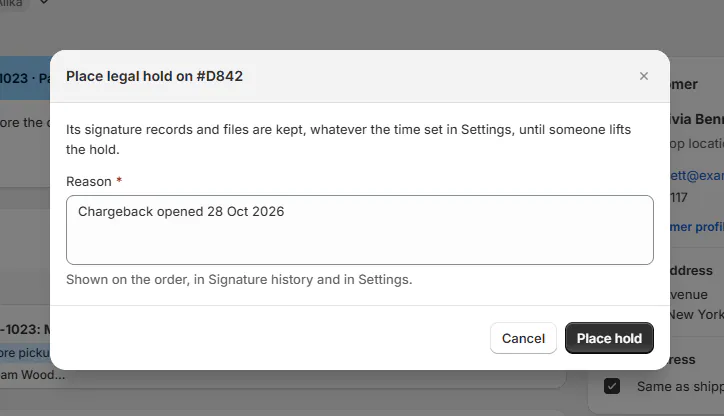
Record why the signature evidence must be retained. Step 2: Lift the hold when appropriate
Choose Lift legal hold, enter why it is being lifted and confirm Lift hold.
The change appears in Activity. The records return to the applicable retention rules.
OrderPilot does not learn of card disputes automatically. Staff must place a hold when their process requires one.
Export the evidence
Step 1: Choose the records
Go to SettingsAccount & dataSignature records. Under Export evidence, set Signed from and to.
Tick Include superseded signatures if you need the earlier agreements too. Click Prepare export.
Step 2: Download the ready parts
Wait for Ready, then download the export. Large exports are divided into parts of up to 500 signatures.
Download links work for 7 days. Keep every part you need and inspect the included manifest and readme.
Step 3: Export before removing the app
Under Before you remove OrderPilot, use Export everything. Download and verify the resulting files before removal.
The export can include signed documents, evidence, document data, signature images and attached scans. A date range is limited to 20,000 signatures.
Choose the retention settings
Step 1: Set the number of years
Under Keep signature records for, enter a whole number from 1 to 30. The default is 7.
The period counts from the latest signature, payment, delivery or pickup. An order with a balance or undelivered items is kept.
Step 2: Choose what happens afterward
Choose Delete the files and the signer's details or Keep everything, then save.
The deletion option deletes files and signer details 30 days after a notice on this page (and by email when one can be sent). A short entry retains the document number, dates and fingerprints. A note under the choices says when the oldest signature becomes due.
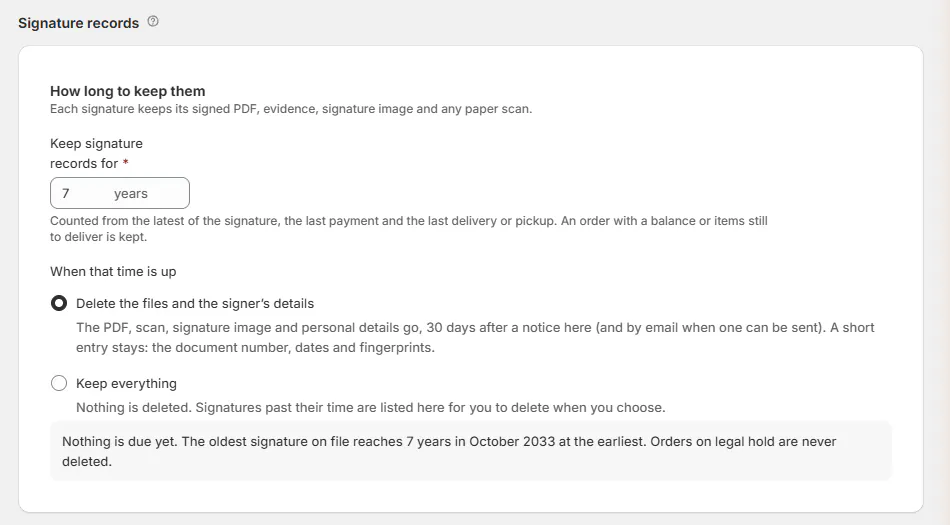
Choose the period and action together. Step 3: Review any manual deletion
If you choose Delete them now, read the count and confirmation. Use Export first when you need copies before deletion.
Confirm deletion only according to the store's retention decision. Held records remain protected until their hold is lifted.
What happens next
Retention deletion follows a 30-day notice. Notices are batched to the owner at most weekly, and held records are not deleted.
Evidence is retained for 6 months beyond shop-data erasure following removal. Export it yourself before removing the app rather than relying on a later delivery.
Example: retain Marcus's agreement
Example · Harlow & Finch Interiors
Keep the relevant evidence together
Marcus Reed disputes his Arden Dining Table payment.
- Nora Ellis places a legal hold with the reason “Chargeback opened.”
- Nora downloads the signed PDF and evidence.
- Nora retains the relevant export copies for the store's dispute process.
- Once the matter is closed and the store approves release, Nora lifts the hold with a reason.
If something goes wrong
Signature history is missing
Check whether the record has a signed or Re-Sign agreement.
Legal hold is missing
Check evidence exists and your hold permission.
Attach scan is unavailable
Check bypass permission and the paper-record type.
The scan is refused
Use a supported format no larger than 10 MB.
The retention value is invalid
Enter a whole number from 1 to 30.
An export failed or expired
Prepare it again; split ranges exceeding 20,000 signatures.
Was this guide helpful?
Thanks. Tell us what was missing at support@meetorderpilot.com.