Purchasing and costing settings
Related guides
- How landed cost and cost layers workInventory and costs · 4 min
- Send a purchase order to your vendorPurchasing · 6 min
- Keep Shopify costs right and read your marginsInventory and costs · 5 min
- Set up vendorsCatalog · 5 min
- Set up lead times for vendors and optionsCatalog · 5 min
Find the defaults for vendor wording, purchase-order numbering, stock costing and Shopify cost updates. Open Purchasing & accounting in Settings.
The page has Vendors, Purchase orders & costing, Commissions and QuickBooks tabs. Manage purchasing settings controls purchasing defaults; editing vendor records needs Manage vendors.
Vendors
The vendor table and dialog are explained in vendor setup. The dialog's Lead time section supplies part of a made-to-order line's delivery calculation.
| Field | What it controls |
|---|---|
| Build time (days) | Whole calendar days needed by the vendor to make the goods. |
| Transfer to us (days) | Whole calendar days for the goods to reach your store. |
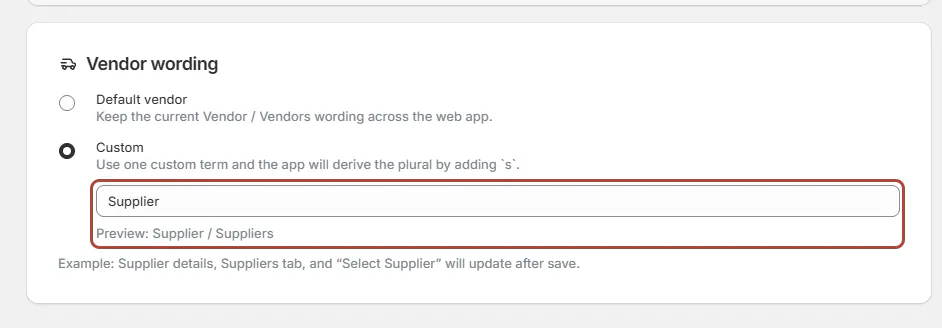
| Vendor wording | Keep Default vendor or choose your own wording for Vendor and Vendors in the app. |
Lead times accept whole days from 0 to 3650. Blank means Not set, while 0 means no additional days. Do not use 0 for an unknown duration.
The line adds vendor time to its slowest option and the store's delivery time. See lead-time setup for the complete calculation.
Vendor wording changes the app's labels. POS continues to say Vendor.
Screen reference
Purchase orders
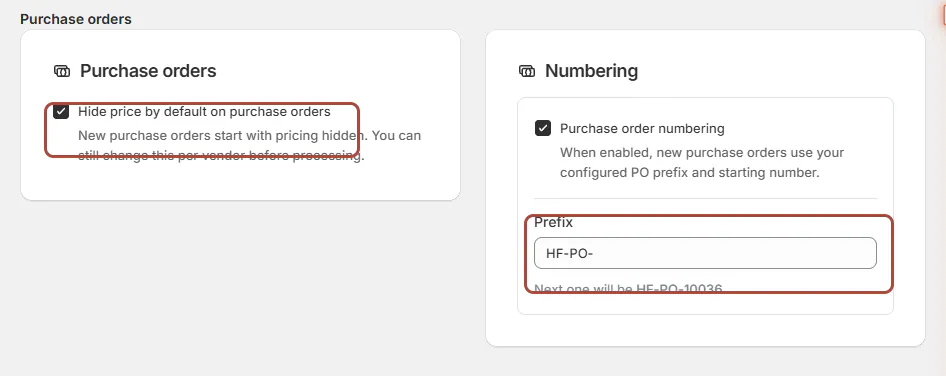
Open SettingsPurchasing & accountingPurchase orders & costingPurchase orders.
| Field | What it controls |
|---|---|
| Purchase order numbering | Enables your configured prefix and next number for new POs. |
| Prefix | The text placed before the configured number. |
| Next number | The starting point used by the enabled numbering setup. |
| Hide price by default on purchase orders | Starts new POs with prices hidden from the vendor's copy. |
Without custom numbering, POs start with PO-0001 and use a counter that skips numbers already taken. Numbering changes affect new POs.
The hidden-price default starts on. You can change a particular PO's choice before sending it.
Cost of goods for stock
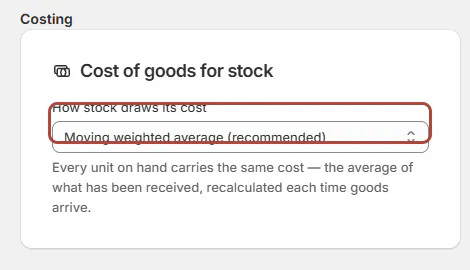
Open SettingsPurchasing & accountingPurchase orders & costingCosting. How stock draws its cost chooses the costing method.
| Choice | What it uses |
|---|---|
| Moving weighted average (recommended) | An average across costed stock |
| FIFO — first in, first out | The oldest available cost layers first |
| LIFO — last in, first out | The newest available cost layers first |
How landed cost works explains layers and the effect on consumed stock.
When switching away from moving weighted average, the banner explains that no past batches exist to reconstruct. FIFO or LIFO begins with the next delivery.
Stock already on hand keeps its assigned average. Changing the method does not reprice past sales.
Charges
| Field | What to know |
|---|---|
| Default split method | Lists By purchase value, By quantity, By weight and Manual. Add charge currently starts on By value, so check each charge's selection. |
| Purchase tax is not part of landed cost | On by default. Tax you reclaim is not a cost of the goods; turn it off only if your tax is unrecoverable. |
| Record the exchange rate on each receipt | On by default, so a rate that moves later does not restate a delivery that already happened. |
| Show cost on the order page | Makes order cost information available in the app, subject to the person's cost permission. It starts off. |
Choose the split method within each charge, and check its allocation preview before saving.
Shopify
| Field | What it controls |
|---|---|
| Keep Cost per item updated for stocked products | Publishes the weighted average of costed stock once its costs are final. |
| When the cost was changed in Shopify | Chooses whether to flag the item and stop publishing or overwrite it with the OrderPilot figure. |
A new stocked variant starts at its PO unit cost even when ongoing cost publishing is off. Later publishing follows the final-cost rule.
Use Shopify cost and margin review to check missing, provisional or failed costs.
Commissions and QuickBooks
Use commission setup for commission rates, the base and sales splits. It has separate permissions from the purchasing defaults.
Use QuickBooks connection and purchasing sync for the accounting connection and what it sends.
Example: Harlow & Finch's purchasing defaults
Nora Ellis keeps Moving weighted average and hidden vendor prices. She enables a custom PO prefix and cost publishing with Flag it and stop publishing that item.
She records Atelier Homeworks' known build and transfer times. An unknown time remains blank, so the order can identify the missing part of its promise.
If something goes wrong
Add charge ignores the saved split default
Choose the split inside the charge; it opens on By value.
POS still says Vendor
Custom vendor wording applies to the app.
FIFO did not change existing stock costs
Existing stock retains its average; new deliveries provide new layers.
Lead time will not save
Enter whole days between 0 and 3650, or leave the field blank.
A card is missing or read only
Check Manage purchasing settings or Manage vendors, according to the field.
Was this guide helpful?
Thanks. Tell us what was missing at support@meetorderpilot.com.