How roles and permissions work
Related guides
- Give staff accessTeam and permissions · 7 min
- Create and manage rolesTeam and permissions · 5 min
- Hand over an order and choose who’s in the salesperson listTeam and permissions · 4 min
- Credit salespeople on a quote or orderTeam and permissions · 5 min
- Set up commissionTeam and permissions · 6 min
A permission allows a specific action or access to particular information, such as viewing costs or editing quotes. A role groups permissions for a job, such as Salesperson or Operations.
Assigning a role gives staff the access intended for that job. Their assigned locations and the role’s record-access rules also determine which records they can work with.
Each person has one role. Roles are always on, and the store owner always has full access and cannot be changed or suspended.
How it works
- 1PersonIdentify the staff member using OrderPilot.
- 2RoleApply their permissions and allowed app surfaces.
- 3Locations and recordsLimit work to the places and records they can reach.
- 4ActionCheck whether the requested change is allowed now.
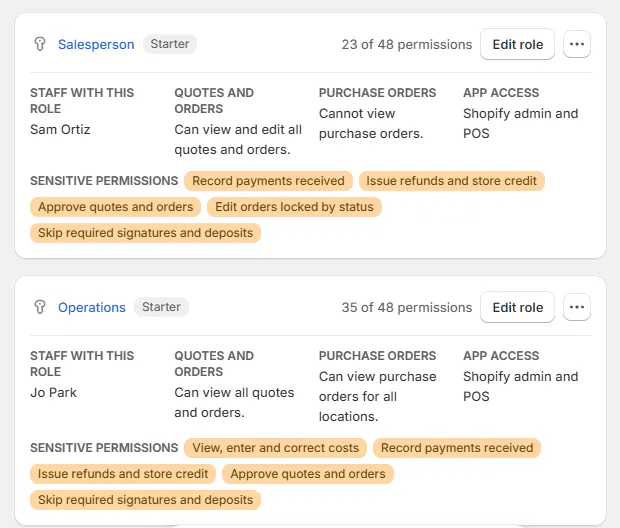
Starter roles are Store administrator, Salesperson and Operations. A conflicting role name gains “(starter)”; deleting a starter role does not recreate it.
Store administrator has full permissions regardless of individual ticks, except Appear in the salesperson picker. Commission permissions are otherwise held back from the starter-role defaults.
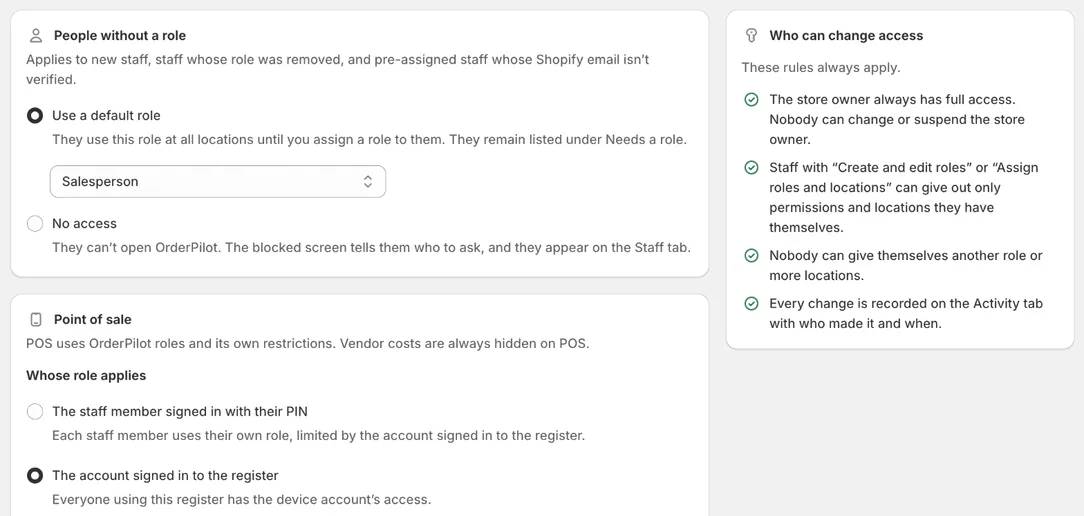
People without a role receive the Access rules default, initially Salesperson, or no access if that is selected. Existing users were given Store administrator when roles were introduced.
A role applies store-wide, with locations assigned per person. Sales credit and assignment are separate: credit does not grant record access.
Where you'll see it
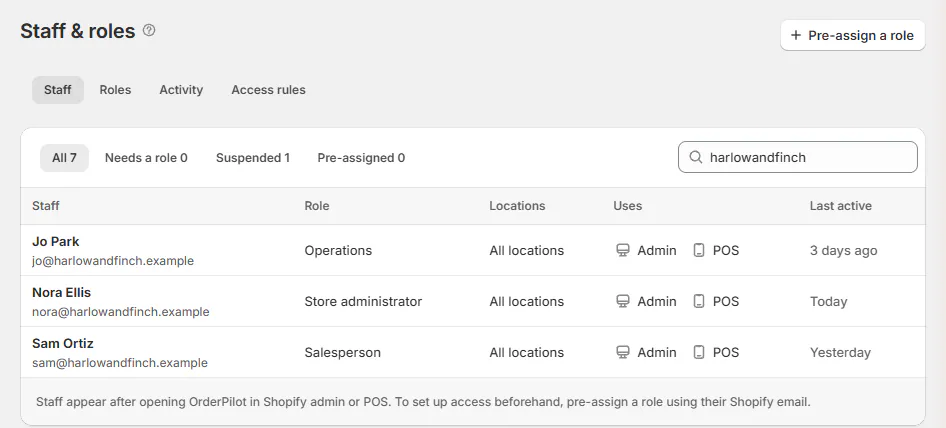
Open Staff & roles in Settings.
| Tab | What it contains |
|---|---|
| Staff | Search staff; All, Needs a role, Suspended and Pre-assigned filters; role, locations, uses and last activity |
| Roles | Starter and custom role cards, permission counts, record scope, surfaces, Duplicate and Delete role |
| Activity | Staff and role filters, access changes and optional blocked attempts |
| Access rules | People without a role, Point of sale and who can change access |
Staff appear after opening OrderPilot in Shopify admin or POS. Pre-assign access using their Shopify email through staff setup. The list holds up to 500 people.
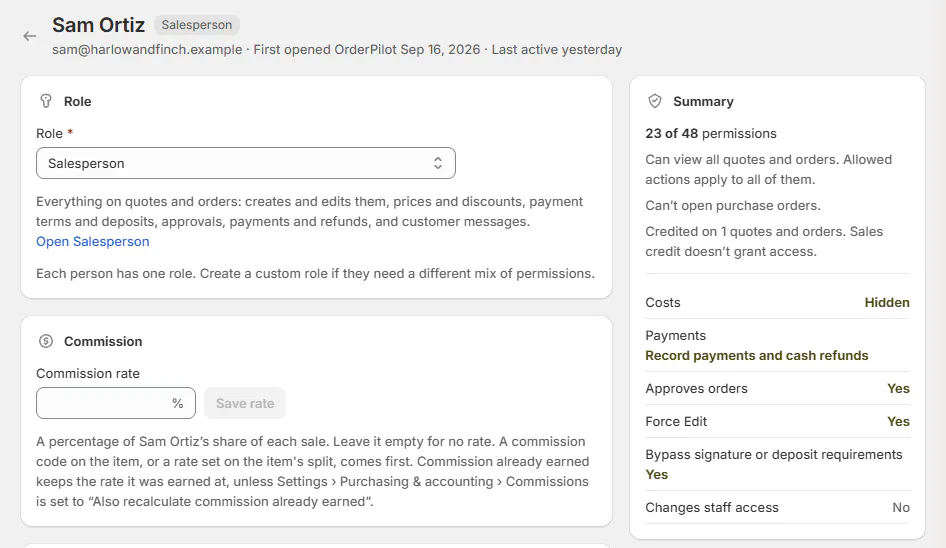
A person's page shows Role, Commission, Locations, read-only Permissions, Which records and Suspend access. Its summary and Access history explain the effective access.
The owner's row is not clickable.
Access changes are kept while the shop uses OrderPilot. Blocked attempts are retained for 30 days.
Screen reference
The choices you have
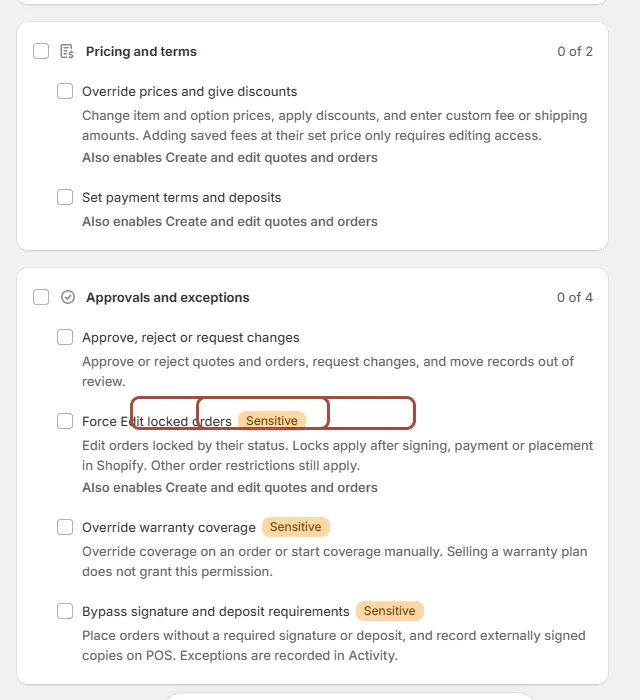
The editor groups 48 permissions into 12 areas. Sensitive highlights permissions with wider consequences; Can’t be undone identifies irreversible actions. Also enables explains required permissions added with a choice.
Quotes and orders
| Field | What it does |
|---|---|
| View quotes and orders | Read allowed records, PDFs, history and comments. |
| Create and edit quotes and orders | Edit products, customer details, delivery, notes, fields and tags; restore versions and change registered locations. |
| Convert quotes to orders | Place quotes; POS payment on a quote needs this. |
| Change order status | Change statuses and mark items collected or delivered. |
| Reassign quotes and orders | Hand a record to someone else; on an order, that means making a different person the primary salesperson. |
| Change sales credit | Change credited salespeople without changing record access. |
| Appear in the salesperson picker | Allow new selection; turning it off preserves existing credit. |
| Delete quotes and draft orders | Remove these records. Cannot be undone. |
Pricing and terms
| Field | What it does |
|---|---|
| Override prices and give discounts | Change prices, discounts and custom fees or shipping. Saved fees at their set price need editing access. |
| Set payment terms and deposits | Set payment timing and deposit requirements. |
Approvals and exceptions
| Field | What it does |
|---|---|
| Approve, reject or request changes | Decide reviews and move records out of review. |
| Force Edit locked orders | Edit status-locked orders while other restrictions remain. Sensitive. |
| Override warranty coverage | Override or manually start coverage. Sensitive. |
| Bypass signature and deposit requirements | Make recorded exceptions to required approval conditions. Sensitive. |
Payments
| Field | What it does |
|---|---|
| Request payment | Enable payment, send requests and cancel them. |
| Record payment and Mark as paid | Record money already received; it does not collect payment. Sensitive. |
| Refund payments | Issue refunds and warranty-claim store credit. Sensitive. |
Customer communication
| Field | What it does |
|---|---|
| Email customers | Send and schedule quote, order and signature emails. |
| Handle customer messages and change requests | Reply and manage requests; completing a request does not itself cancel or refund an order. |
Warranty claims
| Field | What it does |
|---|---|
| View warranty claims | Read claims, coverage checks and history within record access. |
| Manage warranty claims | Start claims, arrange repairs, parts and replacements, record costs and communicate. |
| Approve and decline warranty claims | Decide coverage, paid repair or decline; goodwill also needs warranty override. Sensitive. |
Purchasing
| Field | What it does |
|---|---|
| View purchase orders | Read POs and history within the chosen scope. |
| Prepare purchase orders | Prepare POs and choose vendor-document price visibility. |
| Send and cancel purchase orders | Email, mark sent, resend or cancel. |
| Finalize and reopen purchase orders | Close costs or reopen them. |
| Manage vendors | Maintain contacts, email addresses and minimums; sync or archive vendors. |
Receiving
| Field | What it does |
|---|---|
| Receive items | Record arrivals and customer or stock allocation; cost visibility is separate. |
| Correct receipts | Correct quantities with a reason. |
| Add to stock or write off | Decide goods freed by a cancelled order. Sensitive. |
| Add and edit serial numbers | Maintain unit serial information. |
Costs
| Field | What it does |
|---|---|
| View costs | Read vendor and landed costs, including allowed documents and exports. Sensitive. |
| Enter costs and charges | Enter vendor amounts, allocate charges and finalize estimates. Sensitive. |
| Correct received costs | Adjust posted receipt costs separately from planned costs. Sensitive. |
Without View costs, cost figures are withheld and Costs hidden explains why. Order-page visibility also depends on Costing settings. Costs are always hidden on POS.
Catalog
| Field | What it does |
|---|---|
| Manage the catalog | Maintain templates, options, bundles and categories, including imports and stock settings. |
| Change catalog selling prices | Change template and option prices and new stock-product retail prices. |
Catalog management does not itself grant selling-price or cost editing.
Reports
| Field | What it does |
|---|---|
| View Home and Analytics totals | Read store-wide values; record counts follow the person's record access. |
| View own commission | Read personal sales credit and commission. |
| View all commission and profit | Read allowed records' team credit and Analytics Commission, Profit and Configurations. Sensitive; also enables own commission and cost viewing. |
Administration
| Field | What it does |
|---|---|
| Manage order and quote settings | Manage quote defaults, statuses, fields, fees, discounts and online-store choices. |
| Manage purchasing settings | Manage PO defaults, numbering, costing, QuickBooks and vendor wording. |
| Manage shop settings | Manage business, locations, customers, branding, messages and warranty setup. |
| Assign roles and locations | Assign permitted access, pre-assign, suspend or restore people. Sensitive. |
| Create and edit roles | Maintain roles within your own access. Sensitive. |
| Manage billing | Change billing. Sensitive. |
| Download customer data requests | Download requested customer data. Sensitive. |
| Export and hold signature records | Export evidence, manage legal holds and retention. Sensitive. |
| Reset settings and remove app data | Perform destructive data actions. Sensitive; cannot be undone. |
Which permission opens a Settings area?
Business details, locations, Branding, Customers, Messages and warranty setup use Manage shop settings.
Quotes & orders and Commissions use Manage order and quote settings. PO defaults, Costing and QuickBooks use Manage purchasing settings.
Vendors needs Manage vendors; Options and Categories need Manage the catalog. Subscription needs Manage billing.
Example: a showroom and warehouse
Nora Ellis manages the store's setup. Sam Ortiz has Salesperson access at Showroom and the selected assigned-record scope.
Jo Park has Operations access at Warehouse for purchasing and receiving. Giving Sam sales credit does not give Jo access to the customer's order.
Do it
Give staff access, then create custom roles where the starter roles do not fit. Set up POS separately for shared registers.
Changes apply on the person's next page load or POS opening. A permanently disallowed action is hidden; a temporary blocker leaves it greyed with a reason.
A Settings panel without editing permission opens View only. Hover over its lock to see the required permission.
Was this guide helpful?
Thanks. Tell us what was missing at support@meetorderpilot.com.