Set up trade customers and order tax
Related guides
- Create a quote or orderQuotes and orders · 6 min
- Find and edit customersCustomers and portal · 5 min
- Add fees, shipping and discountsQuotes and orders · 5 min
- Take some items home and deliver the restQuotes and orders · 5 min
- Download and print quote and order PDFsPayments and signatures · 5 min
Link a trade customer to their company, record their resale certificate and choose the tax treatment of an individual draft sale.
Shopify calculates tax. OrderPilot records the customer's exemptions and lets an authorized staff member override tax for an order before it is placed.
Before you start
Open the customer
Use Customers in OrderPilot, or open the profile from a quote or order.
Check access
These sales actions need Create and edit quotes and orders.
Prepare the details
Have the company information and the certificate file, state and expiry date ready.
The customer profile remains accessible from an order even when the Customers menu is off.
Require a reason to charge or exempt tax starts on. Find it under SettingsQuotes & ordersDefaultsDelivery & stock.
Link the customer's company
Step 1: Open the company picker
Open the customer's profile and choose Edit profile. Under Company, use Search or create a company.
On a shop with Shopify B2B companies, choose the company, or type its name and pick Create company "…". No company clears it. The selection appears in the profile form.
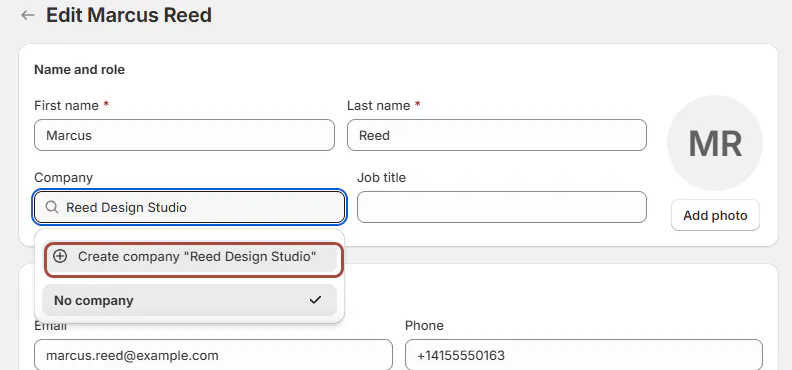
Choose the customer's company from their profile. Step 2: Save the company choice
Save the profile. On a B2B shop, the customer becomes a contact of the selected Shopify company.
Use No company when no company should be linked. The company name prints beneath the customer's name on documents.
Record a resale certificate
Step 1: Open Tax & resale
In the customer profile, open Tax & resale, then Add a resale certificate.
Choose State, select the certificate file with Choose file, and enter Expires. Leave the expiry empty only when the certificate has no expiry.
Step 2: Save and check the certificate
Save the certificate and review the customer's listed states. The exemption is recorded in Shopify for that state; other exemptions are retained.
Use the same tab to replace or remove a certificate. Check the listed coverage before using it on the customer's next sale.
Step 3: Set a broader exemption when applicable
Use Tax exempt everywhere when that is the customer's recorded exemption. This setting overrides the state list.
The customer profile then shows the broader treatment. Confirm the supporting certificate through your store's process before choosing it.
Change tax on one draft sale
Step 1: Review the destination
Open the quote or order and check the selected customer and ship-to address. Under Tax, read the treatment already applying.
A certificate covering the destination offers Charge tax on this order. Otherwise, the control offers Exempt this order from tax.
Step 2: Choose the order-specific treatment
Tick the relevant control. Enter Why charge tax? or Why exempt this order? when required, using up to 200 characters.
Save the sale. The row shows Charged on this order, None: this order is exempt, or Calculated by Shopify.
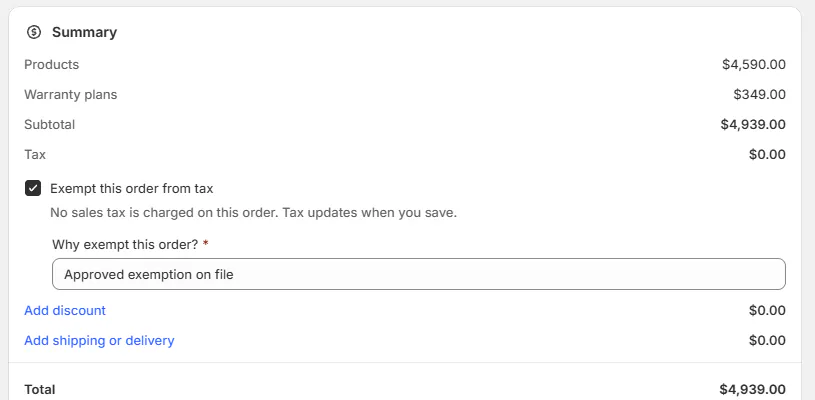
The reason belongs to this order's tax choice. Warning
The tax choice belongs to the draft and locks once the order is placed. Review it before placing the sale or collecting payment.
What happens next
An applicable state certificate exempts orders shipping to that state. Elsewhere, Shopify calculates tax using the destination unless another exemption or override applies.
A draft with Charge tax on this order has no draft invoice. Place it before payment; see Collect a payment.
For template lines, Shopify uses the template's tax category. Without one, it uses the default rate; tracked options retain the default rate.
Split orders explains sales with pickup and delivery taxed in separate parts.
Example: Priya buys for a client
Example · Harlow & Finch Interiors
Distinguish resale from personal use
Priya Shah has a recorded Utah resale certificate and buys Mira Dining Chairs for a client.
- Sam Ortiz checks Priya's company and certificate.
- Sam confirms that the order ships to the certificate's state.
- Sam checks the tax treatment before placing the order.
- For a separate personal purchase, Sam chooses Charge tax on this order and enters “Bought for their own use.”
If something goes wrong
The certificate will not save
Choose both the state and the certificate file.
A tax reason is required
Enter the reason before saving the draft.
Charge tax turned itself off
The new ship-to address is outside the certificate's coverage. Review the message and the new tax treatment.
The tax choice is locked
The order is already placed.
The company picker does not load
Check your permission and whether the shop supports Shopify B2B companies.
A template uses the default rate
Check whether it has a tax category. Tracked option amounts still use the default rate.
Was this guide helpful?
Thanks. Tell us what was missing at support@meetorderpilot.com.