How warranty coverage works
Related guides
- Set up warranty coverageWarranty and service · 5 min
- Set coverage exceptions for options and productsWarranty and service · 4 min
- Create and sell extended warranty plansWarranty and service · 4 min
- Check and change warranty on an orderWarranty and service · 5 min
- Start, end or extend coverage by handWarranty and service · 4 min
Warranty coverage records the terms that apply to a sold item or part, including how long it is covered. OrderPilot keeps those agreed terms with the sale and tracks coverage dates for individual units.
Coverage starts when the unit reaches the customer and the handover is recorded. More specific warranty rules can replace the store default.
A warranty claim records a specific problem reported about those units and the work needed to resolve it. Coverage describes the agreed protection; the claim records the problem, decision and response.
How it works
Coverage terms are counted in months. OrderPilot checks 6 levels and uses the most specific level containing a number. A blank level is skipped.
- 1Default warrantyStart with the store's general term.
- 2By vendorApply a vendor-specific term.
- 3By categoryApply a category-specific term.
- 4By category and vendorApply the combined rule.
- 5By productApply the template or Shopify product's own term.
- 6On the orderApply an authorized change for this sale.
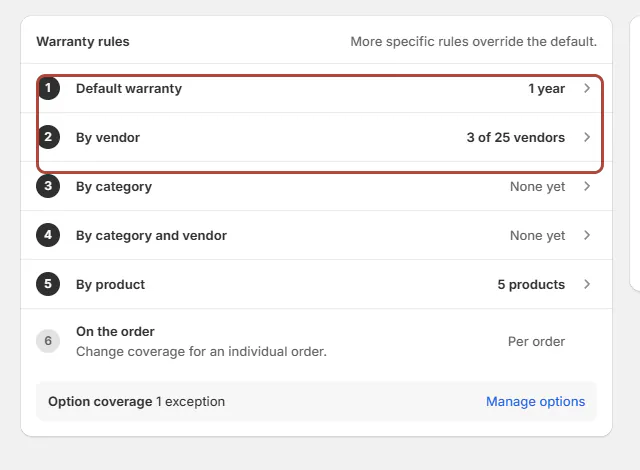
The product level uses the template for a template line, or the Shopify product for a catalog line. It doesn't apply both. A line without a vendor skips the vendor levels.
A term can cover the whole product or an individual option. Warranty setup covers the general rules; coverage exceptions covers options and Shopify products.
Not set, Not covered, and Excluded
Not set means no decision was entered at that level. It lets the search continue through other applicable rules.
Excluded is a deliberate 0-month term. It can override broader coverage. Not covered is the result shown on an order when no applicable term covers it.
A positive number supplies the term. Some screens show whole years when the months divide evenly by 12.
Terms are frozen on the sold line. Changing your rules affects orders placed afterward, not the terms already agreed on existing orders.
An extended warranty plan adds months to the base term. Only one plan attaches to a line. It doesn't cover an excluded option unless an authorized order change lifts that exclusion.
When cover starts and stops
Each physical unit has its own start date. Partial deliveries can therefore produce different coverage dates for units from the same order.
- 1SaleThe agreed terms are recorded on the line.
- 2DeliveryThe unit's coverage clock starts.
- 3CoverageReturns or claim outcomes can stop it; goodwill can extend its end.
- 4End dateCoverage ends on the unit's applicable final day.
| Handover method | When coverage starts |
|---|---|
| Carrier-tracked shipping | When delivery is recorded. |
| Shopify Mark as delivered | On the day of that action. |
| Untracked shipment without delivery confirmation | It doesn't start automatically. |
| Local pickup | When collection is fulfilled. |
| Pickup point | At locker arrival. |
| OrderPilot Mark collected or Mark delivered | At the recorded handover. |
| Items taken at the register | At the register handover. |
| Manual start | On the date selected by authorized staff. |
An hourly check catches missed Shopify updates. If an item still shows Starts at delivery, check the delivery evidence before starting coverage by hand.
A Shopify refund with a return stops coverage on the returned units. Mark returned, a delivered claim replacement, and money back through a claim can also stop coverage.
Warning
Some order changes don't stop coverage
A refund without a return and cancellation in Shopify don't stop coverage by themselves. Record the correct unit-level outcome instead of assuming the clock ended.
Goodwill extends an end date; it never shortens it. Replacement coverage follows your replacement-warranty rule: retain the expiry, retain it with a minimum period, or start a full term.
Coverage dates use UTC calendar days. Near midnight, the displayed date can differ from the local date you expected. Check the actual handover record before correcting it.
Where you'll see it
Staff see coverage on line chips, the order's Warranty panel, and Coverage look-up. Check a product explains how the rules resolve for a selected product.
Use Warranty on an order for the stored terms and units. That record is more useful than recalculating an old sale from today's settings.
Customers see frozen terms inline on quote PDFs, invoice PDFs, and the signing page. PDFs use months, such as Product (24 months) and Fabric (Excluded). Unset terms are omitted.
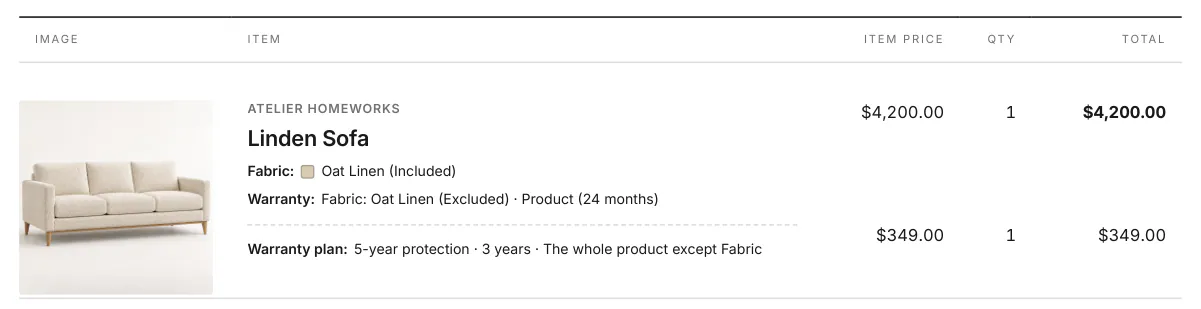
Order emails can express whole-year terms as years. A sold warranty plan appears beneath its item with its recorded quantity and total. The plan row has no warranty of its own.
Purchase-order PDFs don't print warranty terms. POS doesn't show terms on screen. A printed customer document and the POS screen therefore aren't the same coverage view.
The portal's Warranty tab lists bought plans on placed orders. Use the staff coverage record to verify dates; don't describe the portal list as a complete base-coverage register.
The choices you have
Set the default, vendor, category, combined, and product terms to match the warranty you sell. Use an authorized order override for an exception agreed on one sale.
All set option terms print on customer documents. Check those terms when reviewing the customer's quote.
You can sell an extended plan, maintain serials, and record manual coverage corrections. Those choices don't change the need to identify the physical unit and the original agreement.
Example: two warranties and two delivery dates
Olivia Bennett's Linden Sofa uses a 24-month Atelier Homeworks term over Harlow & Finch's 12-month default. Fabric is excluded. A 5-year protection plan adds 36 months to the 24-month base.
The extra plan doesn't remove the Fabric exclusion. Sam Ortiz checks the exception before describing the plan to Olivia.
Priya Shah receives an Arden Dining Table on 14 Mar 2026 and Mira Dining Chairs a week later. Their clocks start on their respective handover dates, so their end dates differ.
Do it
Set up warranty coverage, add coverage exceptions, and review the result with Warranty on an order. Use manual coverage actions for a recorded correction.
Was this guide helpful?
Thanks. Tell us what was missing at support@meetorderpilot.com.