How Buy online works in your store's cart
Related guides
- How OrderPilot works on your online storeOnline store · 7 min
- Put a product template on your online storeOnline store · 8 min
- Set up your theme for OrderPilotOnline store · 7 min
- Fix a problem on your online storeOnline store · 6 min
Buy online lets shoppers choose a product's options, add the configured piece to your Shopify cart and check out. The selected options travel with the item, and the completed checkout becomes an OrderPilot order.
The Shopify cart and OrderPilot's quote cart serve different jobs. Shoppers can buy through the store cart or collect pieces in a quote request for your team.
How it works
- 1Choose optionsThe shopper configures a Buy online template on its product page.
- 2Add to cartThe theme's button adds the configured item at its selected price.
- 3Check outShopify checkout checks the item and its required options.
- 4OrderPilot orderThe completed purchase appears in OrderPilot with the sold configuration.
The product's mode comes from its online settings. Request a quote and Explore only templates cannot be bought through the store cart.
When the cart is ready
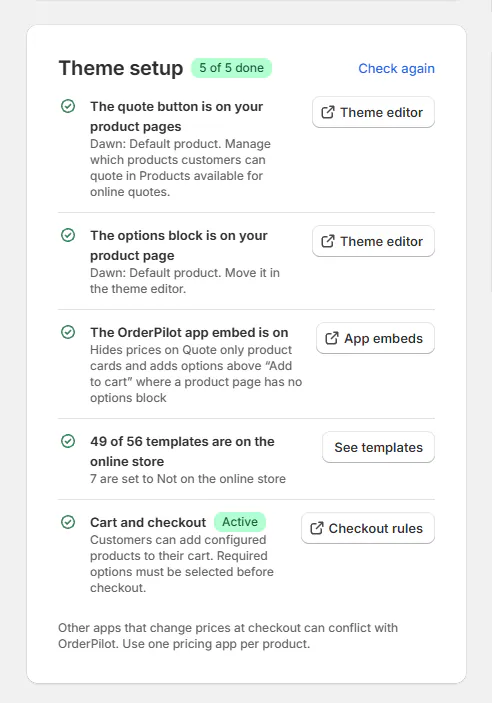
Open SettingsOnline storeTheme setup and check Cart and checkout.
| Status | What it means |
|---|---|
| Active | Shoppers can add configured products. Required options must be selected before checkout. |
| Needs your approval | Approve the app's new permissions in Shopify. Buy online templates offer Request a quote until then. |
| Failed | Read the setup reason. Buy online templates offer Request a quote until setup works. |
| Not set up | Choose Buy online on a template to start setup, or check again in a minute while setup finishes. |
| Not available yet | Buying through the store cart is unavailable for this store. Shoppers see Request a quote instead. |
Not available yet explains that shoppers see Request a quote instead of Add to cart. This row is left out of the progress count while unavailable.
For Failed, read the reason. A disabled checkout guard must be turned on in Shopify; OrderPilot does not turn it back on itself. Checkout rules opens Shopify's checkout settings. If Shopify cannot split cart lines or sell bundles, contact Shopify Support. If required checkout components are missing, contact OrderPilot support. Then use Check again.
The row also offers Checkout rules. Use theme setup to check the options block and app embed alongside checkout.
What the shopper sees
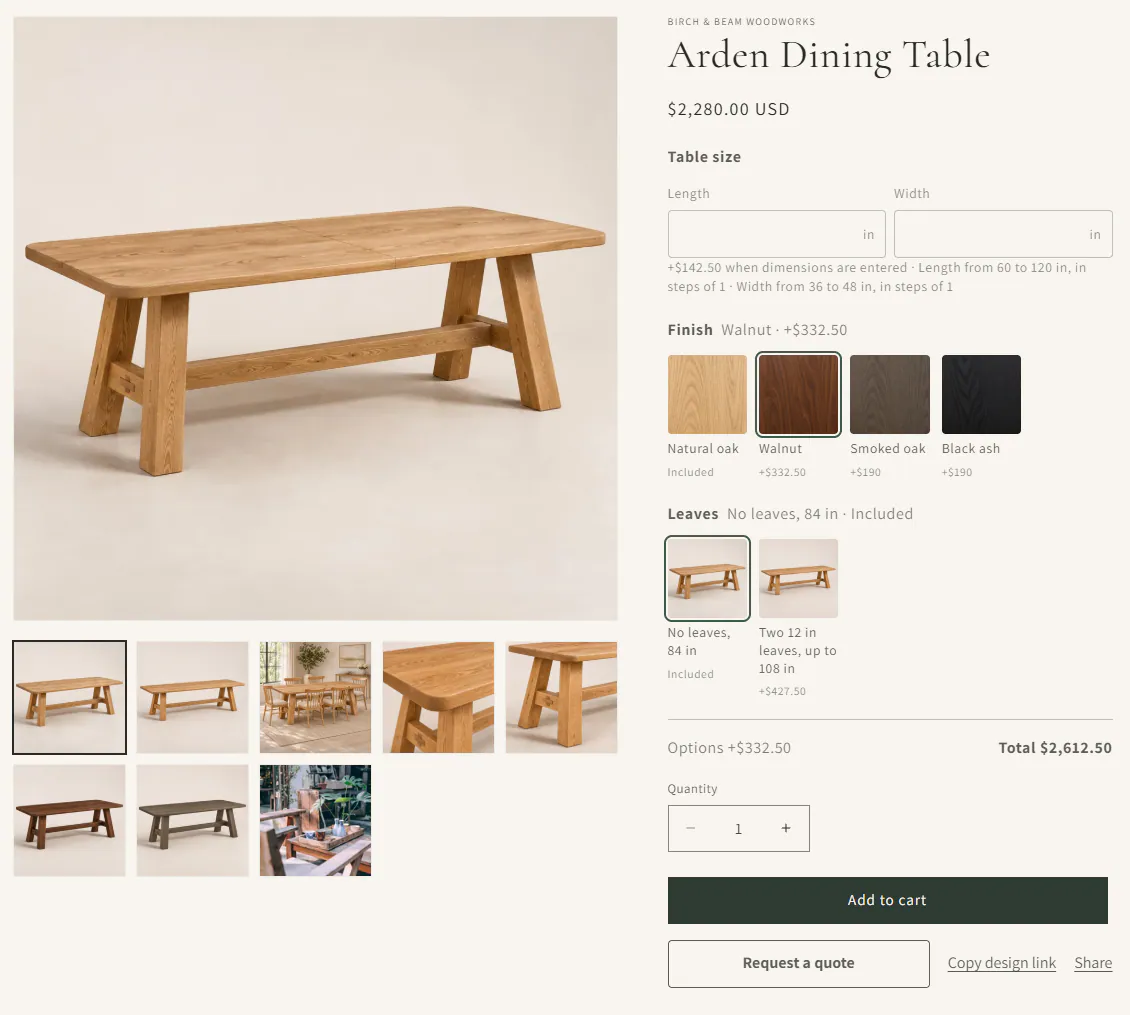
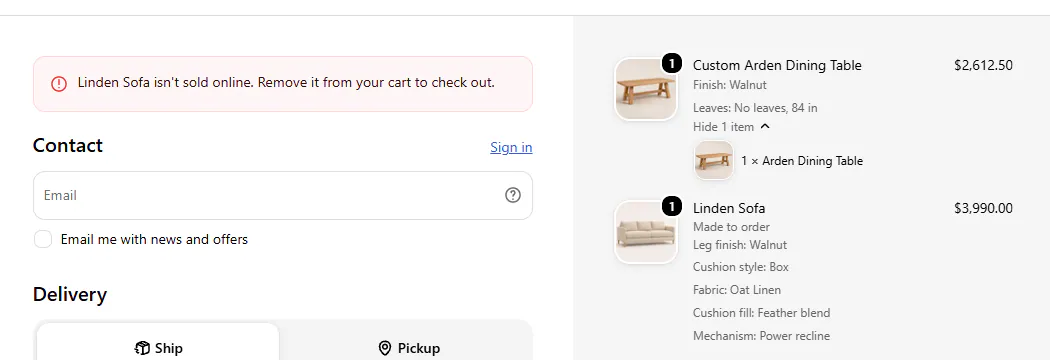
On a Buy online product page, shoppers choose the required options and use the theme's Add to cart button. The cart lists the choices by name under the product. At checkout the title reads Custom Arden Dining Table, with the same choices.
Also offer Request a quote adds that button beside the buying route; it starts off for new templates and newly selected Buy online modes. Existing Buy online templates keep their saved choice. Even with the setting off, the quote button appears when cart capacity or required stock prevents buying.

Number choices retain their decimals and unit in the cart, order and PDF, such as Extra fabric: 2.5 yd. Enter a plain decimal with a point; commas are refused.
A template can fall back to Request a quote when it has too many choices for checkout or a tracked option is not ready. Online options explains either condition. A Number choice over 2,000 units also asks the customer to request a quote instead.
A sold-out starting choice gives way to an available value. If a chosen value sells out, the page clears it and asks the shopper to choose another.
When a required option has no stock left, Add to cart is greyed out. The message names the option and offers Request a quote instead.
When a cart reaches capacity
A cart can hold many configured items, including several templates. Its capacity depends on the options carried by those products, so the page checks the actual cart before adding another.
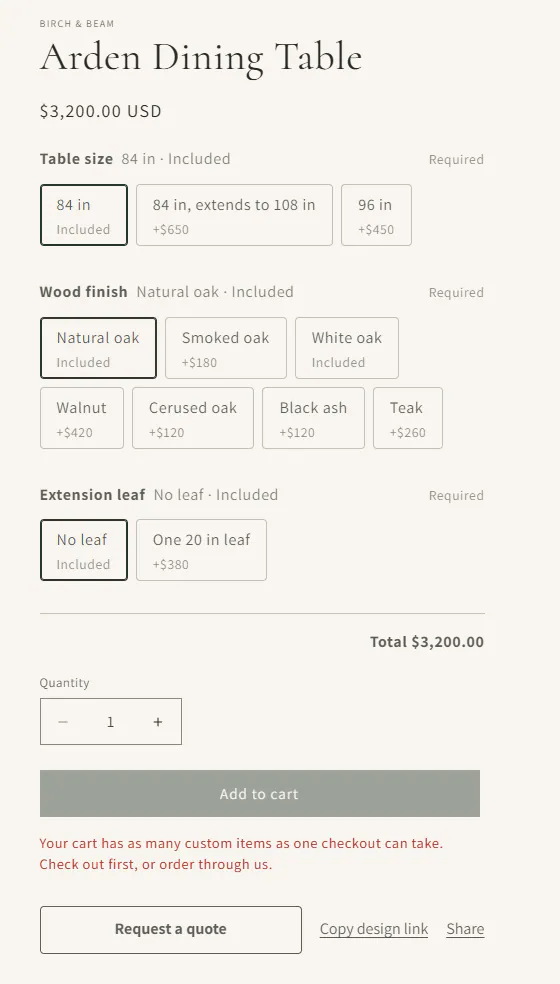
At capacity, Add to cart is greyed out with: “Your cart has as many custom items as one checkout can take. Check out first, or order through us.”
The shopper can check out first and start another cart, or send a quote request. Checkout also stops an item added another way when it would exceed that capacity.
What checkout stops
| Message | What the shopper does |
|---|---|
| The product “isn't sold online” | Remove the Request a quote or Explore only template from the cart. |
| The product “needs its options” | Open its product page and select the configuration. |
| Options were added on a ready-made variant | Open the product page and add the item again. |
| The item “could not be confirmed for this order” on an invoice checkout | Ask the store to save the OrderPilot order or use Retry sync, then send the payment link again. |
These checks prevent a Buy online template from being purchased as a bare product without its required options.
Where the order appears
An imported store-cart purchase starts in Order with a Storefront badge, even when its template normally requires review. Payment never automatically fulfills it. Shopify-triggered status changes send no OrderPilot status email; Shopify sends its own notifications. Its Activity records Order placed through online checkout and the Shopify order number.
Some purchases stay only in Shopify: orders over 500 line items or 50 OrderPilot lines, a line without a variant, or no template line remaining. A purchase notification Shopify never delivers is not recovered by the hourly check. Contact support if the order is missing, and create it in OrderPilot if your team needs it there.
Website checkouts and quote requests still arrive when their location is outside the store's plan. Staff actions at that location remain subject to the plan.
The line keeps the choices by name and a short OrderPilot note. Review those choices on the order when preparing the customer's goods.
The quote cart remains available. When it contains only order-enabled templates, its Place order route can prepare checkout, asking for a required signature first. Its sign-in rule applies to that route; Shopify checkout follows Shopify's own sign-in settings.
Example: Marcus orders a table
Marcus Reed configures the Arden Dining Table at Harlow & Finch Interiors. He adds it to the cart, checks the listed choices and completes Shopify checkout.
The store receives an OrderPilot order for that configuration. If his cart cannot take another custom item, Marcus can check out first or request a quote for the remaining pieces.
Do it
Put a template online to choose Buy online and its quote-button setting. Then set up your theme and confirm Cart and checkout is Active.
For a missing option, a refused item or a full cart, use Fix a problem on your online store.
Was this guide helpful?
Thanks. Tell us what was missing at [email protected].