Set and extend quote expiry dates
Related guides
- Get a quote signedPayments and signatures · 7 min
- Quotes and orders settingsSettings and integrations · 9 min
- Find quotes and ordersQuotes and orders · 7 min
- How customers sign and pay onlineCustomers and portal · 8 min
- Help a customer who can’t open, sign or payCustomers and portal · 7 min
Set a quote's validity from its first send, or give it its own date. Choose whether customers can still sign and pay after that date.
Expiry changes neither the quote's status nor its number. Extending the date does not email the customer.
Before you start
Shop settings
You need Manage order and quote settings to change the default days and blocking choice.
One quote
You need Create and edit quotes and orders to change its date.
Calendar days
The shop's time zone decides the date. A quote valid until Nov 29 remains valid through that day and expires at midnight starting Nov 30.
Set your shop's expiry rules
Step 1: Choose the days and blocking rule
Go to SettingsQuotes and ordersDefaultsQuotes. In Quote expiry, set the controls below, then use the page's Save bar.
The expiry controls
| Control | What it does |
|---|---|
| Quotes are valid for | Whole days from 1 to 365, starting at 30. The clock starts with the first qualifying email to the customer. |
| Block signing and payment after expiry | Off by default. Turn it on to require an extension before the customer can sign or pay; the customer can still view the quote. |
| When to show ‘Expiring soon’ | Choose A third of the time (10 days before), Half the time (15 days before) or Set number of days. A third is the default; the displayed counts follow the validity period. |
| Days before expiry | Appears for Set number of days. Enter 1–365 days; it starts at 7. |
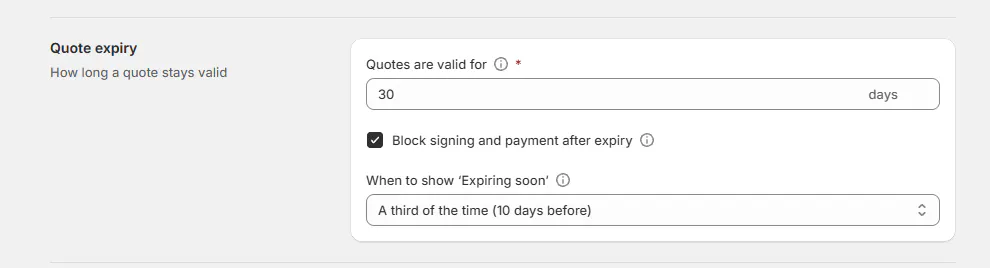
Changing Quotes are valid for updates existing quotes too, including emailed ones, unless you set a separate date on them.
Only open quotes count: Quote-group records other than Draft Quote, with no cancellation, signature, placement or payment. Rejected Quote does not expire.
What starts the countdown
The first customer email using Quote, Quote follow-up, Invoice, Request signature or Request payment starts it. A copy of those templates counts too.
An email carrying the quote, order or invoice PDF also counts when the customer's address is in To, Cc or Bcc. A qualifying automatic status email counts.
Test emails, SMS, printing, Copy sign link and the POS QR code do not start it. Sending again never moves the date.
An unsent quote without its own date does not expire. Its PDF shows today plus the shop's days until the first send fixes the date. An open quote with its own date can expire before it is sent.
Change or extend one quote
Step 1: Open its expiry date
On the quote, click Change in the header or ••• → Change expiry date. Before the first send, the header reads Expires 30 days after it’s sent · Change.
Once it has a date, the header shows Expires Nov 29, 2026 · in 3 days · Change. Inside the alert window, a pill beside the status says Expires in 3 days, Expires tomorrow or Expires today.

The header and pill show the same expiry date. Step 2: Choose and save the date
In Change expiry date, choose Valid until. The quick picks are +7 days, +14 days and +30 days.
Read the hint: Adds days to Nov 22. uses the quote's existing expiry date when it is today or later, including a date you set before sending. Otherwise it says Adds days from today.
For a quote with its own date that has not expired, Shop default returns it to the shop's rule. The save button then reads Use the shop default.
Add Note (optional, shown in the activity log), at most 500 characters. Click Save expiry date, or Use the shop default. Expiry date saved confirms it.
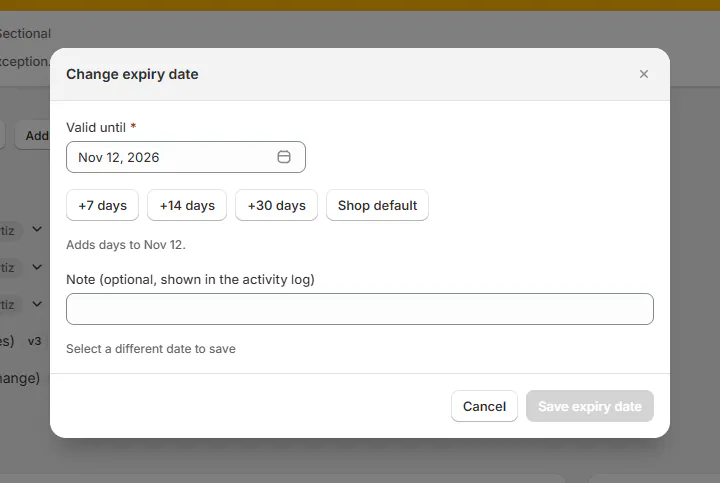
Read whether the quick pick adds to the current date or starts today. Unchanged dates show Select a different date to save. Dates must be within 3 years.
Step 3: Extend an expired quote
Use Extend in the header, Extend quote on the banner, or the same step in the action list when the shop blocks expiry.
Extend quote expiry opens with New expiry date, initially 14 days from today. Choose a valid future date, add a note if needed, then save.

Extend the date so the customer can sign or pay when blocking is on. A past date is allowed but leaves an expired quote expired. Setting a past date on an open quote with no prior date can make it expire immediately.
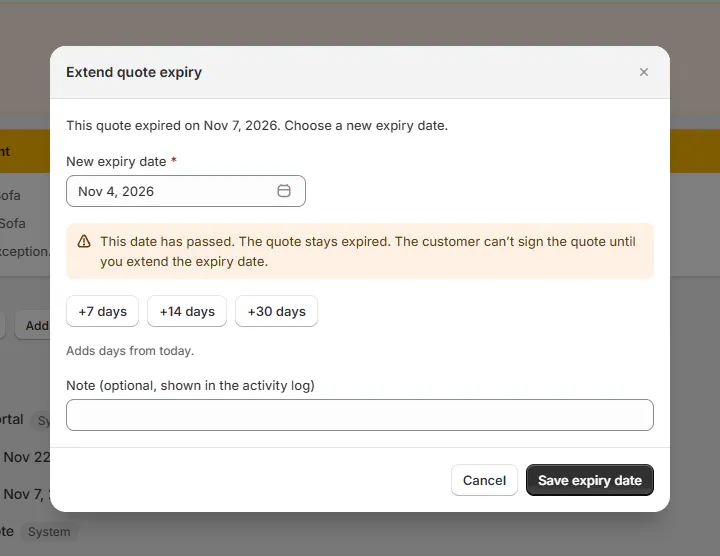
A past date does not reopen an expired quote. After extending, send Request signature again if the customer needs a fresh message. Saving the date itself sends nothing.
Before replying to an expired quote
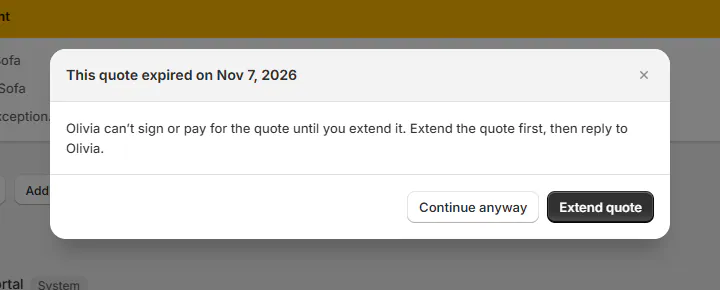
Before a reply or send from a blocked expired quote, This quote expired on Nov 7, 2026 asks you to extend first. Extend quote opens the date dialog; saving continues the action.
Continue anyway proceeds without extending. The Conversation card calls this Send anyway. The page asks once for that expiry date.
Close the expiry banner with its X to hide that date and state. A new date, or the day the quote expires, shows it again. The header badge and Extend stay.
If Needs attention is raised for the same expiry, this X ignores that banner too. It does not extend the quote.
Find quotes nearing expiry
Step 1: Open an expiry filter
On Orders, add Quotes expiring soon or Expired quotes from + → Other, or find them under N more. New stores start without a separate Quotes tab.
When Quotes is enabled, its default row is All, Draft Quote, Quote, Expiring soon and Expired. Expiry filters include expired open quotes whether or not blocking is on.
Your saved row stays unchanged. Use Reset to defaults to restore the current defaults. Find quotes and orders covers the other filters.
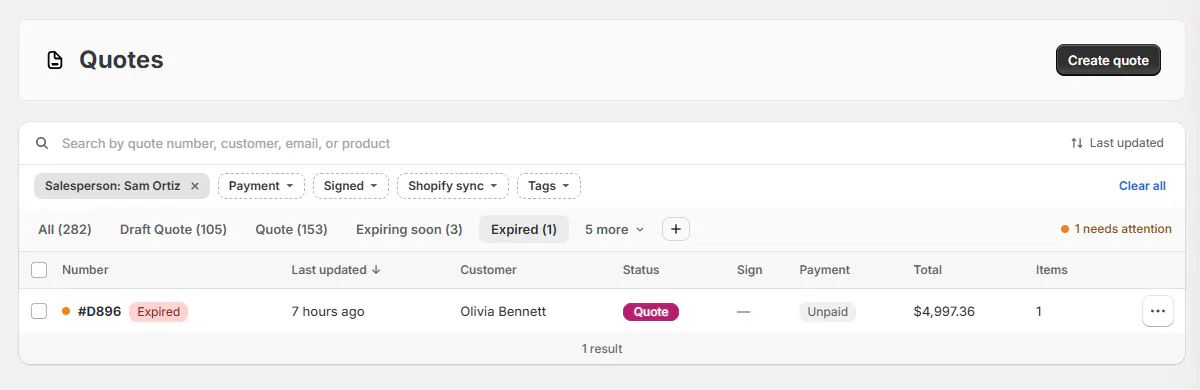
Hover over the expiry badge to read the date.
What happens next
Activity records Expiry date changed from … to …, with your note below. Resetting records Expiry reset to the shop default ….
The quote PDF prints Valid Until. The signing page, portal and sent/viewed information use the quote's date; a signed copy keeps the date it captured.
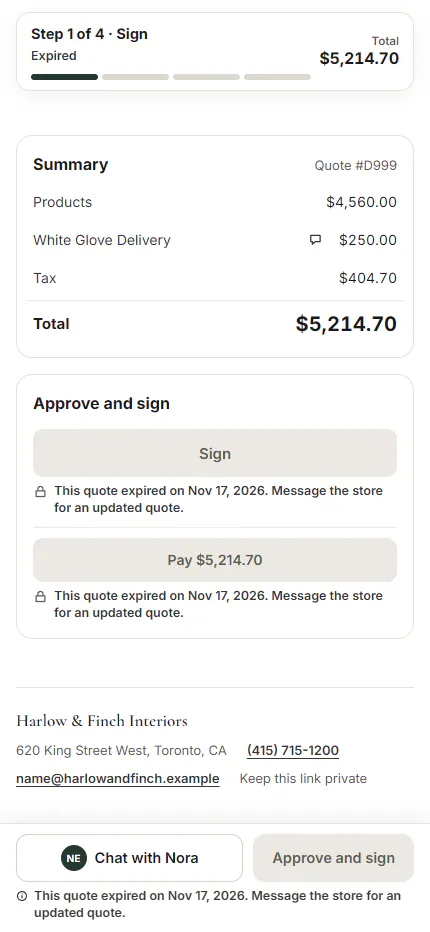
With blocking off, the customer can still sign and pay after expiry. With blocking on, the signing page shows This Quote expired on Nov 29, 2026. and Request an updated Quote.
That button sends one fixed message per expiry date to the quote’s Inbox conversation, within the customer’s message limit. It is a plain message, so it does not hold the store’s signature request. Extend the quote or send a new one. The page then says Your request has been sent to the store.
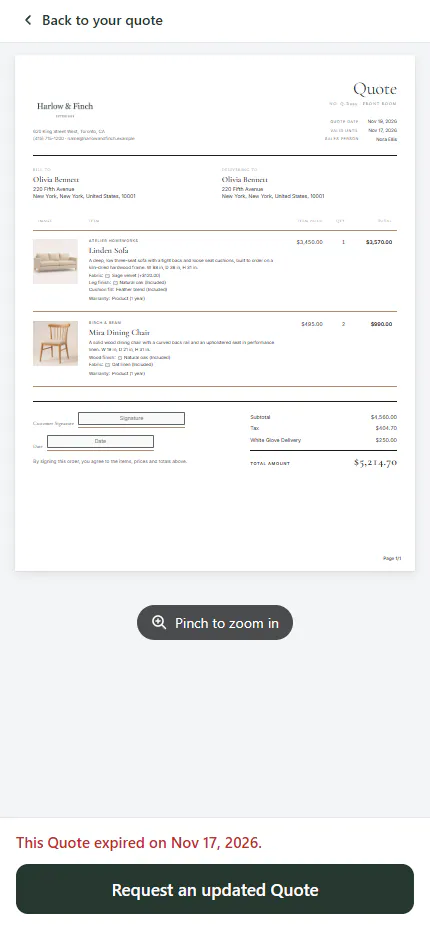
On the portal, Sign in Approve and sign and Pay are greyed with the expiry reason. The progress step reads Expired.
In the app, Request signature, Request payment, Copy sign link and Copy payment link are greyed on every blocked expired quote. This also applies to the list row’s copy links. Extend the quote first.
A blocked quote's payment link opens its record page instead of checkout, even if the signature was waived. The Inbox's signature and payment request buttons wait for an extension too.
POS has no expiry controls or warning. Staff signing on Sign on this iPad is not held by expiry; a QR link opens the customer's signing page, where blocking applies.
Example: Olivia needs more time
Example · Harlow & Finch Interiors
Extend the existing offer
Olivia Bennett asks for an updated Linden Sofa quote.
- Sam Ortiz opens her expired quote at Harlow & Finch Interiors.
- Sam chooses Extend quote, then +14 days.
- Sam adds a note and saves the date.
- Activity records the old and new dates.
- Sam sends Olivia another signature request.
If something goes wrong
A quote is missing from Expired
Check its status, signature, payment and placement. An unsent quote needs its own date to expire.
Every quote's date moved
Check whether someone changed Quotes are valid for. Quotes with their own dates keep them.
Copy sign link or Copy payment link is greyed
Extend the expired quote first so the customer can sign or pay.
Change expiry date is unavailable
Signed, placed, paid or cancelled quotes no longer use an editable expiry date.
The store's time zone could not be read
Try again in a moment.
Was this guide helpful?
Thanks. Tell us what was missing at [email protected].