What the starter roles can do
Related guides
- How roles and permissions workTeam and permissions · 7 min
- Create and manage rolesTeam and permissions · 6 min
- Give staff accessTeam and permissions · 8 min
- Hand over an order and choose who’s in the salesperson listTeam and permissions · 4 min
OrderPilot starts with 3 roles: Store administrator, Salesperson and Operations. They provide different permissions, but all start with access to records across the shop.
A role name is a starting point, not a promise of narrow access. Salesperson includes approvals, refunds and reassigning orders. Review the role before assigning it to someone.
How it works
All 3 starter roles can use OrderPilot in Shopify admin and on Shopify POS. Their quote and order viewing, changing and purchase-order scopes start at All in the shop.
That scope reaches records regardless of the person's registered locations. It does not grant actions the role lacks: Salesperson has a shop-wide purchase-order scope but no permission to view purchase orders.
A person's location assignment still affects location-dependent work and choices. To limit the records they can see, set the role's record scope too. How roles and permissions work explains the separate checks.
| Starter role | Main work | Main limits |
|---|---|---|
| Store administrator | Every record, settings, staff, roles and billing | The salesperson-picker choice can be turned off |
| Salesperson | Quotes, orders, customer communication and warranty claims | No purchasing, costs, catalog management, settings or commission viewing |
| Operations | Purchasing, receiving, costs, catalog, order status, payments and settings | No creating or editing quotes and orders, staff administration, billing or commission viewing |
Your store can edit its roles. A role bearing a starter name may differ from the starting permissions described here. Open its page to check the permissions and record scope currently saved.
Store administrator
Store administrator always has every permission, even if individual permission ticks suggest otherwise. That includes costs, commission, staff access, billing, customer data requests, signature records and resetting settings.
Appear in the salesperson picker is the exception: it can be unticked so an administrator who does not sell is absent from new salesperson choices. Existing credit stays.
Duplicate Store administrator to create a limited administrator. Unticking permissions on the original starter role does not turn it into a restricted role.
The store owner always has full access and cannot be suspended or restricted. The owner controls their own salesperson preference separately; see Order ownership and the salesperson picker.
Salesperson
Salesperson can create, edit, convert, delete and change the status of quotes and orders. It includes Reassign quotes and orders, Change sales credit and Appear in the salesperson picker.
It also includes these permissions:
- Override prices and give discounts and Set payment terms and deposits.
- Approve, reject or request changes, Force Edit locked orders and Override warranty coverage.
- Request payment, Record payment and Mark as paid and Refund payments.
- Email customers and Handle customer messages and change requests.
- View warranty claims, Manage warranty claims and Approve and decline warranty claims.
- Add and edit serial numbers.
Salesperson does not include purchasing, receiving, costs, catalog management, settings, Home totals or commission viewing. Its record scope is store-wide, rather than limited to orders assigned to that person.
It cannot bypass a required signature or deposit. Collecting a signature is different from skipping it: required agreement and payment still have to be satisfied.
Operations
Operations holds every permission except the following:
- Create and edit quotes and orders, Override prices and give discounts, Set payment terms and deposits and Force Edit locked orders.
- Appear in the salesperson picker and Bypass signature and deposit requirements.
- Assign roles and locations, Create and edit roles and Manage billing.
- Download customer data requests, Export and hold signature records and Reset settings and remove app data.
- View own commission and View all commission and profit.
It can purchase, receive, see and correct costs, maintain the catalog, work on warranty claims and change order status. It can also record and refund payments and manage the settings its permissions cover.
Costs remain hidden on POS even for someone who can view them in Shopify admin. POS applies its own restrictions, and shared-register access can be limited by the account signed in to the device.
Where you'll see them
Open SettingsStaff and rolesRoles to compare role cards and open an editor. The cards summarize permissions, record access and allowed surfaces.
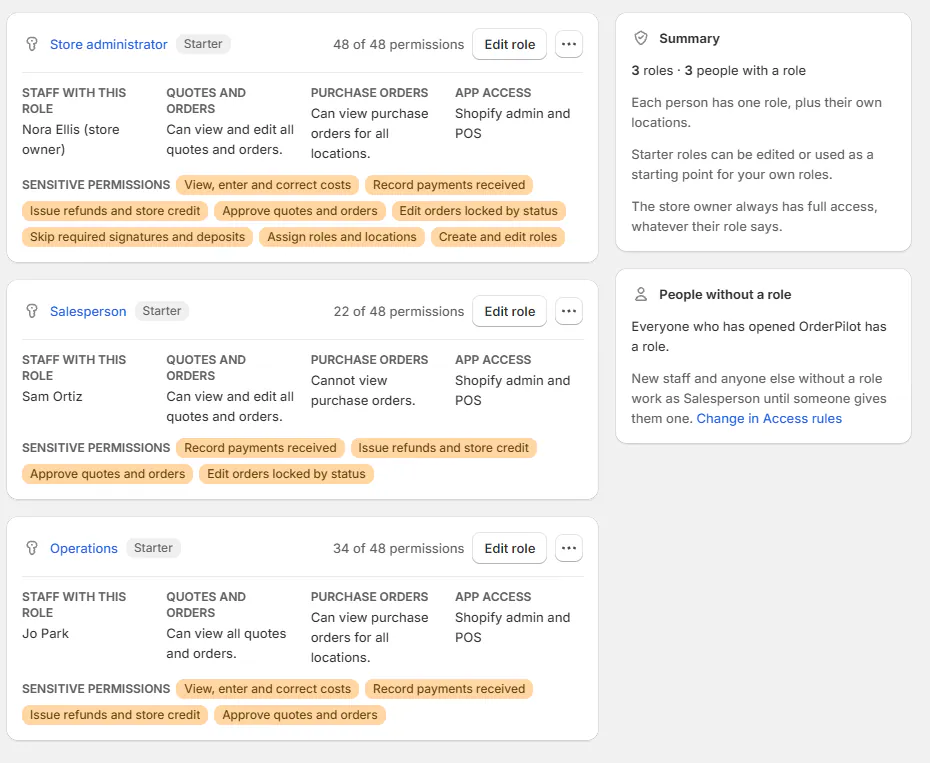
On SettingsStaff and rolesStaff, each person has one role. People without a role in Access rules initially uses Salesperson, unless your store changes the default or chooses No access.
Staff who used OrderPilot before roles were introduced received Store administrator so their existing access continued. Review those assignments when organizing your team.
The choices you have
For an own-records salesperson, duplicate Salesperson and set both Quotes and orders they can see and Quotes and orders they can change to Assigned to them. Assign that custom copy to the person.
The primary salesperson owns the record. Sharing sales credit with another person does not make that person its owner or grant access.
For a location-based team, choose All at their locations instead. This includes assigned records and records shared across locations. Create and manage roles explains scope choices and saving.
A deleted starter role stays deleted. If your store already has a role with a starter name, the starting role can be named with (starter) to distinguish it.
Example: give Sam only his own sales
Nora Ellis wants Sam Ortiz to work only on orders he owns at Harlow & Finch Interiors. Assigning the original Salesperson role would let him see and change shop-wide records.
Nora makes a custom Salesperson copy and sets both quote/order scopes to Assigned to them. She keeps only the permissions Sam needs, then assigns him that role.
Jo Park keeps Operations for purchasing and receiving. Jo can see costs in the admin, but does not appear as a salesperson for new sales credit.
Do it
Give staff access to assign the right role and locations. Use Create and manage roles when a starter role grants too much or too little.
Role changes take effect when staff next load a page or open OrderPilot on POS. Read any review dialog before saving a role shared by several people.
Was this guide helpful?
Thanks. Tell us what was missing at [email protected].