Customer invoices, receipts and signed copies
Related guides
- How customers sign and pay onlineCustomers and portal · 8 min
- The customer portalCustomers and portal · 7 min
- Help a customer who can’t open, sign or payCustomers and portal · 7 min
- Preview, download and print quote and order PDFsPayments and signatures · 7 min
- Export, hold and retain signature recordsPayments and signatures · 7 min
Give the customer the document that answers their question. A signed copy records the agreement; the current invoice shows payments and the amount still due.
Once fully paid, the invoice is the customer’s receipt. Customers can find these downloads in the portal or return to their signing link.
How it works
Signing preserves the document the customer agreed to. Its summary ends at Total Amount, with no payments, refunds, balance due, or Proceed to Payment button.
That rule also applies to the document shown for signing, the emailed signed copy, and POS Print to Sign. Older stored signed copies keep their original payment rows.
An invoice answers a different question: what has been paid and what remains due. A later payment belongs on the current invoice; it does not rewrite the signed agreement.
| Document | What it tells the customer |
|---|---|
| Signed copy | The items, terms, and total agreed when signing. |
| Current invoice | Payments and balance for the sale. |
| Paid invoice | The fully paid invoice, which serves as the receipt. |
| Quote or order download | The current sales document before an invoice is available. |
A signed-copy download is not proof that the customer paid. Equally, a paid invoice does not replace the agreement or its signature evidence.
Keep both documents when the customer needs the agreement and payment record. For the staff-side document controls, see quote and order PDFs.
Where you’ll see it
Documents in the portal
The portal home has a Documents tab for quotes and orders. A placed order also shows a Documents section when downloads are available. On a signed quote, View signed quote opens the signed copy; use the home’s Documents for its invoice.
For each record, the current invoice appears first, such as Invoice I-1186-1. Once fully paid, its row reads Paid invoice with the invoice number.
The available signed copy follows it, such as Signed quote #1186. An order’s row uses the corresponding order wording.
The paid invoice is the receipt in this list. There is no separate customer receipt file to search for after downloading it.
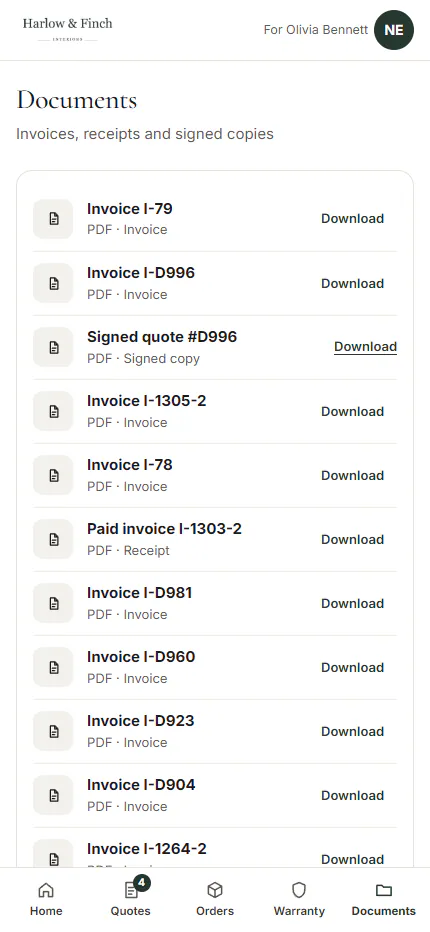
Opening a row creates a short-lived download link. Return to Documents to open the file again if a previously opened download no longer works.
While the invoice is being prepared, the page says Your invoice is being prepared. Try again in a minute. Wait, then open its row again.
A signed copy can similarly say Your signed copy is being prepared. Try again in a minute. Neither message means the customer needs to sign or pay again.
See the customer portal for links, PINs, and the difference between opening one emailed record and the customer’s complete account.
Downloads from the signing link
Immediately after signing, the customer gets Download signed copy. They can save their agreement before returning to the quote or continuing to an available payment.
On a later visit to that signed link, Download invoice comes first. If no invoice exists yet, it reads Download quote or Download order instead.
Download signed copy remains a separate link when the copy is available. The first download answers a current-document question; the signed-copy download preserves the agreed version.
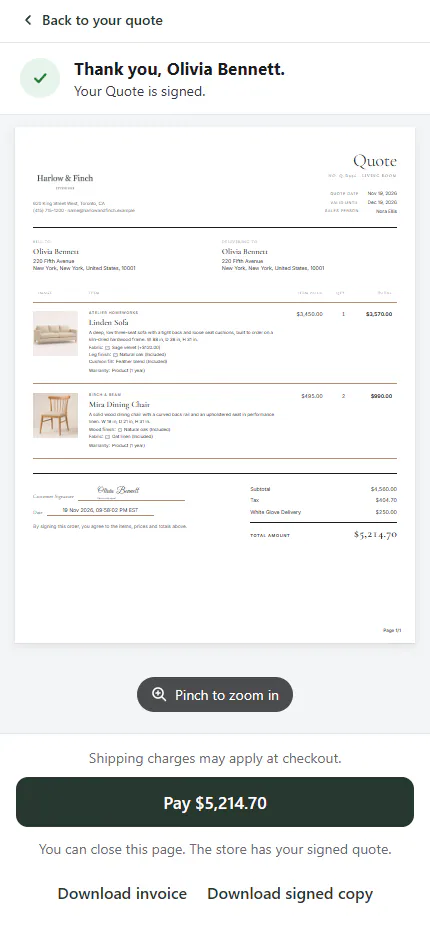
With the portal off, customer email buttons open the signing page. The customer can use its downloads without needing the portal home.
If Back to your quote or Back to your order appears, it returns to the portal the customer came from. See how customers sign and pay for those controls.
When a signed copy is missing
The portal lists a signed copy only when a downloadable signature record exists for the customer. A signature recorded before those records existed may not have a Documents row.
An edit that cancels the signature removes that signed copy from the portal’s current document list. The customer can keep the PDF already emailed to them or ask the store for the earlier agreement.
A customer data request, changed signer email, or retention purge can also remove the downloadable record. Recording a paper signature does not create the same customer download.
A quote signed before signature records existed can still offer its signed document through the quote page’s own link to the signing page. Check that route before assuming every copy is unavailable.
For staff-held evidence or retention questions, use signature records. A missing portal row alone does not establish that the sale was never signed.
The choices you have
Ask what the customer needs before sending another document. For an agreement question, direct them to Download signed copy; for a balance or payment question, use the invoice.
A customer asking for a receipt should choose Paid invoice once the sale is fully paid. If money remains due, the current invoice shows that amount instead.
If an invoice says it cannot be downloaded there and asks the customer to contact the store, provide a copy through your normal document controls. Repeatedly reopening that message will not create the missing file.
Example: Olivia keeps both records
Olivia Bennett signs her Linden Sofa quote with Sage Velvet, Feather Blend, and White Glove Delivery. She downloads the signed copy showing the agreed total.
After paying her deposit, Olivia returns to the link and chooses Download invoice to check the payment and remaining balance. The signed copy still records the agreement.
When she pays the rest, the portal lists Paid invoice. Sam Ortiz directs her there for her receipt and to the signed copy for the original terms.
Do it
Read how customers sign and pay to explain the complete customer journey. Use customer troubleshooting when a link fails or a document remains unavailable.
Was this guide helpful?
Thanks. Tell us what was missing at [email protected].